
A ChatGPT Ads conversion can reach OpenAI and still not appear as a campaign conversion. Test the chain in order and stop at the first check that fails: did OpenAI receive the event, did consent and the landing path keep oppref, is the event setting attached to the campaign you are looking at, and are you reading the right reporting number.
Each check proves one layer and nothing after it. A console message shows the code ran. An API response shows a request passed validation. Neither shows a campaign got credit.
| What you can prove | Where to check | What it does not prove |
|---|---|---|
| Pixel code ran | Browser console with debug: true | OpenAI received the event |
| Event reached OpenAI | Recent-events endpoint (sampled) | The event was attributed |
| Server payload is valid | Conversions API with validate_only: true | The event was saved |
| Event setting is attached | Campaign configuration | A real click carried oppref |
| Conversion attributed | Reporting, after processing | Nothing upstream; this is the last link |
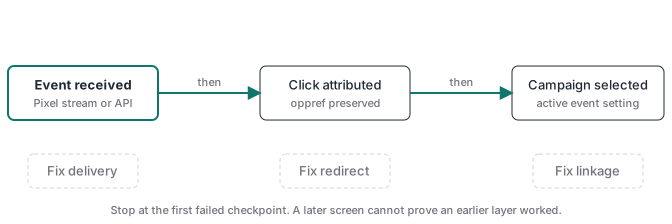
1. Prove OpenAI received the event
Use one test event with a fresh event ID, the right Pixel ID and a current timestamp.
For the browser, initialize the pixel with debug: true, trigger the event, and watch the console and the request to bzr.openai.com. Then ask OpenAI what arrived:
curl -G "https://api.ads.openai.com/v1/conversions/events" \
  -H "Authorization: Bearer ${OPENAI_ADS_API_KEY}" \
  --data-urlencode "pid=${PIXEL_ID}" --data-urlencode "limit=50"
This is the Advertiser API key, not the Conversions API key. The Conversion Tracking guide says it returns a sample of events from roughly the last 15 minutes, with api_channel set to pixel_sdk for browser events and server_to_server for server events. The API reference describes Pixel SDK events only and says the stream needs an enabled account, returning 404 otherwise. Because it is a sample, a missing row does not prove the event was lost. Run the test again before you change code.
For the server, send the payload once with validate_only: true, then once for real. Validation requests are never stored and never show in the stream. One invalid event fails its whole batch, so test with a batch of one. If a batch fails, save the full error body before you retry.
2. Check the IDs and the account behind them
Setup order and the full payload are in the conversion tracking guide. Two details from it cause most of the provisioning errors here.
Creating a data source returns two IDs. pixel_id goes into the pixel and into Conversions API requests. id (for example clidsrc_123) goes into source_ids when you create an event setting. Swapped, they fail: a Client data source not found response means the source_ids value is not a source in this ad account.
A 404 with Not found on /conversions/pixels or /conversions/api_keys means the account is not enabled for those calls, and OpenAI’s API partner setup says to contact your partner representative. Our own self-serve account did not hit this: on 6 August 2026 it created a pixel, a Conversions API key and three event settings through the API, all returning 200.
3. Check consent and the landing path for oppref
The pixel captures oppref from the landing URL and stores it in a __oppref cookie for 30 days. Two different faults produce the same symptom, a conversion with no click behind it.
The grant never reached the pixel. For a consent banner, OpenAI’s documented order is oaiq("consent", false) before init, then oaiq("consent", true) once the visitor accepts. While consent is false, or the pixel finds a stored denial, it sends no measurement pings and uses no cookies. Without a false call, consent defaults to true. The fault is a banner that sets false and never follows with true after acceptance. Events blocked during denial are not replayed. Test with a landing URL that carries an oppref value: after you accept, the next event should fire and __oppref should hold that value (Control measurement consent).
A redirect dropped the query string. Follow one test click through every hop and read the address bar before the pixel loads. A canonical-domain redirect that rebuilds the URL, a locale router or app code that cleans the URL early will each remove oppref. Point ads at the final URL, or carry the full query through each hop.
For a server event, oppref comes from your own store, never from the request. A valid server event without it is accepted but loses the direct click reference. Hashed customer fields on the event can still help OpenAI match it to an ad, with no guarantee (Conversions API, checked 2026-10-17). The oppref guide covers storage past the first page and the {oppref} tracking-template macro.
4. Check the event setting is attached to this campaign
An event setting and a campaign are separate resources, and there are two kinds of attachment.
Measurement, on any campaign. Clicks and impressions campaigns can track conversions through conversion_event_setting_ids without changing their objective. You can add settings later with an update, and the update replaces the whole list, so include every setting you want to keep. If a working event stops counting after a campaign edit, check whether its setting dropped off that list.
Optimization, on conversion-optimized campaigns only. These need bidding_type: "conversions" and exactly one active standard event setting at creation. Custom events cannot be the goal, and neither the objective nor the selected event can change later (Conversion-Optimized Campaigns). Only here does a wrong choice mean building a new campaign. Create it paused and check it before you switch it on.
Goal reporting starts from the moment a setting is attached. Earlier traffic is not counted retroactively.
5. Read the right reporting number
As of 17 October 2026 OpenAI’s own pages describe view-through differently, so check your settings before you compare totals.
The Reporting guide says Insights and the conversions report default to a 30-day click window plus a 1-day view-through window, and that conversions counts both: 3 click-through plus 2 view-through gives conversions: 5. Setting the view window to 0 excludes view-through. When a conversion qualifies both ways, the click wins. The pixel and Conversions API pages still say view-through is a separate metric outside Conversions. Read the view-through window shown on your report, and use the separate click-through and view-through counts when you need to know which path credited the sale.
Two more settings change what you see:
- Processing delay. Conversions update through daily processing. OpenAI says to allow at least one day.
- Date basis. Reports date a conversion by the ad interaction by default. Switch to conversion time when you compare with an order list, or a sale from today can appear under the day of last week’s click.
The checklist
Run one real test order or lead from start to finish. A page refresh does not exercise the event your campaign uses.
| Check | Pass condition | Fix when it fails |
|---|---|---|
| Account enablement | Pixel, key and event-setting calls return 200 | Ask your OpenAI contact to enable the operation named in the 404 |
| Source identity | Event setting uses the source id; pixel and API use pixel_id | Swap the IDs back and recreate the setting if needed |
| Browser receipt | Test event appears in the recent-events sample, or in Event flow | Check pixel init, CSP, event name and the network request; retry before concluding |
| Server receipt | Real request (not validate_only) accepted | Fix key, timestamp, Pixel ID, payload shape or the bad event in the batch |
| Consent | No measurement event before consent; events fire after consent true; __oppref set when the test URL carries oppref | Call consent true on acceptance; remember blocked events are not replayed |
| Click reference | Final URL and your stored record keep oppref | Preserve the query string and store the value before checkout |
| Campaign attachment | Setting is in the campaign's list; oCPC goal is the intended standard event | Update the list with every setting (clicks/impressions); new campaign (oCPC only) |
| Reporting | One day has passed; window and date basis match your comparison | Wait, then set the view window and conversion-time dating explicitly |
Keep the record of the passing test: source ID, Pixel ID, event setting ID, campaign ID, event name, event ID, landing URL, stored oppref, receipt time and the reporting settings you used. When a number changes later, you compare against a chain known to work instead of rebuilding it.
ATA Edge handles the Meta side of verified purchases from your own Cloudflare account, and the membership includes a library of server GTM containers as a bonus.