
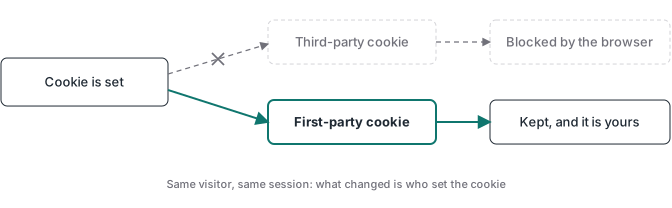
First-party cookies are set by the website you are visiting, and third-party cookies are set by a different domain embedded in that page. The first kind keeps your session working: your login, your cart, your preferences. The second kind follows you across websites so ad networks can recognize the same person and measure what they do. That single difference, whether the cookie is same-site or cross-site, is the root of the privacy changes, browser restrictions, and tracking problems that followed.
That is the definition. Most explanations of this topic were written years ago and still talk about an impending “phase-out” that never landed the way people expected. The current picture is more useful, and more specific: third-party cookies still work in regular Chrome, but Safari and Firefox have neutralized them for cross-site tracking for years, and Google walked back its own plan to remove them.
I run tracking implementations for clients, and I built Advanced Tracking Academy around the server containers I deploy in production. This guide covers what first-party and third-party cookies actually are, how each browser treats them today, what Google really decided, and what the whole thing means for the data your ad platforms receive.
What are first-party and third-party cookies?
A cookie is a small piece of data stored in the browser. What makes a cookie first-party or third-party is not which company set it. It is the site relationship at the moment the cookie is set or read.
First-party cookies are set in a same-site context, meaning the domain that sets the cookie belongs to the same site as the page you are on. The cookie that keeps you logged in, set by the site you signed into, is first-party. They handle logins, language choices, saved preferences, and session continuity, and because they stay within the site that set them they are generally treated as lower-risk than cookies that follow you between sites.
Third-party cookies are set in a cross-site context, meaning the domain that sets the cookie belongs to a different site than the page in your address bar. They usually arrive through embedded content like an ad, an analytics tag, a social widget, or a tracking pixel. Because the same external domain can load on thousands of sites, its cookie can read the same identifier on each one and stitch your movement together across the web. That cross-site reach is what made retargeting and audience measurement possible, and it is also what made third-party cookies the focus of privacy restrictions.
The mechanism is identical. Both are the same kind of file, stored and sent by the browser. The classification turns on the site context, and it follows a non-obvious rule: the same vendor’s cookie, served from your own subdomain, is treated as first-party by the browser. Served from the vendor’s own domain on someone else’s page, it is third-party. The browser looks at the site relationship, not at the vendor behind it.
A concrete pair of examples makes it stick. The cookie that keeps you logged into your account is first-party, set in a same-site context by the site you signed into. The cookie an ad network sets while you read a news article, so it can show you a related ad on an unrelated site later, is third-party, set in a cross-site context.
First-party vs third-party cookies
| First-party cookies | Third-party cookies | |
|---|---|---|
| Who sets it | The site in the address bar | A different, embedded domain |
| Typical reach | A single website | Across many websites |
| Common use | Login, cart, preferences | Retargeting, ad measurement, profiling |
| Safari | Works, but ITP caps JS-set cookies to about 7 days | Blocked outright |
| Firefox | Works | Partitioned per site, known trackers blocked |
| Chrome | Works | Allowed by default; blocked in Incognito; users can restrict |
| Privacy law exposure | Lower, but not exempt | Higher |
| Role in conversion tracking | Carries session and click identifiers | Unreliable for cross-site identity |
The strategic picture in that table is straightforward. The first-party cookie is what you keep. The third-party cookie is what the browsers have been taking away, at different speeds and by different methods.
How each browser treats third-party cookies
The browsers do not behave the same way, and mixing them up is the most common mistake in this conversation.
Safari blocks third-party cookies outright. Apple’s Intelligent Tracking Prevention stopped allowing new third-party cookies, and Safari treats them as blocked by default. Safari also shortens the life of first-party cookies when it detects them being used for cross-site tracking. For Safari users, cross-site tracking through third-party cookies has been largely unavailable for years.
Firefox partitions third-party cookies rather than refusing them. Mozilla’s Total Cookie Protection, on by default, gives each website its own cookie jar, so a cookie set on one site cannot be read on another. Enhanced Tracking Protection additionally blocks known trackers from a blocklist. The practical effect is similar to a block for cross-site tracking, but the mechanism is isolation plus known-tracker blocking, not a blanket refusal of every third-party cookie.
Chrome still allows third-party cookies by default. In regular browsing, Chrome lets third-party cookies through. Incognito mode blocks them by default, and users can choose to restrict them in settings. The default regular-mode experience keeps them available, which is why Chrome is the browser where third-party cookies still function for most visitors.
That browser-by-browser reality matters more than any single headline. A visitor on Safari or Firefox is largely opaque to third-party cross-site tracking already. A visitor on regular Chrome is not.
What actually happened to third-party cookies
The “death of the third-party cookie” is a real story, but most tellings stop at the original plan and skip the reversals. The accurate timeline has two halves.
The first half is the browser restrictions that already happened. Apple’s Safari completed full third-party cookie blocking, and Mozilla’s Firefox made Total Cookie Protection the default in 2022. For users on those browsers, third-party cookies stopped working for cross-site tracking years ago.
The second half is the Chrome phase-out that never landed. Chrome planned to deprecate third-party cookies entirely, and that plan generated years of “cookies are dying” coverage. In July 2024, Google reversed course and said it would not force the deprecation. In April 2025, Google confirmed it would keep third-party cookies available in Chrome and dropped the browser-level choice prompt it had proposed. Then in October 2025, Google retired the remaining Privacy Sandbox APIs that were meant to replace third-party cookies, including Topics, Protected Audience, and Attribution Reporting, ending the years-long effort to build a Chrome-led replacement.
So the practical reality in 2026 is that third-party cookies still function in regular Chrome, while Safari and Firefox neutralize them for cross-site tracking. The phase-out, as most people imagine it, did not happen in Chrome. The loss of cross-site tracking, on the other hand, is real and has been real for a long time on the browsers a large share of visitors use, especially on mobile and among audiences that skew toward Apple devices.
For tracking, the actionable takeaway does not depend on which headline wins. Relying on third-party cookies means accepting that a meaningful portion of your visitors run browsers that defeat them. Building on first-party data means your measurement leans on identifiers those browsers still allow.
What happens when you allow or block third-party cookies
From a visitor’s point of view, blocking third-party cookies reduces cross-site tracking. Ad networks have a harder time following you between unrelated sites, and the retargeting that depends on that follow becomes weaker. Most sites keep working, because the cookies that run logins and carts are first-party and keep loading. Some embedded third-party tools, like social login buttons or certain external video players, may not work until you allow third-party cookies for that site.
From a marketer’s point of view, the effect is more specific and less absolute than “tracking breaks.” Third-party cookie loss weakens cross-site identity and the cross-site measurement that depended on it. It does not automatically remove a visitor from every remarketing pool or sever every attribution path, because the platforms adapted. Google stores the click identifier in a first-party cookie through its tag and Conversion Linker, Meta offers first-party cookie options and the Conversions API, and platforms apply conversion modeling to fill gaps. What third-party cookie loss mostly removes is reliable cross-site recognition and view-through measurement, not all attribution.
What this means for conversion tracking
The platforms need to connect two moments: the ad click and the conversion that followed. Third-party cookies were one way to bridge those moments for cross-site journeys, but they are not the only one, and for many conversions they have not been the main one for a while.
A clearer way to think about the impact is by use case rather than as a single collapse.
Remarketing audiences shift toward first-party events. Retargeting used to lean on a third-party cookie that recognized a visitor across the web. As that cookie weakens, remarketing depends more on first-party site events you collect and send to the platform, on customer lists, and on platform-side identity resolution. The audience gets smaller and more dependent on data you actually own.
Click attribution leans on first-party click IDs. Platforms like Google store the click identifier in a first-party cookie on your domain, so the link between an ad click and a later conversion can survive even when third-party cookies do not. The gap shows up when that first-party identifier is missing, for example after a consent decline, a cross-device journey, or a setup that never captured it.
Match quality and view-through measurement weaken. With fewer cross-site identifiers, platforms identify fewer people across the journey, and view-through attribution, which credits an ad someone saw but did not click, becomes noisier. Conversion modeling partially compensates, but it is an estimate layered on thinner signal.
The durable response is not to fight the browsers or chase a single replacement. It is to collect the data you can rely on in a first-party context, send it through your own infrastructure, and accept that some cross-site signal is gone for good.
Why first-party collection is more durable (and where it stops)
A few related ideas get bundled together here, and separating them helps. First-party data is anything you collect directly from your own audience, whether it lands in a cookie, a CRM, or a database. A first-party cookie is one storage mechanism for that relationship, held in the browser. A same-site server endpoint is a way to move that data so the browser treats it as part of your site rather than as traffic to a known third-party tracker. When you run a server-side tagging container on a subdomain like data.yourdomain.com, the browser sees the traffic as same-site, and a same-site endpoint is not on the static blocklists that target known tracking domains.
That is an improvement, and it is real, but it is not the guaranteed evasion some vendor pages imply. A same-site endpoint is more resilient to static blocklists, which target known third-party tracking domains, but it is not immune. Advanced filters and extensions can target custom endpoints, and Safari’s WebKit can detect CNAME cloaking, where a first-party subdomain actually resolves to a third-party server, and cap cookies set through that path to seven days.
It helps to be precise about what moves where. The cookie stays in the browser, the browser stores it and sends it back, and a Set-Cookie header only instructs the browser. What the server can hold is the session state associated with an identifier, and what the server does is send the event to each platform through its API. Nothing relocates the cookie itself to the server.
This is the architecture the whole ATA library is built on, and it is why the container needs to live on a first-party endpoint you control. A managed host like Stape, where I run client containers, handles that hosting, the custom domain, and the scaling. New to Stape? You can create an account and use code MRPV20 for 20 percent off your first three months.
The honest scope is this. First-party, server-side collection improves how completely and reliably your own events reach each platform. It does not, by itself, rebuild cross-site identity, restore what a consent decline removes, or replace audience reach that depended on cross-site tracking. It makes the data you are allowed to collect arrive intact.
What first-party collection does not fix
Consent still applies. A first-party, server-side setup is not a way to route data around a declined consent banner. GDPR, ePrivacy, and CCPA expect you to honor the visitor’s choice, and Google Consent Mode is built around that signal. Being first-party is not a legal exemption. Strictly necessary cookies get different treatment, but first-party analytics and advertising cookies can still require consent in the EU, and CCPA governs collection, sharing, and sale with notice and opt-out rights.
Cross-site identity does not come back for free. First-party data is tied to your domain, so it does not recognize the same person on another site the way a third-party ad-network cookie did. You rebuild cross-site reach through consented customer matching, hashed identifiers, and platform-side identity graphs, not through a cookie that follows people around.
Safari can still cap first-party cookies used for tracking. Intelligent Tracking Prevention is sophisticated. When it detects a first-party cookie being used for cross-site tracking, it can shorten that cookie’s lifetime. The clean answer is to collect data in a genuine first-party context for real first-party purposes, rather than disguising tracking as first-party activity.
Garbage in is still garbage out. If your browser datalayer double-fires events, moving the endpoint to a server does not fix that. The server faithfully forwards two broken events instead of one. That is also why every ATA container validates purchases against a confirmed webhook instead of trusting whatever the page fires.
Where to go from here
If you are working through what the cookie changes mean for your own funnel or for clients, start with the server-side tracking guide for the first-party architecture. The Facebook Conversions API guide explains the server event, customer matching, and the limits cookies do not solve. When you are ready to implement it, the Meta Conversions API with GTM guide covers the container, deduplication, and webhook validation.
And if you would rather deploy than build: the ATA containers ship with first-party server-side delivery, webhook validation, and multi-platform deduplication already wired in. Import, configure, and go live in under an hour, $27 per month with the price locked while you stay subscribed.