
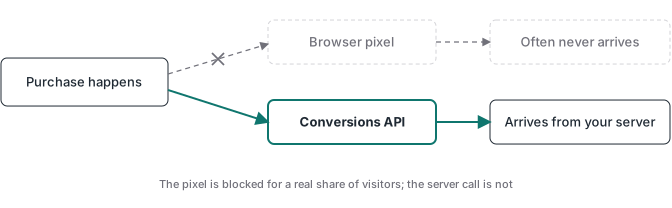
The Facebook Conversions API is a server-to-server connection that sends conversion events from your backend, app, or CRM to Meta. Where the Meta Pixel fires those same events from inside a visitor’s browser, the Conversions API sends them from infrastructure you control. A browser event can be blocked by an ad blocker or fail to load, and the cookies it relies on are shortened by Safari’s tracking prevention. A server event leaves from your own system, so more of your real conversions reach the ad platform that needs them.
Meta and Facebook are the same ad platform, and the Conversions API, the Meta Conversions API, and the Facebook Conversions API are three names for the same thing. The product was rebranded when Facebook became Meta, and advertisers still search for both names. This guide covers what the API is, how Meta matches each event, and the limits it does not overcome on its own.
Teams adding OpenAI as a second destination should read the ChatGPT Ads vs Meta CAPI comparison before copying this field map. The two APIs share an event-delivery shape, but OpenAI rejects phone numbers and events older than seven days.
I deploy tracking implementations for clients, and I built Advanced Tracking Academy around the containers I use in production. The deeper implementation walkthrough, including the Google Tag Manager server container setup, lives in the Meta Conversions API with GTM guide. This article is the fundamentals: what the API sends, how matching works, and where it stops helping.
Why the Conversions API exists
Several forces made the browser a weaker place to measure conversions, and it helps to keep them distinct. Ad blockers and page-load errors stop Pixel requests from firing at all. Safari’s Intelligent Tracking Prevention shortens the cookies the Pixel needs to attribute a visit back to an ad. Apple’s App Tracking Transparency, introduced in 2021, reduced the signals flowing through the app side of the ecosystem and the cross-app attribution that fed back into ad optimization.
Consent belongs in its own category. When a visitor declines tracking, that is a choice both the Pixel and the Conversions API have to honor, not a gap the server steps in to recover. The forces that erode browser measurement are the blockers, the loading failures, and the cookie caps, and a server channel helps with those by sending events from infrastructure those forces do not reach.
For the wider story of why server delivery beats browser-only measurement, the server-side tracking guide covers the data decay problem in detail. The cookie mechanics behind that decay, who sets first-party versus third-party cookies and how each browser treats them, are in the first-party versus third-party cookies guide.
How the Facebook Conversions API actually works
Mechanically, your server makes an HTTPS POST request to Meta’s Graph API endpoint, https://graph.facebook.com/<api_version>/<pixel_id>/events, authenticated with an access token. Meta’s current Using the API documentation shows the Pixel ID in the path, even though Events Manager may group sources under a dataset in its interface. For a manual setup you can generate a token from Events Manager. A system-user token is better suited to an unattended production service because its operation is not tied to a person’s browser session. The request body contains one or more event objects, and Meta checks the required event fields before processing them.
Each event object carries three groups of fields:
- Event data:
event_name(Purchase, Lead, AddToCart, and the rest of the standard set),event_timeas a Unix timestamp in seconds, andaction_sourcedeclaring where the event happened. Meta lists values such aswebsite,app,physical_store,system_generated,email,phone_call,chat, andotherin its server event parameter reference.event_source_urlis required for website events.event_idis optional at the API level but recommended when the same conversion is also reported by the Pixel, because the matching ID and event name let Meta deduplicate the pair. - User data: the customer information parameters Meta uses to match the event to a person. This group is where most of the value sits, and it gets its own section below.
- Custom data: details about the conversion itself:
value,currency,contentsas the list of items bought,content_type, andorder_id.
You can build that request in three ways: write it yourself against the Graph API, route it through a Google Tag Manager server container, or use a partner integration. The API does not care which path sends the event, only that the payload is well-formed and authenticated. The path matters for maintainability, which is the subject of the GTM server-side setup guide.
How Meta matches your events to people
For web events sent with action_source set to website, Meta shows an Event Match Quality rating in Events Manager for each event type. The rating reflects the customer information attached to those events and how useful it is for matching them to Meta accounts. Treat it as a setup diagnostic. It does not confirm that a purchase was real, prove that Pixel and server events were deduplicated, or predict campaign results. There is no universal score that every account has to hit. The Event Match Quality score guide explains why coverage differs by event, why fbc only belongs to eligible Meta ad traffic, and when the dashboard recommendation is noise.
The rating depends almost entirely on the user data you send. The Conversions API accepts a set of customer information parameters, each abbreviated to a short code. The common ones for website events:
| Parameter | Meaning | Hashing treatment |
|---|---|---|
em |
SHA-256 required | |
ph |
Phone | SHA-256 required |
fn, ln |
First and last name | SHA-256 required |
ge |
Gender | SHA-256 required |
db |
Date of birth | SHA-256 required |
ct, st, zp |
City, state, zip | SHA-256 required |
country |
Country | SHA-256 required |
external_id |
Your own customer ID | SHA-256 recommended |
fb_login_id |
Facebook Login ID | No |
subscription_id |
Subscription ID | No |
fbc |
Click ID from the ad | No |
fbp |
Browser cookie ID | No |
client_ip_address, client_user_agent |
Network and device | No |
This is a practical subset for website implementations; the full list is longer and includes app- and messaging-specific identifiers. The personal fields in that list, the email, phone, name, gender, date of birth, and location fields, are normalized and then SHA-256 hashed on your server before they are sent. Meta hashes the same way on its side and compares the hashes. Hashing is pseudonymization, not anonymization: a hash of an email is still tied to a person, and the obligations around consent and data protection still apply. What is not hashed travels as-is over the same HTTPS connection, namely the click ID (fbc), the browser ID (fbp), the Facebook Login ID, the subscription ID, the visitor’s IP address, and the user agent. Your request should not contain raw contact fields, but it does contain several unhashed identifiers. That distinction matters when you document the data flow.
Two things follow. First, the match quality ceiling is set at the point of collection, not at the point of sending. If your checkout form does not ask for a phone number, no Conversions API configuration can manufacture a ph parameter. Start by formatting and sending the identifiers you already collect lawfully, including the click and browser IDs when available. Adding a field to the form is a product and conversion-rate decision because it can add friction and privacy exposure. Second, extra parameters only help when they belong to the same customer and are formatted according to Meta’s current rules. The practical goal is accurate coverage, not the longest possible payload.
If the purchase happens on another domain, the hosted checkout click ID index explains how to preserve those browser identifiers until the paid webhook can send them.
How do the Facebook Conversions API and Meta Pixel differ?
The Pixel and the Conversions API are two delivery paths for the same measurement system. The Pixel sees browser context directly, including the page, referrer, and Meta browser identifiers. The Conversions API can use data held by your checkout, backend, or CRM and sends from server infrastructure. Meta recommends a redundant setup for web events: send the browser event and its server counterpart, then deduplicate them. Its deduplication documentation recommends matching the Pixel eventID with the server event_id, along with the same event name. That design keeps browser context while adding a second delivery path.
| Meta Pixel (browser) | Conversions API (server) | |
|---|---|---|
| Sees the page and referrer | Yes | Only what you forward |
| Hashed identifiers it can pass | Yes, via Advanced Matching, when the page has them | Yes, from server and checkout data, more consistently |
| Exposure to ad blockers | Often blocked | Less exposed, depending on event origin |
| Reliance on browser cookies capped by Safari ITP | Heavy | Lighter, depending on event origin |
| Acts as one path of a deduplicated event | Yes | Yes |
The Pixel is good at in-browser context: which page, what referrer, the click that brought the visitor. It is not limited to that context alone, because its Advanced Matching feature can pass hashed email, phone, and name when the page has them. The practical difference is that the server, sitting behind checkout and CRM, has more consistent access to the same identifiers.
The qualifier on the table matters. A first-party endpoint keeps real advantages even when the event starts in the browser: it is less exposed to common blocklists, and it lets you normalize and distribute the event from the server. Backend-originated events, such as a confirmed payment webhook or a CRM status change, add an independent source. That distinction becomes important when you audit the limits below. The container setup and its testing steps are in the Meta Conversions API with GTM guide.
What can the Conversions API not recover?
The Conversions API improves delivery and gives your backend a direct route to Meta. Its limits start before the request is sent. It cannot create consent, invent identifiers that the customer never supplied, or decide whether a reported purchase settled. Those are separate problems with separate controls: a consent platform records the visitor’s choice, checkout and CRM systems hold customer data, and a payment webhook confirms the transaction. Keeping those boundaries clear prevents a technically valid CAPI request from becoming a misleading conversion signal.
Consent and opt-out still apply. A server event does not sidestep the choices a visitor made. The Conversions API changes where the event originates, not whether you may send it. Under regimes such as GDPR and ePrivacy in the EU or CCPA in California, whether an event can be sent depends on your legal basis, the data involved, and the consent or opt-out signals your consent management platform recorded, so the server has to honor those signals the same way the browser does. The specific obligations are a question for whoever owns your privacy compliance, not something the API resolves on its own.
You cannot match data you never collected. Event Match Quality is bounded by the user data you captured. The API cannot invent a hashed email for a checkout that asked for none, and the first gain usually comes from sending the identifiers you already collect lawfully, accurately and completely. Adding collection fields is a deliberate product decision rather than an automatic fix.
The API ships whatever event you hand it. If your Purchase event fires when someone lands on the thank-you page, then a page refresh, a bot crawling the URL, and a payment that failed after the redirect all become purchases in Meta’s eyes. The platform then optimizes on people who load a URL instead of people who paid. The reliable fix is to make the payment system the source of truth: a confirmed charge sends a webhook to your server, the server matches it to the stored attribution, and only then does it fire the event. That validation layer is the difference between an API setup that sends events and one that sends events you can act on, and the Stripe walkthrough shows the webhook-validated flow end to end.
A server-routed event can still vanish before your server. If your only Conversions API path depends on a browser event reaching your tagging server first, the browser can drop that event before it ever arrives. A purchase that originates on your backend, from a payment webhook or a CRM update, is an independent source that does not depend on the browser at all.
When is the Facebook Conversions API worth using in 2026?
The Conversions API is worth testing when the gap between your payment system or CRM and the Pixel is large enough to change optimization decisions. It also makes sense when you can originate high-value events from a backend source such as a confirmed payment webhook. Spend by itself does not answer the question. Compare the value of the missing or poorly matched events with hosting, implementation, and maintenance cost. Then validate the setup against the system that records the actual outcome. A small funnel with reliable browser measurement may see little practical gain, while a client account losing confirmed purchases can justify the work quickly.
How much does the Facebook Conversions API cost?
Meta charges no fee to receive Conversions API events. You pay for the infrastructure and the work needed to build, test, and maintain the event flow. Managed sGTM hosting is billed monthly, and the provider’s current plan page should be checked when you quote a client because prices and request limits change. A self-hosted Google Cloud deployment can be inexpensive in test mode, but Google’s server-side tagging guidance recommends at least three instances per container for production redundancy. That makes a one-instance test estimate a poor production budget. Setup time is usually the larger variable. A custom build with deduplication and webhook validation can take days, depending on the data layer, payment platform, and account access. For the gateways supported by ATA, a pre-built container and walkthrough reduce the implementation to about an hour when the required access and data are ready.
What should you do next?
For the implementation, the Meta Conversions API with GTM guide is the practical walkthrough, including the deduplication step and the server container setup. For the managed route, the Conversions API Gateway setup guide covers its Pixel prerequisite, first-party domain, testing, cost, and limits. The Gateway versus server-side GTM comparison then lays out the architecture trade-offs. And if you would rather deploy than build, the ATA Meta CAPI container ships with deduplication and webhook validation already wired, ready to import and configure for a supported gateway in about an hour, following the included walkthrough.