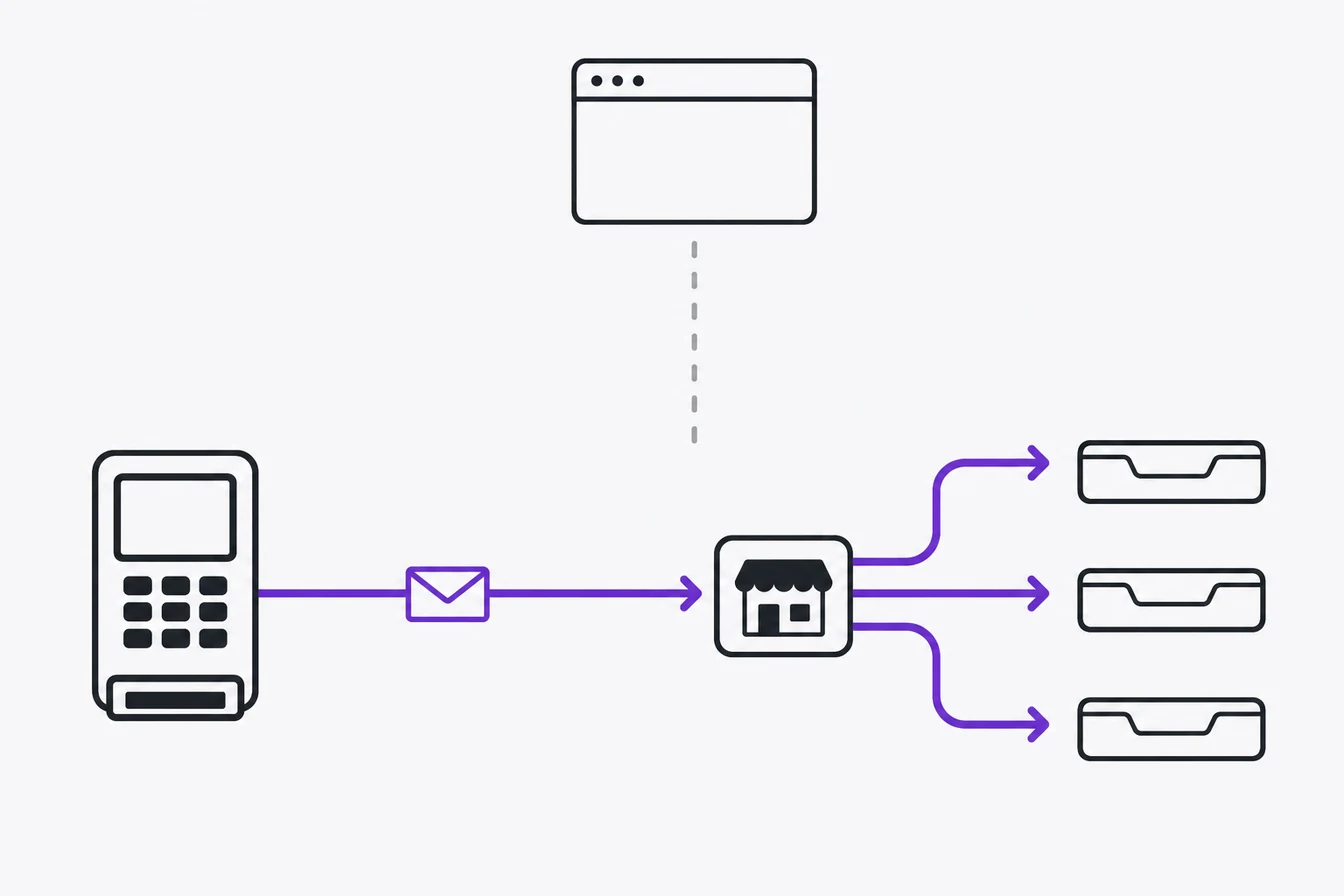
Stripe conversion tracking connects a paid Stripe Checkout, Payment Link, or subscription invoice to the ad click that brought the customer in. Capture click IDs and session context before checkout, store them against a reference passed to Stripe, then verify the payment through a signed webhook before sending the purchase to GA4 and your ad platforms. That way, a real paid order still counts if the buyer never returns to your thank-you page, while a page refresh cannot create another sale.
That is the definition. The reason it matters is the gap every Stripe-based funnel runs into. Your tag fires when the visitor lands on the thank-you page. It has no idea whether the charge actually settled or whether the event made it past an ad blocker. So your ad platforms optimize toward page loads, and the conversion count looks healthy right up until you compare it to what Stripe actually collected. Stripe conversion tracking is how you close that gap and feed your platforms real purchases instead of page loads.
I run tracking implementations for clients, and I built Advanced Tracking Academy around the server containers I deploy in production. This guide covers what Stripe conversion tracking is, why the browser approach breaks on a third-party checkout, how a webhook-validated server counts only settled charges, and how to fan one confirmed purchase out to every platform from a single place.
What is Stripe conversion tracking?
Stripe conversion tracking records purchases that settle through Stripe and sends them to your ad and analytics platforms so each platform can credit the campaign that drove them. The conversion here is a money event: a paid one-time order or a subscription invoice with a value above zero. Button clicks, trial starts, and subscriptions that have not charged yet belong elsewhere in the funnel.
The event name alone does not decide whether money moved. Your handler has to read the object and its status.
| Stripe event | When it can become a purchase conversion |
|---|---|
checkout.session.completed |
The Checkout Session reports payment_status: paid |
checkout.session.async_payment_succeeded |
A delayed payment method succeeds after Checkout completed |
payment_intent.succeeded |
The PaymentIntent is the chosen source for a one-time payment and has not already been counted through Checkout |
invoice.paid |
The paid invoice is the intended subscription event and amount_paid is greater than zero |
That status check matters. ACH debit and other delayed methods can leave Checkout while the payment is still processing. Stripe’s Checkout fulfillment documentation tells implementers to inspect payment_status and listen for checkout.session.async_payment_succeeded when payment clears later. A completed Checkout Session is useful. It is not a universal synonym for settled revenue.
A note on scope. This covers purchase-level events, the charge that settled. Item-level e-commerce tracking, things like view-item, add-to-cart, and catalog browsing, is a different problem on a different page of the funnel. Stripe purchase tracking does not promise that, and if a setup tries to sell it to you, treat it with suspicion.
It is also worth separating this from what Stripe reports on its own. Stripe’s dashboard shows your checkout funnel and your payment volume, and it can report the conversion rate between steps of the payment flow. That is internal reporting about your account. It does not credit a purchase to a Meta campaign or a Google Ads keyword, and it does not push conversions to any ad platform. Stripe conversion tracking, as advertisers use the term, is the path that takes a settled charge and feeds it back to the platforms so they learn which spend earned it. The dashboard answers what happened in your account. The webhook-validated event answers which ad earned it.
The problem with tracking Stripe in the browser
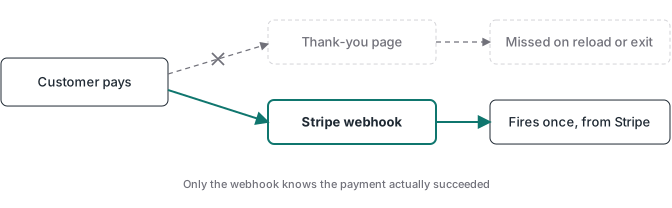
Most Stripe tracking tutorials tell you to drop a tag on the thank-you page and call it done. That instruction papers over the single biggest weakness of hosted Stripe Checkout and Payment Links: the payment does not happen on your website. Embedded Checkout and a custom Checkout domain change the browser path, but they do not turn a page load into payment confirmation.
Stripe Checkout and Payment Links run on Stripe’s domain. The visitor leaves your site, pays on Stripe, and only comes back to your thank-you page on a redirect. Your browser tag lives on that redirect destination, and it inherits every limitation of browser tracking at the worst possible moment.
| Thank-you page tag | Webhook-validated server event | |
|---|---|---|
| Where it fires | Browser, after a redirect from Stripe | Your server, from Stripe directly |
| Domain path | Payment runs on Stripe, then the tag fires after the redirect back | Your endpoint receives the event directly |
| Final event delivery bypasses browser blockers | Often no | Yes |
| Can fire again on a refresh or direct URL visit | Yes | No, if the handler is idempotent |
| Handles delayed payment methods | No reliable signal | Yes, with the later success event |
| Ties to a paid status | Only after another server check | Yes |
Read that table and the failure mode is obvious. A thank-you page event proves that a URL loaded. It can double-count on refresh, fire when a bot or person opens the URL directly, and run before a delayed payment reaches its final state. A webhook-validated server event can prove the paid status, provided your handler checks it. The difference shows up when you reconcile an ad platform’s purchase count against Stripe and find the browser number was counting visits to a page.
The most common browser approach reads the Stripe session ID or transaction ID out of the thank-you URL and fires a Google Ads or GA4 conversion from it. It looks clean, because the ID is real and unique. It still breaks for the same reasons. The tag can be blocked, attribution cookies can be shortened or lost, and a manual refresh or bot can open the URL again. A real transaction ID does not protect you from firing twice or from firing on a payment that later failed. The ID makes the event identifiable. It does not make the event reliable.
Then there is the timing problem, which the browser cannot solve at all. A Stripe purchase is often a high-consideration event. Someone clicks your ad, reads your page, closes the tab, comes back from an email two days later, and pays. The browser session that held the click ID is long gone. A thank-you page tag has no attribution to send, because the attribution never survived the gap. Reliability and persistence are two different failures, and the browser fails at both.
How Stripe conversion tracking works
The mechanism rests on one idea: Stripe tells your server the moment a charge settles, and that server-to-server message is the signal you can trust.
Here is the path a single tracked Stripe purchase takes.
- A visitor clicks your ad. The click carries attribution identifiers, the Google click ID, the Meta click ID, and whatever else the platform needs to credit the click later.
- You capture attribution and tie it to the checkout. When the Stripe Checkout Session or Payment Link is created, you store the click IDs alongside it, using Stripe’s
client_reference_idor a metadata field you control. Capture the UTM parameters at the same time, source, medium, and campaign, because the click IDs are what the platforms match on and the UTMs are the readable fallback when a click ID is stripped. Write all of it to a record on your side, not to the browser session, so the link survives the days between the click and the charge. - The visitor pays on Stripe. The charge runs on Stripe’s domain, outside what your browser tag can reliably see.
- Stripe sends the relevant webhook. An immediate card payment may arrive through a paid
checkout.session.completedevent. A delayed method needscheckout.session.async_payment_succeeded. Subscription revenue normally comes from a paid invoice. - Your server validates and deduplicates. It verifies the signature against the raw request body, checks the accepted status, and rejects a webhook delivery it already processed. If a browser Purchase also exists, both routes use the destination’s shared deduplication ID.
- Your server fires the conversion. The paid order goes to each platform with its own required payload. That can include the stored click identifier, conversion time, order value, currency, transaction ID, and customer data you have permission to send.
Step 2 and step 5 are where DIY builds go wrong. Skip the attribution capture and the webhook knows a sale happened but not which ad earned it. Skip the validation and duplicate deliveries or the wrong payment state become purchases.
The first-party click ID index guide isolates that landing-page-to-webhook join and shows how to carry one opaque reference across a hosted checkout domain.
How do Stripe Payment Links and Pricing Tables keep attribution?
Stripe Payment Links and embedded Pricing Tables create Checkout Sessions without your backend creating each session on demand. You still need a join between the browser click and the later webhook. The clean method is an opaque internal reference. Save the click IDs, UTMs, consent state, and any GA4 session context in your own store, then pass only the reference into Stripe.
Stripe’s Payment Link tracking documentation supports UTM URL parameters and client_reference_id. The client reference returns in checkout.session.completed. The embedded Stripe Pricing Table exposes a client-reference-id attribute that reaches the Checkout Session in the same field. An API-created Checkout Session can receive client_reference_id or metadata directly.
| Checkout path | Reference to pass | Where you read it later |
|---|---|---|
| API-created Checkout Session | client_reference_id or session metadata |
Checkout Session in the webhook |
| Payment Link | client_reference_id URL parameter |
Checkout Session in the webhook |
| Embedded Pricing Table | client-reference-id attribute |
Checkout Session in the webhook |
Do not turn the URL into a database. A raw email, secret, or full set of ad identifiers does not belong in client_reference_id. Use a random or internal order key, then resolve the private attribution record on your server. This also answers the “conversion tracking number” problem that shows up around Payment Links: the useful number is a stable reconciliation ID, not the success-page URL itself.
What Stripe tracking does not fix
This is the section worth slowing down on, because “just fire the webhook” advice has its own failure mode.
A webhook endpoint can receive far more than clean purchase events. Stripe sends payment failures, refunds, disputes, invoice updates, and test-mode traffic if the endpoint or handler is configured too broadly. Fire a conversion on every event and the platforms optimize toward a mix of revenue and noise. The webhook is a better source than the thank-you page, but the business rule in your handler decides what the conversion means.
The failure mode looks like this in audits. A team wires every Stripe webhook to send a purchase. The conversion count climbs, the cost per conversion drops, and actual net revenue tells a different story. The tracking got more complete and less accurate at the same time because nobody wrote down which event and status counted.
There is a second, quieter problem. Even a perfectly validated webhook only tells you a sale happened. If the attribution was not captured and stored at the click, the conversion reaches Meta or Google with no click ID to match, and the platform cannot credit the campaign that earned it. A validated event with no attribution is a purchase the platform saw but could not learn from.
A related trap shows up in subscription funnels. A trial sign-up and a trial that converts to a paid plan are different events, and only one of them is revenue. If you fire a purchase on the trial start, your platforms optimize toward free sign-ups. Count the trial start in GA4 or your CRM if you want the trial-to-paid rate, then use a paid invoice with a value above zero for revenue.
Consent does not disappear at the webhook. A server can deliver the event without a browser tag, but that says nothing about whether advertising identifiers or customer information may be processed for that visitor. Store the consent state with the attribution record and apply each destination’s rules when the event is sent. The Google Consent Mode guide explains the Google side. Your privacy notice and legal basis still need to match the markets where you operate.
Validating the event: webhook, not thank-you page
The fix is to make the conversion mean a settled charge before it leaves your server. Stripe sends the webhook, your server confirms the payment status, and only a confirmed charge becomes a conversion. Every conversion your platforms receive now maps to money that moved.
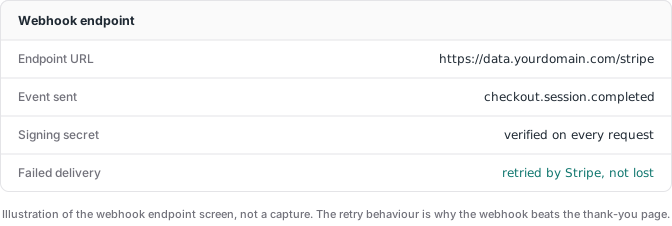
Validation goes past the signature check. Verify the signature against the unmodified request body so a forged request cannot inject purchases. Then filter the event type, livemode, currency, value, and payment status. A paid checkout.session.completed can count immediately. A session still processing must wait for checkout.session.async_payment_succeeded.
Webhook idempotency and ad-platform deduplication solve different duplicates. Stripe can retry the same delivery, so store the Stripe Event ID and skip one you already processed. Stripe also notes that two Event objects can sometimes describe the same logical object. Its webhook guidance recommends using the object ID in data.object together with the event type for that case. Separately, if a browser pixel and the server both send Purchase, give the destination the same deduplication ID for both copies.
Use a stable business transaction ID too. A Checkout Session ID, PaymentIntent ID, invoice ID, or your own order ID can anchor the purchase, as long as the same business event always resolves to the same value. That ID prevents a second platform import and lets you find the original conversion if a refund changes the revenue later.
One detail that trips up DIY builds: you validate the webhook with its signing secret, the per-endpoint secret Stripe generates for that webhook, not your Stripe secret key. The signing secret proves the event came from Stripe. Your secret key is what authorizes charges and refunds on your account, and it never belongs in a browser tag, a client-side script, or anywhere a visitor can read it. Mixing the two is how payment setups leak the one credential that can move money.
That validation layer is custom logic, and it is the part a turnkey thank-you-page snippet will never do for you. It is also the architecture every ATA container ships with, because a purchase count you cannot tie to a paid object is a number, not a signal.
How should trials, renewals, and refunds be counted?
Treat lifecycle events as different business outcomes. A trial start can be useful for funnel analysis, but it is not paid revenue. A first invoice with amount_paid above zero can be the subscription purchase. Later paid invoices are renewals, and whether they belong in an acquisition campaign’s primary conversion action is a measurement decision, not something Stripe can choose for you.
Refunds happen after the original purchase, so they cannot always be “filtered out before firing.” Keep the transaction ID that went to each destination. When Stripe reports a full or partial refund, use the platform’s own adjustment contract. Google Ads can retract a conversion or restate its value, and its conversion adjustment documentation uses the original order ID to find that conversion. A destination without an accepted adjustment path should not receive a made-up negative Purchase. Keep the refund in your warehouse or reporting layer so gross conversions and net revenue stay visibly different.
Sending a Stripe purchase to more than one platform
The validated Stripe purchase does not belong to a single platform. The same confirmed charge that becomes a Meta conversion is also a Google Ads conversion, a GA4 purchase, and a TikTok event, if you run ads on any of them.
The same paid event can support non-paid attribution too, but GA4 needs more than a UTM label attached at the last minute. Preserve the GA4 client and session context when the visitor is still on your site, then join it to the payment record. Without that join, Measurement Protocol can record a purchase while leaving its original session attribution incomplete. The GA4 conversion tracking guide explains why receiving an event and validating its business outcome are separate checks.
This is where a server-side tagging container earns its keep. Instead of bolting a separate Stripe integration onto every platform, you validate the payment once on your server and fan it out to the Meta Conversions API, Google Ads, GA4, and the TikTok Events API from one place. That shared source produces a different payload for each destination.
| Destination | Data the Stripe workflow must preserve |
|---|---|
| Google Ads | Click identifier, conversion action, time, value, currency, order ID, and consent state |
| Meta | Event name, event time, event ID, value, currency, permitted match fields, and click or browser identifiers when available |
| GA4 | purchase, transaction ID, value, currency, items when available, plus the original client and session context |
| TikTok | Event name, event time, event ID, value, currency, consented match data, and TikTok click or browser identifiers when available |
The Google Ads path is an offline click conversion. Pair the paid Stripe order with the click identifier captured earlier, then send the conversion action, time, value, currency, and order ID. Google’s current offline conversion upload sample includes those fields and a consent object. The order ID also gives later refunds a durable adjustment reference. The full flow, including upload options and junk filtering, is covered in the Google Ads offline conversion tracking guide. If you are weighing the shared server against a lighter single-platform option, the Conversions API Gateway vs server-side GTM guide lays out the trade-off.
Setting up Stripe conversion tracking with a server container
A realistic path, whether you build it or deploy a prebuilt container.
- Capture attribution and consent on the landing page. Store the relevant click IDs, UTMs, GA4 context, and consent state in a server-side record.
- Create an opaque join key. Pass it through
client_reference_idor metadata for an API-created session, through the Payment Link URL parameter, or through the Pricing Table attribute. - Subscribe only to the events you use. Include the paid Checkout event, the later success event for delayed methods, the chosen paid-invoice event for subscriptions, and refund events if your reporting handles adjustments.
- Verify the raw webhook request. Use the endpoint signing secret, reject invalid signatures, separate test mode from live mode, and return a fast successful response before slow downstream work.
- Make processing idempotent. Store the Stripe Event ID and the logical payment key. Replaying a webhook must not create another purchase.
- Map one paid order into destination-specific payloads. Reuse the business transaction ID, while respecting each platform’s click ID, event ID, consent, and customer-data contract.
- Test the awkward paths. Cover refreshes, direct success-URL visits, webhook retries, delayed payment success and failure, a zero-value trial invoice, a renewal, and a refund. Then confirm every destination received the intended count and value.
Steps 4 through 7 are where most builds go quiet. The dashboards look healthy because conversions are flowing, and nobody notices that retries, processing payments, or trial invoices entered the count.
What Stripe conversion tracking costs
Stripe charges nothing per webhook delivered, the same way it charges nothing for the event itself. The cost is the infrastructure that captures, validates, and sends.
Two numbers to budget:
- Hosting: a managed server container starts around $20 per month per site. Google Cloud Run can be cheaper at low traffic if you operate it yourself. A managed host like Stape, where I run client containers, handles the server container and the platform connectors.
- Setup time: the real variable. Built from scratch, a correct Stripe setup with attribution capture, webhook validation, and multi-platform deduplication is days to weeks the first time. Prebuilt containers compress that to about an hour.
For anyone spending real money on ads into a Stripe funnel, feeding the platforms your settled purchases pays back the hosting many times over. If your ad spend is small, fix the offer and the funnel before the plumbing.
Where to go from here
If you are implementing this, the Meta Conversions API guide covers how the same server feeds Meta, with destination deduplication in detail. The Google Ads offline conversion tracking guide covers the upload and adjustment side. For the container itself, use the server-side GTM guide. The first-party vs third-party cookies guide explains the browser mechanics, and the ChatGPT Ads server-side GTM implementation shows the same webhook-to-stored-click-ID join in a live subscription funnel.
And if you would rather deploy than build: the ATA Stripe container ships with attribution capture, webhook signature validation, payment-status filtering, and multi-platform deduplication already wired in. Import, configure, and go live in under an hour, $27 per month with the price locked while you stay subscribed.