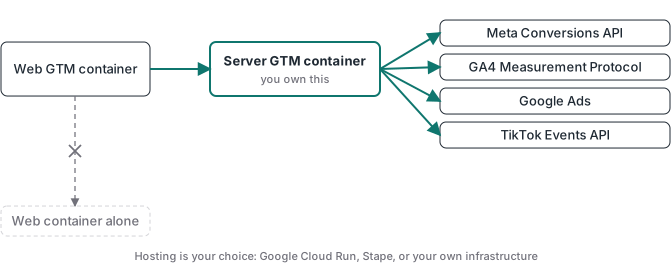
Server-side GTM (sGTM) is a version of Google Tag Manager that runs in a server container you host, instead of running in the visitor’s browser. Your website sends events to that container on your own subdomain, and the container forwards them to Meta, Google, TikTok, and GA4 from your server. The browser does less, and you control exactly what each platform receives.
That’s the definition. The reason people go looking for it is usually the same gap I see in every audit: Ads Manager reports far fewer conversions than the payment processor actually settled. Ad blockers, Safari’s tracking prevention, consent banners, and shorter cookie lifetimes all eat browser events before they reach a platform. Server-side GTM is the standard infrastructure answer to that decay.
I run tracking implementations for clients, and I built Advanced Tracking Academy around the server containers I deploy in production. This guide covers what sGTM means, how the server container works, how it differs from the client-side GTM you already use, where to host it, and what it actually costs.
What sGTM means
The acronym trips people up because it has two unrelated lives. In casual messaging, “sgtm” means “sounds good to me.” In tracking, sGTM means server-side Google Tag Manager. If you landed here from a marketing context, the tracking one is what you want.
Server-side Google Tag Manager is the same product you know from the web. You build tags, triggers, and variables in the same interface. The difference is where the container runs. A normal GTM container is JavaScript that loads in the browser and fires requests to each platform from the visitor’s device. A server container runs on infrastructure you host and fires those requests from your server. The visitor’s browser only ever talks to one endpoint on your own domain.
That single change in location is what fixes the data loss, because requests to your own subdomain don’t look like third-party tracking to a blocker.
sGTM is the multi-platform answer. If you only run Meta ads and want server-side delivery without a full container, Meta’s Conversions API Gateway is the narrower alternative, and the Gateway vs server-side GTM guide lays out where each one wins.
How server-side GTM works
Here is the flow, start to finish, for a single purchase event.
- The browser sends one event stream to a tagging server on your own subdomain, something like
data.yourdomain.com. Because the subdomain is yours, the browser treats this as first-party traffic. - The server container receives the event and runs your logic. It can enrich the event with customer data for better matching, strip fields you don’t want to share, deduplicate against the browser copy, or drop junk before it ever reaches a platform.
- The server forwards the processed event to each destination through its API: the Meta Conversions API, Google Ads, the TikTok Events API, and GA4. One server, every platform.
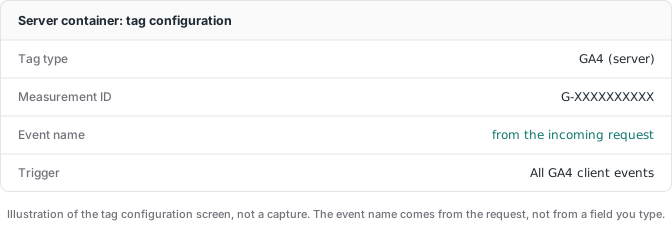
The component inside the server container that catches each incoming request is called a client. The GA4 client is the one most setups use. It parses the stream your web container sent, shapes it into a structured event, and hands that event to your tags. Tags are the outbound half: the Meta CAPI tag, the Google Ads tag, the TikTok tag, the GA4 tag, each deciding what to send on. Clients take requests in, tags send requests out. That split is why one server can feed every platform without a separate integration for each.
So is GTM server-side? Regular GTM isn’t. Server-side GTM is a second container you add alongside it. In a real setup the web container in the browser collects the event and hands it to the server container, which does the heavy lifting and the platform delivery.
Server-side GTM vs client-side GTM
This is the comparison people ask for most, and the honest version is that it isn’t either-or. A good setup uses both.
| Client-side GTM (web container) | Server-side GTM (server container) | |
|---|---|---|
| Where it runs | Visitor’s browser | A server you host |
| Talks to platforms from | The visitor’s device | Your infrastructure |
| Ad blockers | Frequently blocked | Mostly unaffected |
| Cookie lifetime in Safari | Capped as low as 7 days | First-party cookies, longer-lived |
| Data control | Each tag takes what it collects | You choose every field per platform |
| Page weight | One script per platform | One lightweight stream |
| Running cost | Free | Hosting from roughly $20/month |
| Setup effort | Paste a snippet | Container, hosting, configuration |
The web container is still good at browser context: the page, the referrer, the click. The server container is good at reliability and at carrying richer customer data. You run the web container to capture context and the server container to deliver clean, blocker-resistant events. For the wider version of this argument across every platform, I wrote a full guide to server-side tracking that covers the data decay problem in detail.
What you need to run a server container
Three pieces, and none of them are exotic.
The server container itself. You create it in your GTM account the same way you create a web container, then pick “server” as the type. It’s free to create.
A place to host it. The container is software that has to run somewhere with an always-on endpoint. That’s the part that costs money and the part most guides gloss over. More on the two real options below.
A first-party subdomain. You point a subdomain like data.yourdomain.com at the hosted container. This is what keeps incoming requests first-party, which is the entire reason the events survive blockers. The first-party versus third-party cookies guide breaks down why that distinction matters at the browser level. Without the custom domain, you lose most of the benefit.
Where to host server-side GTM
This is the decision that actually matters, and it comes down to two paths.
Google Cloud Run (self-operated). Google’s own documentation walks you through provisioning the container on Cloud Run. It can be cheap at low traffic, sometimes a few dollars a month, and you own every part of it. The trade-off is that you own every part of it. You set up the load balancer, manage the SSL certificate, watch the logs, and handle scaling when a campaign spikes. If you have a DevOps habit, this is fine. If you don’t, this is where projects stall.
The server container ships as a Docker image, so Cloud Run is only the home-field option. The same image runs on AWS, Azure, or any host that keeps an always-on endpoint and terminates SSL. The operations work is the same wherever the container lives.
A managed host. A managed server-side host runs the container for you, handles the custom domain and SSL, scales automatically, and gives you readable logs. This is the route most non-developers and most agencies take, because the time saved on infrastructure is worth more than the difference in hosting cost. I run client containers on Stape for exactly this reason: it removes the Cloud Run operations work so the time goes into the tracking logic instead of the plumbing.
Either way the container is identical. Hosting is an operations choice, not a tracking one.
What server-side GTM fixes
Move your conversion events to a server container and four things change.
More events reach the platforms. Blockers and privacy features filter known tracking domains. A request from your own subdomain isn’t on those lists, so it gets through. The conversion count platforms optimize on gets closer to the real number.
Better match quality. Meta and Google grade each event by how well they can tie it to a person. Server events can carry hashed emails, phone numbers, and order data a browser tag rarely has. Better matching means the algorithm learns from more of your actual buyers.
Real control over the data. In a server container you write the contract. This platform gets the order value and a hashed email, that one never sees the raw IP. For GDPR and CCPA work, enforcing the data flow beats hoping each vendor’s script behaves.
Lighter, faster pages. Every tag you move off the browser is one less script downloading and running on the visitor’s device. A web container that pings Meta, Google, TikTok, and GA4 on its own loads code for each one. A server container collapses that into a single stream and does the fan-out on the server instead of in the browser. It is not the main reason to switch, but on a site weighed down by marketing scripts it is a real cleanup.
Server-side GTM for GA4
GA4 is usually the first destination people think about for server-side, because GA4 measurement is exactly what ad blockers and consent banners erode. Run GA4 through a server container and the GA4 tag forwards events to GA4 from your server using the Measurement Protocol, instead of depending on the browser gtag to make it through. The same first-party-subdomain logic that protects ad events protects GA4 events, and you can enrich them or strip fields before they land in your reports.
The part to keep straight is that server-side GA4 does not fix a broken event model. If your purchase fires on page load, GA4 now receives a clean, blocker-resistant page-load event that still miscounts revenue. The delivery got better; the definition of the event did not. Most production stacks run both the web GA4 tag, for browser context, and the server GA4 tag, for reliable delivery, with deduplication so a single purchase is not counted twice.
What server-side GTM doesn’t fix
This is the section vendor blogs skip, so let me be direct, because skipping it is why there’s so much skepticism about sGTM in marketing forums.
It doesn’t clean dirty data. If you pipe a broken browser datalayer through a server container, you get broken data on nicer infrastructure. An event that fired twice in the browser still fires twice. Moving the endpoint validates nothing on its own.
It doesn’t replace consent. A server container has to respect a visitor who declined tracking, same as any pixel. How that consent signal reaches the server before any tag fires is its own wiring problem, and the Google Consent Mode v2 guide covers it. Using the server to route around a declined consent banner is a straight-up violation.
It doesn’t fix thank-you-page purchase events. This is the big one. The most common failure I find is a purchase event that fires on page load. Refresh fires it again. A bot hitting the URL fires it. A failed payment after redirect fires it anyway. Now the platform optimizes toward people who load a URL, not people who paid.
The fix for that last one is webhook validation: let the payment gateway be the source of truth. Stripe sends a webhook when a charge actually confirms, your server matches it to the stored browser session, and only then does the server container send the purchase to Meta, Google, and TikTok. Every event maps to settled money. It’s the architecture every ATA container ships with, because thank-you-page events stopped being trustworthy years ago.
Setting up server-side GTM
A realistic path, whether you build it or deploy a pre-built container.
- Create the server container in your GTM account and choose the server type.
- Host it. Provision on Cloud Run yourself, or spin it up on a managed host in a few minutes.
- Point a first-party subdomain at it, so browser requests stay first-party.
- Route your web events to the server. The GA4 tag in your web container can act as the transport, sending one stream to your subdomain where the server fans it out.
- Configure the platform tags in the server container: Meta CAPI, Google Ads, TikTok Events API, GA4, each with deduplication so the browser and server copies of an event aren’t both counted. The Meta side has its own details, which I cover in the Meta Conversions API guide.
- Add webhook validation for purchases, so revenue events fire on confirmed payment, not page load.
- Test before you trust it. Use the server container’s preview mode, run real test transactions, and confirm each platform received exactly what you expected.
Steps 5 and 6 are where do-it-yourself setups quietly go wrong. The dashboard looks fine while the underlying events are duplicated, unvalidated, or unmatched.
What server-side GTM costs
Three numbers to budget.
- The container: free to create in GTM.
- Hosting: a few dollars a month on Cloud Run at low traffic if you operate it, or from roughly $20 a month on a managed host that operates it for you.
- Your time: the real variable. A correct server-side setup with deduplication and webhook validation is days to weeks the first time you build it. A pre-built container compresses that to about an hour.
For any advertiser spending real money, the recovered conversions and better match quality pay back the hosting many times over. If your spend is small, fix the offer before the plumbing.
Where to go from here
If you need an auditable record of what your server container received and wrote, the sGTM event database guide shows how to store selected event receipts in Postgres and distinguish a retry from an upstream duplicate.
If you’re new to the concept, start with the server-side tracking guide for the full picture of why server delivery beats browser-only tracking. If you’ve decided on sGTM and Meta is your main platform, the Meta Conversions API guide walks through the deduplication and webhook-validation steps in detail. If TikTok is in your mix, the TikTok Events API guide walks the same server container from the TikTok side, including the event_id deduplication.
And if you’d rather deploy than build: the ATA containers are pre-built server-side GTM setups with webhook validation already wired in. Import, configure, and go live in under an hour, $27 per month with the price locked while you stay subscribed.