When a ChatGPT Ads campaign targets one region and your analytics shows visits from somewhere else, start with Ads
Manager’s own country breakdown. That is OpenAI’s report; most analytics tools guess each visitor’s country from an
IP address. If Ads Manager shows clicks elsewhere, check your location settings first. If it shows only your countries,
measurement becomes the likelier explanation, and the visits themselves (their oppref parameter, network and
timing) give you more clues before you decide anything about bots.
This came up on r/PPC today. One advertiser reported that a Europe-only campaign brought a large share of analytics visits geolocated to Iran, far above that country’s usual share of their site traffic, and asked whether they were paying for bot clicks. Nobody can answer that from a report like that alone. Here is how to work through it with your own data.
Two systems, two different counts
OpenAI states it plainly in its Measure Results help page: “Ads clicks measure ad interactions. Analytics sessions depend on page load, redirects, consent settings, browser blocking, UTM handling, attribution windows, and time zone settings.”
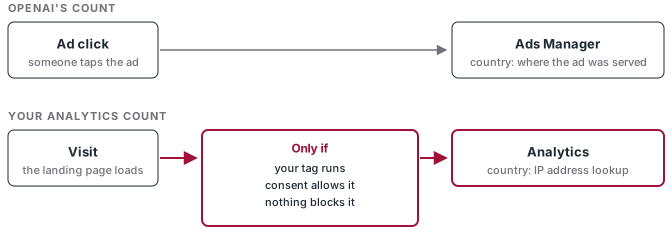
So a click and a visit are not the same event. A click is recorded when someone taps the ad. A visit exists only if the page loads, your tag runs, consent allows it and nothing blocks it. Location is also measured differently. OpenAI knows where it served the ad. Your analytics tool looks up the visitor’s IP address in a geolocation database.
Before you compare anything, line up the basics OpenAI lists: the same date range, the same time zone, the same campaigns. Then pull the click report as a CSV export so you can work at campaign and ad level.
Step 1: read Ads Manager’s country segment
In Ads Manager, the Segment menu gives Device, Country and Platform breakdowns. Segment the campaign by Country for the same dates as your analytics report.
You get one of two answers.
Clicks outside your countries. That’s a targeting question. OpenAI’s troubleshooting page names the most likely cause: “Selecting all countries and excluding some can still allow delivery in eligible countries that have not been excluded.” If you want Europe only, select the European countries you want rather than starting from all and removing the rest. Also check when targeting changed, because “changes to targeting do not change where past delivery occurred.” A fix made on Wednesday doesn’t move Monday’s clicks.
Clicks only in your countries, analytics disagrees. That points toward measurement, though it doesn’t settle it. The next two steps help you weigh it.
Step 2: understand where the analytics country comes from
Matomo, like most analytics tools, maps the visitor’s IP address to a country. At country level that lookup is usually right. MaxMind, the database Matomo Cloud uses, says “country level accuracy is generally very high, exceeding 99%, especially when excluding VPN usage.”
That qualifier is the point. Matomo’s own troubleshooting page lists the cases where the location comes out wrong: visitors on VPNs, mobile networks or personal proxies, and setups where Matomo sits behind a reverse proxy or CDN and logs the proxy’s IP address instead of the visitor’s. A European visitor whose traffic exits through a server in another country is filed under that other country.
A cluster of visits from one unexpected country, on one campaign, is a pattern worth reading rather than averaging. In Matomo’s visitor log, check whether those visits share a network provider, a device type, a browser, or arrive in a tight time window. A spread of ordinary consumer networks looks different from a handful of hosting providers.
Step 3: split the visits by oppref
OpenAI’s Pixel documentation says the Pixel “captures oppref from the landing page URL” and stores it in a
first-party __oppref cookie for 30 days. OpenAI appends oppref to ad clicks; it does not add UTMs to them. Your UTMs
are the static parameters you set, and OpenAI says they “persist on ad clicks.”
That gives you one more signal to read. Treat it as a clue rather than proof. A URL with oppref can be copied, shared or
reloaded, and a redirect can strip it. In your analytics, capture the landing page URL with its query string (or a
custom dimension holding oppref), then sort the unexpected visits into two groups:
- Visits with
oppref. These landed on a URL that came from an ad click, most likely the click itself. If they geolocate to the unexpected country while Ads Manager shows your target region, a location lookup gap moves up the list. Read them together with the network and timing patterns from Step 2. - Visits with your UTMs and no
oppref. These need another explanation, and there are several. One is documented: “Ad-review crawlers may visit submitted landing pages with tracking parameters. Third-party analytics may classify these visits as paid traffic, but crawler visits are not billable ad clicks.” The crawler identifies itself as OAI-AdsBot, and OpenAI publishes its IP ranges, so you can check those visits against them. A redirect on your side that drops the query string also losesoppref, so check the landing URL path too.
Neither group answers the question on its own. Together with Ads Manager’s country report and the visit patterns, they tell you whether you have something worth taking to support.
Step 4: put a price on it, then escalate with evidence
Price the question before you act. Multiply the clicks in question by the average CPC in your export. OpenAI recommends starting CPC bids at US$3 to US$5, so on a small test the disputed amount is often tens of dollars. Compare that with what the campaign brings in before you pause it.
If Ads Manager shows delivery where it shouldn’t, or the clicks with oppref still don’t make sense, contact OpenAI’s
ads support. For location issues their troubleshooting page asks for: the ad account and campaign IDs, report
screenshots or exports, the date range, time zone and filters, screenshots of the location settings, the affected
countries, and when any targeting changes were made. For click-billed campaigns OpenAI’s help pages say you pay per
valid click, but they don’t describe how invalid clicks are identified or credited, so that conversation goes through
support.
What this has to do with your results
ChatGPT Ads offers impression and valid-click billing, and a Conversions campaign learns from the conversion events you
send back. The cleaner the click reference reaching those events, the better OpenAI can match a sale to the ad click
that came before it. If
oppref gets lost in a redirect or never reaches your server events, you lose that match. Our earlier piece on
sending one event to both Meta CAPI and OpenAI’s Conversions API covers the server
side.
The habit that saves money here is the same one that works on every platform: compare the platform’s count with your own, line up the definitions, and find the reason for the gap before you move budget.