
If your US campaigns report purchases but your new EU campaigns show fewer conversions than your checkout, start with the consent path. A paid order and an attributed Google Ads conversion are different records. The order can be real while the ad platform lacks permission, an identifier, or an event it can connect to an ad click. Google’s consent rules cover more than the EU: its EU User Consent Policy applies to end users in the European Economic Area, the UK and Switzerland (checked 2026-10-17), so a store selling to London or Zurich belongs in the same audit.
Do not assume a share of European sales is missing. “Half the sales do not attribute” is a figure to measure against your own orders, countries, consent choices and conversion actions. Reported conversions can fall for reasons that have nothing to do with tracking. This guide is for a seller expanding into Europe who needs to find the break and keep a truthful purchase record. The mechanics of the four signals and the two modes are in the Google Consent Mode v2 explainer.
Three records, three checkpoints
Your payment system records whether money was captured. Your tag or server endpoint records whether a purchase event was delivered. Google Ads then decides whether that event can be tied to an eligible ad interaction. Consent denial can stop the tags or strip identifiers. A default that loads after the tags can send the wrong signal. A tag blocked after the visitor grants consent can miss a purchase it was allowed to measure. Lost click identifiers, hosted checkout redirects, duplicate actions and reporting delays produce similar symptoms.
So the first comparison is paid orders, received purchase events and attributed conversions, each broken out by country. A single global purchase count hides a regional failure. Google’s EEA guidance for advertisers says measurement, remarketing and personalization for those users require consent and consent signals shared with Google. That is a policy and measurement requirement, not a promise that a banner restores conversions. Your privacy owner chooses the consent design; the audit checks that the chosen state reaches the tags.
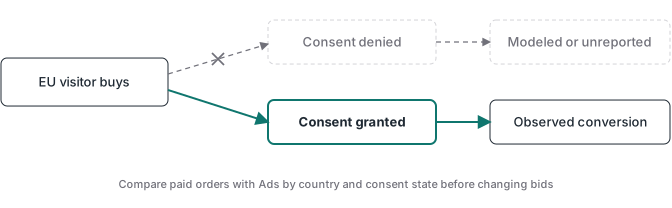
In Basic mode a buyer who declines sends Google nothing. In Advanced mode the tags send cookieless pings that modeling may use. Which one you run decides what Google Ads can estimate, and the explainer shows both setups in code.
Modeling may not fill the gap
Google says eligible modeled conversions appear in the Conversions column and in downstream reports. Whether your account is eligible depends on click volume, and Google’s own pages give two different thresholds (both checked 2026-10-17):
- The consent mode modeling page states “a daily ad click threshold of 700 ad clicks over a 7 day period, per country and domain grouping.”
- The Basic mode eligibility page asks for 100 clicks per day, per country and domain grouping, and says this condition is required for Basic mode but not for Advanced.
So a new EU launch on Basic mode with low click volume per country may get no modeled conversions at all. Advanced mode removes that click condition on the second page, though it still depends on a correct implementation. Do not guess which applies. Read the conversion action’s diagnostics in your account and note what it says about consent mode before you treat any modeled figure as recovered sales.
Keep this apart from GA4. GA4 behavioral modeling has its own thresholds, measured in events and users with analytics_storage denied and granted, and it fills users and sessions, not Google Ads conversions.
A launch can look healthy while consenting visitors buy, then thin out when the mix of countries, consent choices or traffic sources changes. Automated bidding then works from fewer conversions. That is a plausible mechanism, not a forecast. Test it against the order ledger and the campaign change history, and if paid EU orders fell too, look at demand, delivery and checkout as well.
Find the break before changing bids
Run a controlled test with a real order in the relevant country and a known consent choice. Use a refundable internal order so you can trace one order ID without treating a thank-you page view as a sale, and keep test transactions out of optimization where your platform allows it. Then follow the event from checkout to reporting and stop at the first checkpoint where the evidence disappears.
- Set the paid-order baseline. Export confirmed orders by country and day from the payment or order system. Separate refunds, cancellations and test orders. Decide what “country” means (billing, shipping or visitor location) and use the same definition everywhere, because Google Ads location reports do not read your billing address.
- Check event delivery. For a sample order, confirm the purchase event reached your web or server endpoint with the expected transaction ID. Receipt at the endpoint is not attribution. On hosted checkouts, check that the click identifier survives the redirect where you are allowed to keep it.
- Run the consent matrix. Use a fresh browser session per row and read each one in the Tag Assistant Consent tab and in the network panel.
| Test | What should hold |
|---|---|
| Load, before any choice | Default state declared before any Google tag fires; all four signals at your policy’s default |
| Choice made | An update carrying exactly what the visitor granted, before the next measurement hit |
| Purchase | The purchase hit carries the consent state the buyer chose |
| Reload | The stored choice is applied again before the first hit |
| Withdraw | Signals return to denied and no granted hit follows |
On a GA4 hit, gcs carries ad_storage and analytics_storage, and gcd carries the wider consent state. Google says these fields may change, so treat them as a confirmation beside Tag Assistant rather than decoding them from a fixed table. If you scope the default by region, run the matrix once from a European location too. A region-scoped default is an option, not a requirement.
- Check the conversion action. Confirm the right Google Ads action, its source, primary or secondary setting, counting rule and window. Read its diagnostics.
- Compare like with like. The standard Conversions columns date a conversion by the ad click, while your ledger dates it by payment. Google’s conversion columns guide says the “by conv. time” columns report “based on the time the conversion occurred” and that reporting can lag 24 to 48 hours (checked 2026-10-17). Use those columns, filter to the purchase action, compare only settled days, and match time zones. A direct order and an unattributed ad order will never match one to one, so do not read orders minus conversions as a loss percentage.
We ran this matrix by clicking a real banner on a Brazilian client’s live site on 2026-10-13. GA4 hits read G100 with no choice, G101 with analytics only and G111 after accepting all. The withdraw row is the one that confuses people: the events fired by the withdrawal clicks themselves (in our run, cta_click and scroll_depth) went out under the old granted state, so a G111 hit right at the withdrawal is expected as long as none follows it. The full table, and the defect that run caught, are in the Consent Mode v2 explainer.
If the order is paid and the event arrived but no conversion appears, look at attribution and consent diagnostics. If the event never arrived, inspect the trigger, the redirect and the server route. If the order itself is missing, start with checkout or payment. The server-side event recovery guide covers the wider event path and separates receipt from a verified conversion.
What a server container can fix
A server container can receive permitted browser or backend events, validate fields, keep the transaction ID, and stop duplicate delivery from becoming duplicate purchases. It cannot infer a visitor’s consent, invent a missing click ID or make Google Ads attribute every legitimate EU order. If the browser event was blocked before it reached your endpoint, the container has nothing to process. A payment webhook gives a stronger purchase record, but its consent and attribution context has to be collected and applied separately.
After the audit, repair the failure the trace proved: a late consent default, a missing purchase trigger, a lost checkout reference. Keep the paid-order ledger as the business result, and keep Google Ads conversions as the platform’s attributed view, with its consent and modeling limits visible to whoever changes bids. If you build these flows for several stores, the Advanced Tracking Academy library, on a waitlist while it is built, is planned to give you reusable GTM containers and debugging guides for the event path. The EU consent decision stays with each business.