
Meta deduplicates a browser Purchase and its server copy when both carry the same event name and the same event ID. For purchases, Meta’s own server event reference suggests an order number or transaction ID as that ID. The browser sends it as eventID; the Conversions API sends the identical value as event_id.
A random UUID is valid, but it breaks as soon as the browser invents one value and the payment webhook invents another. An order-based ID is already attached to the financial fact you will reconcile against. Send fbp and a stable external_id beside it when they legitimately exist: one field identifies the action, one the browser, one the customer.
This guide continues the Meta Conversions API with server-side GTM setup. It stays on the part that causes the most misleading alerts: Purchase identity, the 48-hour arrival window, and the difference between two received copies and two counted conversions. I set these flows up for clients, and the dated checks below come from our own datasets.
The pairing rule, with code
Meta’s deduplication documentation (checked 2026-11-01) compares the browser event name and eventID with the server event_name and event_id, under the same Pixel ID. Both must match. In Meta’s words, events “are only deduplicated if they are received within 48 hours of when we receive the first event”. What counts is when Meta receives them, not the event_time you send. When the two copies don’t differ meaningfully, Meta says it generally keeps the one received first.
| Route | Event name | Deduplication ID | Other identity |
|---|---|---|---|
| Browser Pixel | Purchase |
eventID = order_8472 |
fbp, and external_id when available |
| Server CAPI | Purchase |
event_id = order_8472 |
The same fbp and external_id when available |
| Result | Same action | One shared value | One counted Purchase |
The browser side passes the ID in the fourth argument of the fbq call:
fbq('track', 'Purchase', { value: 49.00, currency: 'USD' }, { eventID: 'order_8472' });The server side sends the same string as event_id. The values below are synthetic:
{
  "data": [{
    "event_name": "Purchase",
    "event_time": 1792159500,
    "event_id": "order_8472",
    "action_source": "website",
    "event_source_url": "https://shop.example.com/checkout/thank-you",
    "user_data": {
      "fbp": "fb.1.1792158000000.1234567890",
      "external_id": ["<SHA-256 of your customer ID>"],
      "client_ip_address": "203.0.113.24",
      "client_user_agent": "<the visitor's browser user agent>"
    },
    "custom_data": { "currency": "USD", "value": 49.00, "order_id": "8472" }
  }]
}
order_id in custom_data is useful transaction detail, but Meta does not present it as a substitute for event_id. The values must match character for character, including any prefix such as order_.
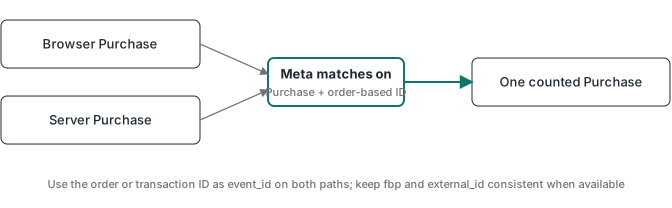
Why the order ID beats a random ID for Purchase
Meta’s server event reference gives the example directly: two purchases with different order numbers need two different event IDs, and each browser Purchase reuses the number sent by its matching server call. A random value suits events with no transaction behind them.
An order-based value also makes support work faster. You take order 8472 from the payment ledger, find the Pixel call, find the webhook request and compare the same string in both. A throwaway browser UUID often disappears at the checkout boundary. If your payment system creates the final order only after the redirect, persist a pre-created checkout ID and map it to the final order before the webhook fires. The hosted checkout click ID guide shows the same persistence pattern for browser context.
What fbp and external_id add, and where they stop
Meta documents a second method: matching event_name plus fbp and/or external_id across the browser and server. It has a limit that matters for webhook-driven purchases. Meta says: “Generally, it only works for deduplicating events sent first from the browser and then through the server.” Also, a server event is not discarded if no matching browser event arrived in the previous 48 hours. A payment webhook often reaches Meta before the browser event, so this fallback won’t pair them. That is why event_id stays the primary method for Purchase.
fbp and external_id still earn their place for matching, which is a separate question from counting the event once. A shared order ID can deduplicate perfectly while matching stays weak. The Event Match Quality guide covers that side. Never generate a fake fbp or borrow another person’s external_id to fill a field.
The same section of Meta’s page says it does not deduplicate when only one source is used, browser-only or server-only. Meta doesn’t document collapsing two server copies under the event_id method either. When we sized a client’s server-only CRM purchase flow on 2026-10-09, that reading is what made us treat exactly-once sending as our own job. Your webhook receiver needs idempotency: store the payment notification ID and transaction ID before sending, and reject a retry that was already processed.
Two arrivals in a live view are not two purchases
A live test can show one browser receipt and one server receipt, because Meta received both routes. That is the raw material for deduplication, not proof of double counting. The 48 hours is the window in which the pair has to arrive, not a processing delay. You don’t need to wait two days to diagnose: if the names or IDs differ, you can see that immediately.
Different problems look the same in the first minute. Two different IDs stay two events. Two browser calls, one from a native checkout integration and one from GTM, are an installation problem. A webhook replay needs server-side idempotency. Turning off the server route because a live view shows two arrivals can remove the route that recovers blocked browser events, so inspect the identifiers first.
Count your Purchase senders
Most real duplicate problems aren’t a missing event_id between one Pixel and one server. They come from senders stacking up over time, each with its own ID:
- the Pixel on the thank-you page
- the Conversions API from your server or server container
- your checkout or store platform’s own Meta integration, switched on years ago
- a GTM Purchase tag someone added later
- a buyer who reloads or bookmarks the thank-you page
Every sender that doesn’t share the order ID is one more Purchase for the same sale. Meta then learns from buyers who don’t exist, and the cost per purchase looks better than it is.
To count them, make one test purchase and watch Test Events: each row for that order is a sender. In the Events Manager overview, Connection Method shows which channel sent each event, and the Event Deduplication tab in the event’s details shows what share was deduplicated from each source. Then keep one browser sender and one server sender, both carrying the order ID, and switch the rest off.
Don’t count on Meta to merge a reload. Its documentation doesn’t say what happens to two browser events with the same eventID, so fire the browser Purchase once per order: set a flag in sessionStorage keyed to the order ID, or have the server render the purchase push only on the first visit to the confirmation page.
Wiring the order ID through GTM
The data contract comes first. The payment system or commerce backend issues one stable order ID per legitimate charge and stores it with the checkout record. The confirmation page receives it before the browser sends Purchase, and the payment webhook reads the same value before the server sends CAPI. A hosted checkout needs a mapping created before the redirect, because its webhook arrives without your cookies or page state.
In GTM, the value travels like this:
- The confirmation page pushes the order to the dataLayer as
ecommerce.transaction_id. - The web Meta Pixel tag reads it through a Data Layer Variable and sends it as the event ID.
- The GA4 purchase event that feeds the server container carries the same value. Meta’s official Conversions API Tag for server GTM reads
event_idfrom the event data and mapstransaction_idtocustom_data.order_id, not toevent_id, so the ID needs its own parameter (template checked 2026-11-01, last changed 2026-06-03). - Check the incoming event data in server Preview before you trust a web parameter named
event_id. In our containers gtag sent it as the reservedevnidfield instead, so we sendmeta_event_idand copy it toevent_idon the server for the Meta tag only. The setup guide has the details. - For webhook-driven purchases, the server tag reads the stored order ID from the webhook payload instead.
Checking the result
Use one approved order as the unit of proof, then one negative control with a deliberately changed ID. The positive test should consolidate; the negative control should stay separate, which proves the ID is doing the work.
| Check | Where | What it tells you |
|---|---|---|
| Financial ledger | Payment processor or order system | How many purchases exist |
| Browser request | Network panel | One Purchase with the expected eventID |
| Server request | Server container Preview | One Purchase with the matching event_id |
| Test Events | Events Manager, with test_event_code on the server request |
One copy processed and its match marked deduplicated, same event name and ID, in real time |
| Connection Method | Events Manager overview | Which channel sent each event |
| Event Deduplication tab | Events Manager, the event’s details | The share of events deduplicated from each source |
| Dataset stats | Graph API /<dataset>/stats with aggregation=event_source |
Counts split by source. In our 2026-10-07 tests they came back hourly, labelled BROWSER and SERVER, about an hour late |
We lean on the stats endpoint when our own logs disagree with Meta. On 2026-10-07 our own sampled event log dropped an ad_view row in two of three test runs, while Meta’s dataset stats counted every AdView we sent. Prove delivery from Meta’s counts, not from a missing log row. If you script it, drop the paging block from the response: its next link repeats the access token.
To reconcile against money, compare like with like. Use Events Manager’s processed Purchase count, not Ads Manager’s attributed purchases, which only cover clicks and views inside the attribution window. Use the same timezone on both sides, only orders whose buyers consented, and exclude test orders. Then repeat with a webhook retry, which your receiver should stop before it reaches Meta, and with a second legitimate order, which needs its own event_id.
If you set this up for several clients, the ATA Tracking Toolkit membership includes ATA Edge, which sends one Purchase per order, and the server GTM containers I use for these flows as a bonus.