
GA4 (not set) revenue means Analytics recorded revenue but couldn’t fill the dimension you selected for that row. When the purchase came through the Measurement Protocol, the first suspects are the link to the browser session, the request format and the event timestamp. The purchase arrives with its money, while its session source, medium or campaign stays unknown.
The session count rarely shows the problem. Ordinary browsing sessions are tagged by the browser and look fine. The purchases arriving later from a webhook are few, but they carry the revenue, so a small number of broken rows can hold a large share of it. Weight the issue by revenue for a fixed period, not by session count.
What (not set) means depends on the dimension
(not set) is GA4’s placeholder when it has no value for the dimension in the report. Google’s guide to (not set) values says session source or medium can become (not set) when the session has no session_start event, and landing page when there is no page_view. A custom dimension shows it when the parameter was absent.
So write down the exact report, dimension, metric, date range, property time zone and filters before you change anything. Session source or medium isn’t interchangeable with event-scoped source. The case this article covers is revenue from a server-sent purchase that should inherit the source, medium and campaign of an earlier browser session.
How Measurement Protocol attaches a purchase to a session
For a web stream, the request’s client_id identifies the browser and the event’s session_id identifies the session. Google’s Measurement Protocol use cases (checked 2026-10-17) set three conditions for session attribution:
- Include
session_idin the event parameters. - Send the request “no later than 24 hours after the start of the online session”.
- If you override
timestamp_micros, keep it between the session’s start and end.
Events that meet them appear with the session’s source, medium, campaign and location. The reference (checked 2026-10-17) separately allows backdating events “up to 72 hours”. The two numbers don’t conflict: a purchase backdated 50 hours can still be collected, but it won’t inherit a session that started more than 24 hours before the request. Don’t move the purchase time to fit an earlier session. A late payment legitimately lands outside it.
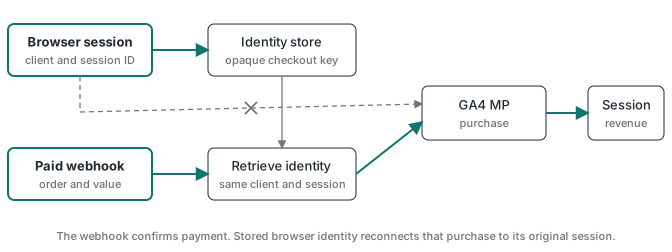
Measurement Protocol doesn’t rebuild lost browser context. Capture the identifiers while the visitor is still on your site, store them against an opaque checkout reference, and read them back when the paid webhook arrives. The hosted-checkout tracking guide shows that round trip.
Validate the identity fields first
The reference accepts client_id as two positive numbers joined by a period, or the full client cookie value. It accepts session_id as a positive numeric timestamp (number or string), the value from GTM’s Analytics Session ID variable, or the full session cookie. A JSON number isn’t the bug. The dangerous values are blank strings, null, NaN, a malformed cookie, an ID from another browser, or a session that doesn’t belong to that client.
| Field | What to preserve | Failure to test |
|---|---|---|
client_id |
The browser’s original value, or the supported full cookie | A server-generated value starts a different user history |
session_id |
The matching session value or supported session cookie | Missing, stale or mismatched identity loses session context |
timestamp_micros |
The real purchase time, if you override it | A time outside the session can’t support the session link |
transaction_id |
One stable string per paid order | Retries or changed IDs distort purchase counts |
currency and value |
The paid order’s currency and amount | Revenue is wrong even when the event appears |
Two cases from our own work show how the identity can break without any error.
On a client site we checked on 2026-10-09, the server container’s GA4 client used server-managed cookies. Gtag in the browser sent a client ID beginning 1095728100., while the server forwarded the hit under an ID derived from the HttpOnly FPID cookie, beginning zw5oA. Site code can’t read FPID. A webhook purchase built from the browser’s _ga value would carry a client ID GA4 had never seen for that visitor. Before you store “the client ID”, check which one your property actually receives.
On a Brazilian client’s deposit funnel in September 2026, a site change started hashing the email that the server used to look up stored context. The webhook’s lookups came back empty, the purchases went out without client_id, and GA4 discards a Measurement Protocol hit without one. Purchase coverage against the bank fell from 97% to 18% in three days while every request still returned success.
Send JSON, and don’t treat a 2xx as a receipt
Google documents the transport as an HTTPS POST with a JSON body, and its sample sets Content-Type: application/json. Set it explicitly. The reference also says the endpoint “returns a 2xx status code if the HTTP request is received” and “doesn’t return an error code if the payload is malformed”. Whatever the header, a 2xx isn’t proof of collection.
Use the validation server during development, with validation_behavior set to ENFORCE_RECOMMENDATIONS for strict checks. Events sent there “don’t show up in reports”, and the validation server doesn’t check api_secret, so a clean result still says nothing about your production secret. An illustrative purchase:
POST https://www.google-analytics.com/debug/mp/collect?measurement_id=G-XXXXXXXXXX&api_secret=REDACTED
Content-Type: application/json

{
  "client_id": "123456789.1760000000",
  "timestamp_micros": 1760710000000000,
  "validation_behavior": "ENFORCE_RECOMMENDATIONS",
  "events": [{
    "name": "purchase",
    "params": {
      "session_id": "1760709000",
      "engagement_time_msec": 1,
      "transaction_id": "order_48213",
      "currency": "USD",
      "value": 49.00,
      "items": [{ "item_id": "pro_monthly", "item_name": "Pro plan", "price": 49.00, "quantity": 1 }]
    }
  }]
}
The time values are placeholders from October 2025 and will fail as written. Before you validate, replace timestamp_micros with the time of a recent test event, inside the reference’s 72-hour window, and session_id with the matching session from that same test visit. An empty validationMessages array means the structure passed. Remove validation_behavior for production, as Google advises, and send to /mp/collect.
Debug (not set) revenue in order
Use one fixed paid order and stop at the first layer that fails.
- Name the broken row: scoped dimension, revenue metric, date range, time zone and filters.
- Confirm the order was paid, unique and has one stable transaction ID. The Stripe webhook guide explains why payment confirmation comes before the analytics event.
- Check what was stored before checkout: the
client_idGA4 actually receives, the session value, campaign context, consent state and timestamp, under an opaque reference the webhook can return. - Read the actual outbound bytes: measurement ID, content type, event name, transaction ID, identity fields, timestamp, currency and value. A tag template preview isn’t enough.
- Send the same payload shape to the debug endpoint with strict validation and fix every message.
- Follow one real paid order through the normal path, check Realtime or DebugView for receipt, then wait for processed reports and confirm the session source or medium.
- Break one identifier on purpose in a separate test property, not in production, so you know your monitor notices.
After the repair, reconcile paid orders against distinct GA4 transaction IDs every day. The tracking monitoring guide shows how to alert on a changed gap instead of waiting for a monthly report.
What server-side GTM fixes, and what it doesn’t
Server-side GTM gives you one place to validate webhook payloads, read stored identifiers, set the request header, block invalid fields and log the response. A managed host such as Stape can run that container for you. None of that creates session identity after it was lost: the landing page still has to capture the right identifiers and consent before the visitor leaves. A server route also doesn’t turn a 2xx into a processed event or GA4 into a payment validator.