
Measure conversions on customer devices is a Meta Pixel setting that matches an ad view to a later website purchase on the buyer’s device. It is on by default for eligible pixels, but a sale qualifies only if your site requires login with an email or mobile number, the Pixel runs directly on the page, and the buyer is outside the EU and UK. Meta receives only purchase confirmation and the campaign to credit from this match. The feature works alongside your Pixel and Conversions API without changing your attribution window or model.
Everything below comes from Meta’s two help pages on the feature, first read on 2026-10-24, re-checked on 2026-11-13 and listed at the end, plus what our own pixel showed on 2026-11-13. Where Meta is silent, I say so.
It’s on in our own account
On 2026-11-13 our pixel’s Settings tab in Events Manager showed Measure conversions on customer devices switched on, as Meta’s on-by-default wording says it would be. Our site doesn’t make people log in before they buy, which is the first of Meta’s three conditions below, so on our sales the switch is on and does nothing. That’s the point of checking both: the toggle tells you the setting is on, the conditions tell you whether it can work for you.
The sale it is meant to catch
Meta’s own example is a lamp. Someone sees your ad for it on Instagram, then visits your website two days later and buys it. In Meta’s words, it “may have a record of the ad view and receive the purchase event, but can’t always connect them to attribute the purchase to your campaign.” Without a click there is no click ID in the visit, so the connection rests on whatever customer information the purchase event carries.
With the setting on, Meta says “that match happens on the customer’s device, where both the ad view and the purchase are present”, and “Meta only receives confirmation that a purchase happened and which campaign to attribute it to.” The inputs, in Meta’s words, are “information they already shared with you (like an email) and temporary, non-identifying device information.”
The benefits Meta lists are more conversions in your reporting and, in its words, a “stronger signal” for campaign performance. It doesn’t say how much more.
Three conditions decide whether it applies to you
Meta lists them under “Before you turn on measuring conversions on customer devices”. Miss one and the setting does nothing for that sale.
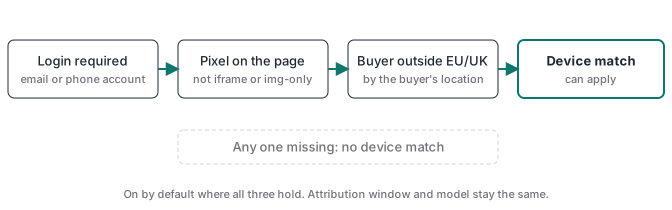
People have to log in
“Your website must require people to log in to an account using an email or mobile phone number.” Meta doesn’t say how it treats a store that offers an account but lets people check out as guests. Until it does, I read guest checkouts as not covered, because nobody was required to log in.
The Pixel sits directly on the page
“Install the pixel directly on your page, not inside an iframe or as an image-only (img) pixel.” A setup that sends purchases only through the Conversions API, with no Pixel in the browser, doesn’t meet this condition. Meta doesn’t mention tag managers. My reading is that a Pixel loaded by Google Tag Manager counts, because it runs in the page’s own frame, the opposite of the iframe case Meta excludes.
The buyer is outside the EU and UK
“Measuring conversions on customer devices is not active for people located in the EU and UK.” The condition follows where each buyer is, so a US store with UK customers gets the device match for its US buyers only.
What doesn’t change
“Your attribution window and attribution model don’t change. Measuring conversions on customer devices affects which conversions can be measured, not how they’re credited to your ads.” A 7-day click and 1-day view setting stays exactly that.
Meta also says the feature works “alongside your existing Pixel and Conversions API setup and doesn’t replace it.” Nothing to rebuild. If you already send purchases from your server, the Meta Conversions API guide still describes your setup, and the Event Match Quality guide still applies. Meta describes that score as how effective the customer information on your server events may be at matching them to Meta accounts.
What Meta hasn’t said
Meta names the inputs but not the mechanism, so any claim about which cookie or storage the match uses is a guess.
There is no published lift either. Figures like “+20 to 25%” circulate online, and I couldn’t find a source for any of them.
And the help pages give no date. November 12, 2026 comes from trade press relaying an email Meta sent advertisers, and Stape gives the same date in its own post. Your pixel’s Settings tab is the better check.
Now that it’s on, compare against your real orders
The risk here is a misread. If Meta starts counting sales it couldn’t see before, campaigns can look better overnight without a single extra buyer. Meta matching more of your real sales is good data for its delivery, but a lower cost per purchase from that alone isn’t new demand. Put the two side by side before you change a budget:
- In Ads Manager, export purchases per campaign by day with your current attribution setting, from a week before the setting was on to today.
- For the same days, list your real paid orders from your store or payment gateway.
- If Meta’s number rises while real orders stay flat, the extra is most likely Meta matching more of the sales you already had, not new demand.
- Mark the date you first saw the setting on in whatever report your team reads, so nobody scales a budget on that jump alone.
Then check the switch: Events Manager > Data sources > your pixel > Settings > Measure conversions on customer devices. It is on by default where the conditions hold.
The limit this doesn’t touch
If Meta classifies your site in a sensitive category, such as health, finance and a few others, it can still restrict the purchase events it accepts from you. This setting doesn’t change that, and no tracking setup can lift it. Meta’s help page also says: “It’s your responsibility to make sure your integration doesn’t share prohibited information with Meta.” The switch doesn’t change what you’re allowed to send.
Sources
- Meta Business Help Center, About measuring conversions on customer devices, checked 2026-11-13.
- Meta Business Help Center, How to turn on measuring conversions on customer devices, checked 2026-11-13.
- Meta Business Help Center, About Event Match Quality, checked 2026-10-25.
- Stape, Meta on-device conversion measurement: what you need to know, published 2026-10-22, read 2026-11-13 (secondary: the rollout date and its read of the reporting impact).