
Instant form leads go bad when the only thing a campaign learns from is the submitted form. A standard lead campaign optimizes for submits, and prefill fills in contact details from the person’s profile, so submitting is quick. To improve lead quality, ask for a little intent on the form, check where the leads come from, and then send each lead’s stage from your CRM back to Meta with the conversion leads goal, so the campaign gets data about what happened after the form.
Here is the pattern, with example numbers. A local home services business runs a lead campaign with a 10 km radius. Ads Manager reports 70 leads for the month. The office calls all 70 and books 5. That’s a 7.1% booked rate. At an example cost of US$20 per lead, the month cost US$1,400, which means each booked appointment cost US$280, fourteen times the cost per lead the dashboard shows. When the office calls the rest, several say they don’t remember filling in anything.
Why Meta keeps sending leads that don’t answer
On a standard instant form campaign, the event the campaign optimizes for is a submitted form. Meta’s delivery system doesn’t see that 65 of those 70 people never booked, so from its side the campaign is delivering what it was asked for.
The default form is built for volume. Meta’s help center describes More volume as making it easy for people to “quickly submit the form on a mobile device,” adding that it “is designed to generate a larger number of leads.” Prefill questions come with “auto-populated answers from the person’s Facebook profile.” Put those together and submitting takes very little effort.
None of this means instant forms are broken. It means a submitted form is a weak signal on its own.
Fix 1: switch the form type to Higher intent
In the form editor, the Form type box has three options: More volume (the default), Higher intent and Rich creative. Higher intent adds inline context under the contact fields saying your business may follow up, and “an additional review screen that gives people a chance to confirm their information.” Meta says these features help you “receive more intentional submissions.”
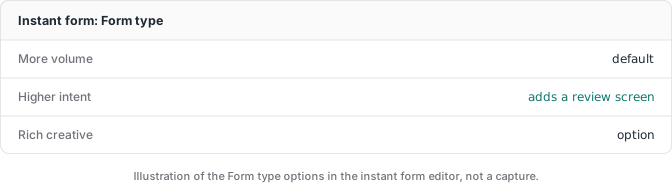
Judge the change on cost per booked appointment, not cost per lead.
Fix 2: add one question your team reads before calling
Prefilled fields come from the profile. A custom question is something the person types. Instant forms allow up to 15 custom questions, but one is usually enough: something like “What do you need done, and when?” as a short answer. Your team can read the answers and decide whom to call first.
Keep it to one. Every extra field asks more of real buyers too.
Fix 3: check where the leads come from
Break the campaign down by placement in Ads Manager and put bookings next to each row. If one placement brings plenty of leads and no bookings, exclude it and watch the following weeks.
If you exclude placements, know about limited spend. Meta’s developer blog (October 2025) describes a placement feature that “allows up to 5% of your spend to be allocated for each excluded placement” when “it’s likely to improve performance.” For Marketing API advertisers it is not automatically enabled. In Ads Manager, check whether limited spend is on for the placements you excluded, and choose on purpose. While you are in the ad set, also check that your location settings deliver where you expect.
The real fix: send the CRM stage back to Meta
The three fixes above clean the input. The bigger change is what Meta optimizes for. Meta has a performance goal called Conversion Leads, which “is currently only compatible with Facebook/Instagram’s Lead Ads (Instant Forms).” You connect your CRM through the Conversions API, update each lead’s stage as it moves (contacted, booked, sold, whatever stages your business uses), and choose the stage you want the campaign to optimize for. Meta’s developer docs say integrating your CRM and using that goal “may yield higher quality leads that are more likely to convert.”
It’s the same idea as sending a purchase to Meta instead of an add to cart: better data in, a better chance at better leads out. We covered the general mechanics in the Facebook Conversions API guide.
The setup, from Meta’s getting started guide:
- In Events Manager, connect a new data source, choose CRM, and create a CRM dataset (Meta suggests a new one so CRM events don’t overlap with your web events).
- Pick a partner integration if your CRM has one, or a manual integration if you have a developer.
- Store the Meta Lead ID (15 to 17 digits) with every lead in your CRM and send it with each stage update. Without it, Meta suggests sending customer parameters such as click ID, phone number or email.
- Duplicate your lead campaign and set the ad set’s optimization to Conversion Leads. The goal can’t be changed on a published campaign.
After that, Ads Manager can show qualified leads, cost per qualified lead and qualified lead rate. Meta says these are estimated and “partially derived through modeling,” so compare them with your CRM count before you trust them.
Your lead archive matters here too. Meta keeps lead downloads for 90 days, so if stage updates depend on the lead data, save leads from day one.
Is your account a good fit for conversion leads?
Meta’s guide lists guidelines to check whether a business is a good fit for the optimization:
- At least 200 leads per month
- CRM data uploaded at least once per day
- The stage you optimize for happens within 28 days of the lead
- That stage converts between 1% and 40% of leads
These describe a good fit, not a switch you flip at a number. In the example, booked is the stage, at 7.1%, inside the range, but 70 leads a month is well under 200. For an account like that, do the three form and placement fixes now and start recording stages and Lead IDs in the CRM. Meta says the integration isn’t required to start the goal, but results improve once you fully integrate, so plan the two together.
The limit no setup can lift
If Meta categorizes your business as health, wellness, finance or another restricted category, it can block bottom-of-funnel events like booked or sold from optimization, even when your ads are approved. That is Meta’s policy, applied to the data source. Clean CRM tracking still sends everything Meta will accept and keeps the real count in your own records, but it can’t remove the restriction. Check your dataset in Events Manager before you plan a campaign around CRM stages.
What to do this week
Pull last month’s leads and mark each one booked or not booked. Divide your spend by the booked number. That’s your cost per booked appointment. If it surprises you, you know the gap between what Meta counts and what you sell. Change the form type, add one question, check placements, and start storing the Meta Lead ID with every lead so the CRM feedback is ready.