Meta’s attribution can credit a sale that happens inside the window after someone clicked or viewed your ad. It does not test whether the ad caused that sale. When a large share of credited purchases comes from people who already knew you, a strong ROAS can be measuring loyalty more than advertising. Before you cut or restructure campaigns, compare Meta’s credit with your own order data, read Meta’s audience segments breakdown, check frequency on warm audiences, and run a controlled test.
The question came up this week in a Facebook Ads thread: an advertiser saw a good month turn into break-even, found a big slice of spend going to engaged audiences, and switched off every old campaign to launch one aimed at new people. Early signs looked good to them. Maybe the fix is right. The way it was tested can’t tell.
What does Meta actually credit?
Meta’s attribution settings are rules about timing. Click-through covers events within 1 or 7 days of a link click, and view-through covers events within 1 day of an impression. An event inside the window is eligible for credit; it isn’t guaranteed it. Ads Manager then shows events attributed to a person who was shown your ad.
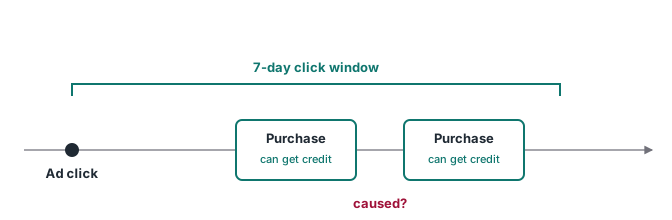
Nothing in those rules asks what would have happened without the ad. A customer who buys from you every month, sees a retargeting ad on Tuesday and orders on Wednesday can get the same credit as a first-time buyer who would never have found you otherwise. Both can count as one purchase in your ROAS.
That is why warm audiences often look great. People who already know your brand often buy again, so they can collect more credit per dollar. The number is real. What it proves is narrower than it looks.
Check your own orders first
Your order data doesn’t depend on Meta’s matching, so start there. For a fixed period, split buyers into two groups: people who ordered on their first visit, and people who came back before buying. Then split again by new and returning customer.
This only works if you saved the first touch at the moment of the order. Store the first-touch and last-touch UTMs, the click IDs and the landing page on the order itself, from a first-party record written at submit time. A report rebuilt weeks later from analytics sessions loses more buyers who changed device, cleared cookies or blocked scripts. Even the order record has a limit: it only knows what the ordering browser knew, so someone who first arrived on a phone and bought on a laptop shows the laptop’s first touch. It’s a better record, not a complete one.
If most of your revenue comes from returning customers, and most of Meta’s credited purchases also sit there, you have a hypothesis worth testing. You don’t have proof yet that the spend is wasted.
Read Meta’s audience segments breakdown
Meta can break sales campaign results into three groups: new audience, engaged audience and existing customers. The split is based on audiences you define yourself, in Ads Manager under All tools, Advertising settings, Audience segments.
Meta describes them this way. An engaged audience is people who are aware of your business or have interacted with your products, but haven’t bought. Existing customers are people who have purchased or signed up. A new audience is people who haven’t interacted with your products or services. Meta also notes the feature may not be available on every account yet.
Here is how to read it, with example numbers. Say Ads Manager credits 60 purchases in a week, and the breakdown shows 12 new, 18 engaged and 30 existing customers. Half the credited purchases (30 of 60) came from people in your existing-customer audience, the ones who had already bought or signed up. That doesn’t mean those 30 sales were free. It means the campaign’s ROAS leans on a group that probably needed the least convincing.
The breakdown has a weak spot, and it’s a data problem. Meta’s existing-customer audience is built from the sources you pick: website events, app activity, a customer list, offline activity, lead forms and others. If a buyer’s purchase never reached Meta, or reached it without the customer details it needs to match, and no other source covers them, they may be missing from the existing-customer audience. Their purchases can then land in another segment, and that segment looks better than it is.
Look at frequency on the warm side
Frequency is the average number of times each person saw your ads. Check it per segment or per audience, not only at the campaign level. A warm audience is usually much smaller than the new one, so spend concentrated there often shows up as the same people seeing the ad again and again.
High warm frequency doesn’t prove the ads are wasted. It suggests the campaign is spending a lot of its budget on a smaller pool, which is exactly the spend a test should question.
Test before you cut
Meta’s own A/B testing page is direct about the shortcut. It says it does not recommend testing informally, “such as by turning ad sets or campaigns on and off manually”, because informal testing can lead to inefficient delivery and unreliable results. Turning everything off and judging the next week mixes the change you made with seasonality, creative fatigue, learning resets and whatever else moved that week.
Two cleaner options:
- An A/B test in Ads Manager or the Experiments tool. It compares two versions of your advertising, and Meta says it splits audiences evenly so they are statistically comparable. Compare, for example, your current campaign against one that excludes existing customers. Both versions still run ads, so it tells you which setup does better, not what the ads add over no ads.
- A lift test (Meta’s Conversion Lift, a holdout design). Meta compares a test group that has the opportunity to see your ads with a control group that doesn’t. It measures the campaign’s overall effect, not which individual sales the ads caused. Conversion Lift Percent is the incremental conversions divided by the conversions Meta estimates you would have had without the ads. In an example where the exposed group converts 200 times and Meta estimates 160 without ads, the incremental conversions are 40 and the lift is 40 / 160 = 25%.
Meta says Conversion Lift on standard web events needs the Conversions API, and that minimums come through your Meta account representative. If a lift test is out of reach, an A/B test with an existing-customer exclusion is the practical first step. It won’t measure incrementality against no ads, but it compares the two setups fairly.
If you do want a campaign that spends nothing on existing customers, Meta’s documented route is a custom audience exclusion in the campaign’s audience controls. The old Advantage+ existing customer budget cap is no longer available.
Where better data changes the answer
Every check above depends on purchase data being complete and matched. Your order split needs the first touch stored at checkout. Meta’s existing-customer segment needs buyers who actually reached Meta with enough detail to match. A lift test needs the Conversions API. With gaps in that data, the split between warm and new is a guess, and a budget cut built on it is a guess too.
That’s the work ATA Edge does: it records each conversion with its first-party ID, UTMs and click IDs at submit time, and sends it server side with the customer details Meta uses for matching. The breakdown, the order split and the test then start from a more complete purchase record. Cross-device journeys and consent choices still leave gaps no setup closes.
Related reading: why a purchase can reach Meta and still not be credited, how Meta’s customer-device measurement changes the count, and setting up the Conversions API with GTM.
Sources
- Meta Business Help Center, Create audience segments in Meta Ads Manager
- Meta Business Help Center, About A/B testing for Meta Ads
- Meta Business Help Center, About Facebook-managed tests
- Meta Business Help Center, Conversion Lift Percent
- Meta Business Help Center, How to replicate existing customer budget cap
- Meta Business Help Center, About attribution models and attribution settings