
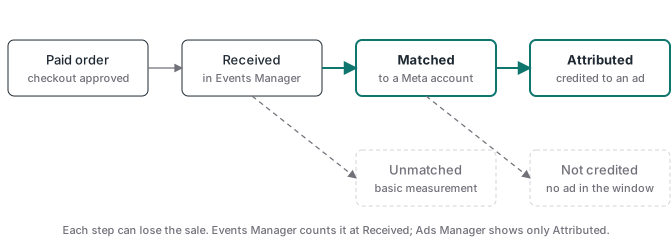
A Purchase can arrive in Meta with no errors and still never be credited to an ad. Meta’s Conversions API best practices put it in one line: “You can use only matched events for ads attribution and ad delivery optimization.” Received means Meta got the event. Matched means Meta could tie it to a person. Only a matched sale can be credited to your ad or teach the campaign who buys.
A media buyer described it on r/FacebookAds in October: “The Purchase events show up correctly in Events Manager with no errors, but the sales don’t get attributed.” That is the money problem. Sales your campaign drove but Meta couldn’t match look like an ad that didn’t sell, so budget moves away from it, and the algorithm optimizes on fewer buyers than you actually have.
There are two checks. First, see which buyer details reach Meta with each Purchase. Second, compare your paid orders with what was sent, so you know whether a gap is a matching problem or a sale that never left.
Why can a Purchase show in Events Manager and still not be credited?
Because Events Manager and Ads Manager count different things. Meta’s help on event count differences says Events Manager “shows both attributed and unattributed events”, while Ads Manager and Ads Reporting “show events that are attributed to a person who was shown your ad.”
Between the two sits matching. The best practices page continues: “You cannot use unmatched events for attribution or ad delivery optimization, but you can still use them for basic measurement.” An unmatched Purchase still lands in your event counts. It can’t be credited to an ad, and it can’t feed delivery optimization.
Matching is necessary, not sufficient. A matched buyer who never clicked or saw your ad inside the ad set’s attribution setting won’t be credited either, and that part is correct behaviour. The matching gap is the part you can fix.
What does “matched” mean for a Purchase?
Meta matches an event to an account using the customer information parameters you send with it. Its help page on event match quality ranks them. Email and click ID are high priority. Phone number, external ID and browser ID are among the medium ones. Name, city and zip are low.
For a sale, three of them do most of the work:
- The click ID (
fbc), built from thefbclidMeta adds to the landing URL. It only exists when the buyer arrived from an ad click, and it has to survive the trip to your checkout. - The email the buyer typed at checkout, normalized and hashed with SHA-256.
- The phone number, normalized and hashed the same way, when the checkout collects it.
Sending a parameter is not the same as a match. Meta’s help is direct about it: “Sending a customer information parameter doesn’t guarantee that your event will be matched to a Meta account.” One parameter alone may not be enough, and some buyers don’t have a Meta account at all. The Conversions API guide covers formats and hashing for each field.
Where do you check which buyer details arrive?
Meta’s help on server event details gives the path. Go to Events Manager, select the name and ID of your data, find the Purchase event and click View details. Then open the event matching tab. The same article calls it the Event Quality tab in its summary list, so look for either label.
The tab shows “the percentage of events with complete customer data” per parameter. Read it as coverage: of the Purchases Meta received, how many carried an email, a click ID, a phone. These breakdowns cover website events sent through the Conversions API, and the score uses the last 48 hours of data.
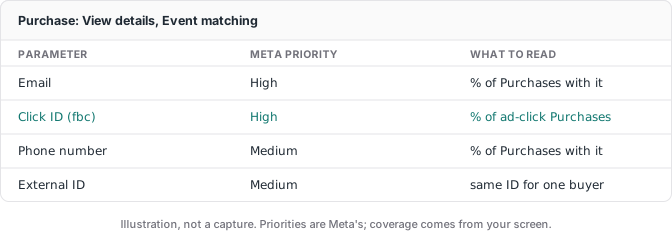
Three patterns to look for:
- Email coverage well below your checkout’s. If the checkout requires an email and the Purchase rarely carries one, the sender is dropping it.
- Click ID far below your share of sales from ad clicks. The
fbclidwas lost on the way to a hosted checkout, or the server event never received the value saved in the browser. The click ID guide for hosted checkouts shows how to carry it. - Phone missing when the checkout asks for it. Same cause as email: collected, not forwarded.
The score itself is a summary. Our EMQ score guide explains why it moves without a setup change and why a high score can still belong to a bad conversion.
Is the sale unmatched, or did it never reach Meta?
Before working on matching, make sure the sale was sent at all. A gap between your bank and your ads report can come from either side. A 1-star review of a tracking tool on Trustpilot sums up what it costs when nobody can say which: “For a tool used to make budget decisions, that destroyed trust in the data.”
Four steps sort it out:
- Pull yesterday’s paid orders from your checkout or payment processor. Paid only, no refunds yet. Use your ad account’s timezone, because your checkout and Meta can disagree on what “yesterday” means.
- Pull what was sent. Meta doesn’t list your sales one by one. Your sender’s log does: every Purchase it sent, with the order ID. No log is the first fix.
- Match them by order ID and label every gap. Refunded after the sale. Test order. Blocked in the browser. Never sent.
- Treat only “never sent” as a tracking bug. The rest you can explain in one line. Fix that one first.
This works best when the order ID is also the Purchase’s event_id, which the deduplication guide recommends anyway. To confirm your Purchase fires on the payment and not the thank-you page, run the three checkouts in the purchase event test.
Once every paid order is accounted for, any remaining gap between Events Manager and Ads Manager is matching or attribution, and the event matching tab is where you look.
How do you get more Purchases matched?
Sending more events won’t do it. A second copy of the same sale carries no new buyer details and has to be deduplicated. What helps is sending who bought with each sale, from the order your checkout approved.
In practice that means the Purchase goes from your server when the payment processor confirms the payment, as the Stripe conversion tracking guide builds it. The order already holds the email and phone the buyer typed. Add the click ID and browser ID you saved before the buyer left for checkout, plus the client IP and user agent from that visit. Hash email and phone. Send fbc and fbp raw, and only when a real value exists: a made-up click ID is worse than none. Personal data goes only where the buyer consented to it.
Then go back to the event matching tab after a few days of sales and compare coverage per parameter with what it showed before. Check the order reconciliation again too. Coverage tells you more details arrive; the reconciliation tells you the sales are still all there.
ATA Edge works from the payment webhook: it records every approved sale in your panel and sends a Purchase to Meta for the sales it ties to a tracked ad visit, from your own Cloudflare account. The checks above work the same whatever sends your events.
One limit stays whatever you send. If Meta puts your site in a sensitive category, such as health or finance, it can restrict the purchase events it accepts, and better matching can’t lift that.
Sources
- Meta for Developers, Conversions API best practices, matched and unmatched events, checked 2026-11-06.
- Meta Business Help Center, About event match quality, parameter priorities and matching caveats, checked 2026-11-06.
- Meta Business Help Center, View server event details in Meta Events Manager, View details and the event matching tab, checked 2026-11-06.
- Meta Business Help Center, Differences between event counts in Ads Manager, Ads Reporting and Events Manager, checked 2026-11-03.
- Meta Business Help Center, About attribution models and attribution settings, checked 2026-11-03.
- Reddit, r/FacebookAds, post of 2026-10-27, re-read 2026-11-06.
- Trustpilot, 1-star review of a tracking tool, 2026-03-10, re-read 2026-11-06.
For the wider reconciliation across payment records and Google Ads, read why ad platform numbers do not match.