
Ad platform numbers don’t match because they count different things. Meta Events Manager shows event activity received by a dataset, including activity from people who never interacted with your ads. Ads Manager reports results attributed to ads under the applicable settings. Google Ads applies its own attribution rules. Your payment system records orders and payments. Those totals answer different questions.
A mismatch alone tells you too little to judge whether tracking works. First identify which number changed: approved orders, events delivered, or conversions credited. Then test that layer. Trying to make every dashboard display the same total can lead you to send duplicate Purchases or change a working setup.
This guide separates normal attribution overlap from faults worth fixing, then checks three common explanations: pixel warm-up, a moving Event Match Quality score, and a dashboard that promises a more trustworthy number.
Why does Events Manager show more events than Ads Manager?
Events Manager includes received activity across traffic sources; Ads Manager assigns ad credit. A Purchase from an organic visit can appear in the dataset without becoming an attributed campaign result. Even a matched event needs an eligible ad interaction to receive credit. Receipt, matching and attribution are separate checks.
Meta’s About attribution models and attribution settings explains that Ads Manager results are reported under attribution settings. For this article’s comparison, consider purchases from email, returning visitors and direct traffic: they can appear in Events Manager alongside paid traffic, so it cannot serve as an ad-sales ledger. It also cannot certify that your sender labeled every Purchase correctly.
Start by selecting the same dataset and event name. Check the reporting period, account timezone and whether you are looking at event activity or an attributed result column. A report called “Results” may count leads while another counts purchases. That comparison is wrong before attribution even enters it.
If approved payments reached the sender but no event left, investigate delivery. If Meta received the event but cannot connect it to the buyer, inspect matching. If the buyer matched but had no eligible ad interaction, there may be no campaign credit to recover. The guide to Meta Purchases not attributed covers that second half in more detail.
| Number | What it helps establish | What it cannot establish alone |
|---|---|---|
| Approved orders | Which purchases the checkout confirmed | Which ad caused the purchase |
| Sender log | Which events were attempted, accepted or rejected | Whether Meta credited a campaign |
| Events Manager activity | Which event activity reached the dataset | Unique paid orders or ad-only sales |
| Ads Manager Purchases | Purchase credit under Meta’s reporting rules | Total business revenue across channels |
| Google Ads conversions | Credit for configured conversion actions | A globally deduplicated count across ad platforms |
Can Meta and Google claim the same sale?
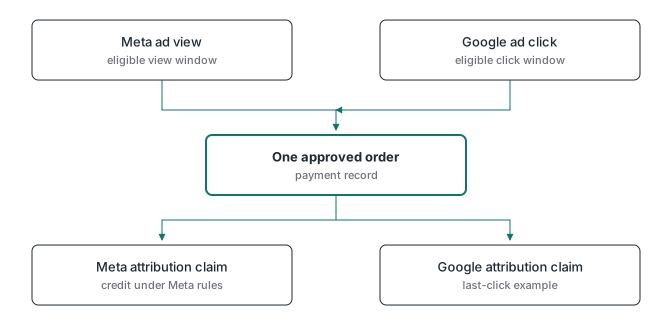
Yes. The same buyer can have an eligible interaction with each platform before paying. Each platform evaluates that journey under its own rules, so both can credit the purchase. An order ID deduplicates event copies within a receiving system when implemented correctly; it does not make competing attribution reports share credit.
Consider this illustrative journey, not a client measurement. Meta uses 1-day view attribution, and the Google Ads conversion action uses last click:
- A buyer sees a Meta ad in the morning without clicking it.
- Later that day, the buyer searches, clicks a Google search ad and pays.
- The purchase reaches both platforms through correctly configured tracking.
- Under these settings, Meta credits the view and Google credits the search ad. Both platforms claim the same order.
The checkout has one paid order. Google’s attribution model documentation says data-driven attribution is the default for most conversion actions and last click gives credit to the last-clicked ad and its keyword.
In this journey, Google’s model evaluates Google ad interactions and does not remove Meta’s credit. There is no deduplication between the platforms’ reports.
What happened to Meta’s 7-day view window?
On January 12, 2026, the Ads Insights API’s action_attribution_windows parameter stopped returning 7d_view and 28d_view, according to Meta’s October 16, 2025 announcement. Meta says 1-day click, 7-day click, 28-day click, 1-day engaged view and 1-day view remain available, and describes this as consistent with Ads Manager behavior.
Do not confuse 7-day click with 7-day view. Write down the actual setting beside any comparison you send to a client.
Which differences should you investigate first?
Investigate missing or duplicated paid orders before debating attribution. A useful reconciliation connects each approved order to its intended event, records what the destination accepted, and explains exclusions. Once that record is sound, compare attributed results using consistent definitions, dates and windows. Some differences will remain legitimate.
Use this order of checks:
- Define the business total. Choose approved payments, specify how refunds are handled, and exclude test orders. Keep currency and timezone consistent.
- Trace the event. Use a stable order ID to find the source webhook, sender record and destination response. An accepted request is evidence of receipt, not ad credit.
- Check duplicate paths. Browser and server copies of the same Meta event need a matching
event_nameandevent_id. A webhook retry must not become another sale. See the order-ID deduplication guide. - Inspect the intended conversion action. Compare Purchase with Purchase, and check whether the reported total includes other actions or secondary conversions.
- Align the reporting basis. Google explains in its conversion-data guide that reporting dates, attribution and processing can create differences. Use conversion-time columns where appropriate instead of comparing an interaction-date total directly with today’s orders.
- Document the remaining gap. Separate consent exclusions, unmatched visits, ineligible interactions and reporting delay from events that were never sent. Recheck delayed periods without resending the purchases merely because a report is incomplete.
There is no universal acceptable discrepancy percentage. A small gap caused by an unsent webhook is a defect. A larger difference caused by clearly defined cross-channel credit may be expected. Keep an alert on the order-to-event relationship so a genuine delivery failure does not hide behind “attribution is always different.”
Which tracking myths make the mismatch harder to diagnose?
Three common shortcuts confuse separate processes: waiting for a pixel to warm up, treating every EMQ movement as a deployment failure, and assuming an imported ad report independently verifies sales. Each shortcut can delay the check that matters. Ask what evidence the metric actually provides before changing the implementation.
Myth 1: “The pixel needs to warm up before Purchases can arrive”
Meta’s learning-phase guidance describes a learning phase for ad delivery as the system learns how to optimize an ad set. We found no Meta documentation describing a pixel warm-up that must finish before valid events are received. Whether your website or server sent a valid Purchase is a separate check.
A new setup can need processing time before activity appears in a particular report. That is not a reason to wait through missing requests, rejected payloads or an absent payment webhook. Run a controlled purchase through the real path, verify the source and destination, and keep test activity out of business revenue. The purchase event test helps distinguish an approved payment from a thank-you page that can load without one.
Myth 2: “EMQ moved, so the container broke”
An EMQ oscillation can be normal. The score describes customer information associated with server events; the population can change even when the code does not. Anonymous visits, identified buyers and different consent states do not supply identical data. A decimal change alone cannot tell you which parameter failed.
Events Manager shows parameter coverage per event; inspect the affected event there, then check recent traffic mix. Investigate if an expected checkout email stopped reaching Purchase, or if genuine click identifiers disappeared after a redirect change. Do not invent identifiers or collect extra personal information just to improve a score. The Event Match Quality guide explains why a high score can still accompany an invalid purchase or incomplete attribution.
Myth 3: “A third-party dashboard has a truer Meta conversion count”
A dashboard that only imports Meta reporting is reading Meta’s attribution output. Meta’s Ads Insights API supplies ad performance data with report parameters, fields and breakdowns. Displaying that output in a different interface does not independently establish which orders were paid.
Some systems also collect first-party visits or payment records and apply their own attribution models. Ask which source supplies the conversion number, which model assigns credit, and how orders are deduplicated. A report-only connector can still be useful for consolidating accounts and spend. Its limits become a problem when an imported metric is presented as independently verified revenue.
What should you show a client when the totals differ?
Show approved revenue beside platform-attributed results, with the attribution settings stated. Explain delivery coverage separately. This lets the client see whether the business received payment, whether the intended events were sent, and how each platform assigned credit. It avoids turning a normal overlap into an unexplained revenue increase.
Use these columns as a report template, and name the order source above the table:
| Period and timezone | Approved orders | Refunds excluded | Purchase events sent | Meta attributed Purchases with window | Google conversions with model |
|---|---|---|---|---|---|
Attribution credit is not causal proof; evaluating incremental impact requires a separate method, such as a properly designed experiment.
The practical next step is to establish a reliable payment record and trace its event delivery before changing bids based on an unexplained discrepancy. ATA Edge is ATA’s tool that records approved sales from checkout webhooks in your own Cloudflare account and sends them to Meta. See ATA Edge’s current release and checkout support if you need that webhook-based record. It can support the reconciliation; it cannot force two ad platforms to agree about who deserves credit.