
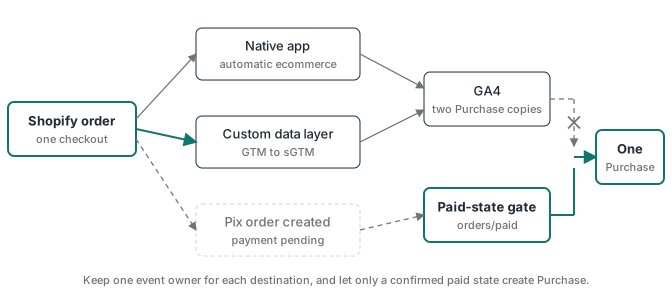
Shopify sGTM duplicate events usually have a plain cause: more than one system thinks it owns the same ecommerce event. The Google & YouTube app can send GA4 events while a custom Google tag or GTM setup sends the same actions through a server container. The Facebook and Instagram by Meta app can do the same next to a custom Pixel and CAPI route, and at its higher data-sharing levels it already runs its own Conversions API. Pix adds a third problem when order creation is treated as payment.
Don’t fix it by deleting every native app. Inventory each event owner, assign one owner per destination, and keep the commerce services the apps also provide. For Google, that means protecting the Merchant Center feed. For Pix, it means creating Purchase only after the order is paid. The target is one paid order, one stable ID and one counted Purchase in each destination.
Two GA4 owners send the same event twice
Shopify sends the same GA4 event twice when its native Google & YouTube connection and a custom implementation both write to one property. Shopify’s GA4 setup guide says that once GA4 is connected through the Google & YouTube sales channel, “certain ecommerce events are tracked automatically” (checked 2026-10-17). A GTM setup can read Shopify’s customer events or a custom data layer, build a purchase and send it through sGTM. Together, that’s two owners. An app embed, custom pixel or old theme snippet can add more.
GA4 only partly protects you. Google’s transaction ID page says deduplication works for web streams and for transactions from the same user (checked 2026-10-17). It won’t repair duplicate page views, add-to-cart events or two copies with different transaction IDs.
Start in the browser Network panel. Filter for collect, run one clean test purchase and group requests by initiator and hostname. One copy usually goes straight to a Google collection domain while the custom copy goes to your server hostname. That pattern proves split ownership. The sGTM debug ladder follows the custom copy from the web container to the server.
GTM inside the custom-pixel sandbox is unsupported
Before you disconnect the native GA4 path, know what you’re replacing it with. A GTM container that reads Shopify’s customer events runs inside a custom pixel, which is a sandbox. Google’s Shopify GTM page says plainly: “Running Tag Manager inside of Shopify’s custom pixel sandbox is not a supported implementation” (checked 2026-10-17). It lists Preview mode, many trigger types, many built-in and user-defined variables, Tag Coverage, Tag Diagnostics and DOM-changing tags such as consent banners as likely to break. Google recommends configuring Google products directly in the Google & YouTube app.
That leaves three routes, and they behave differently:
- Native measurement through the Google & YouTube app. Supported by Google, least control over the event contract.
- A custom pixel that runs GTM, or a lighter sender that posts to your sGTM endpoint. It works, but you own every test, including consent behaviour.
- A backend route: an
orders/paidwebhook processed on your server. It doesn’t depend on the browser at all, but it needs stored attribution to be useful for ads.
Only disconnect the native path once your replacement has shown correct attribution and consent behaviour on real test orders.
The Google & YouTube connection reappears outside GTM
The integration people miss lives in Shopify, not in the GTM workspace or theme code. Open the Google & YouTube sales channel, go to Settings and check the connected GA4 property. Removing a hard-coded Google tag elsewhere doesn’t change that connection. The reverse also happens: someone reconnects the property during account maintenance and automatic ecommerce events come back without any GTM publish. The duplicate returns, and there’s no new container version to inspect.
Record it in the tracking inventory as a partner integration, with property ID, owner and change date. Then keep a synthetic purchase check that looks at request initiators, so a returning direct request is flagged as a second owner within a day.
Google’s Shopify connection guide treats Merchant Center, Google Ads, Google Analytics and conversion tracking as separate connections inside the same app. Use that. If sGTM will own GA4, disconnect the GA4 property in the app rather than uninstalling the sales channel.
Uninstalling Google & YouTube can starve Performance Max
The app often does two unrelated jobs: sending analytics events and syncing products to Merchant Center. Shopify says the channel syncs products and store information automatically, and Google says Shopping and retail Performance Max campaigns need an active product feed. If the app is the only feed source, uninstalling it to stop a duplicate tag removes the thing keeping the catalog current. Products can go stale, become ineligible and drop out of the campaign’s listing groups. The analytics problem looks fixed the same week that product serving starts to fall.
Keep the app and disconnect only GA4, or stage another Merchant Center source first. A replacement isn’t ready because it accepted credentials. It’s ready when the expected products are synced, approved, current and visible in the campaign’s product groups.
- Record the Merchant Center account, feed owner, product count, approval state and Performance Max listing groups.
- If the app must go, connect the replacement feed and complete one full product sync.
- Resolve missing identifiers, shipping, tax, policy and landing-page errors before cutover.
- Confirm the replacement is the active source and campaign product groups remain eligible.
- Only then remove the old feed owner, and watch item count and campaign serving.
Shopify’s Meta app can run its own Conversions API
The Facebook and Instagram by Meta app connects a Meta pixel and sets a customer data-sharing level. Shopify’s data-sharing page (checked 2026-10-17) describes three levels:
| Level | What Shopify sends | Purchase |
|---|---|---|
| Standard | Meta pixel only | Browser Purchase from the native pixel |
| Enhanced | “Conversions API as well as the Meta pixel” | Also sent “between Shopify and Facebook servers” |
| Maximum | Same as Enhanced plus Meta’s newer ad technology | Same as Enhanced |
So removing the theme pixel isn’t enough. If the app stays at Enhanced or Maximum next to your own sGTM CAPI tag, you get two server Purchases for one order, with an event_id Shopify controls on one side and yours on the other. Dropping to Standard doesn’t solve it either, because the native pixel still sends a browser Purchase that won’t share your ID.
The rule is simple. If sGTM owns Purchase, the native app can’t send its own Purchase on either channel, or its browser copy must carry your event_id, which you usually can’t control. Otherwise keep the native app as the only Meta owner. Shopify’s Meta pixel guide also warns that theme pixel code left next to the connected app causes duplicate or incorrect reporting. Check catalog and shop features separately before turning anything off.
For a custom route, use the final order ID as the Purchase event_id on both the browser and server copies, unchanged. The Meta CAPI deduplication guide explains why the same order-based value has to cross both paths and how to run a negative control.
A Pix code is not a payment
Generating a Pix code isn’t the same as receiving money. Shopify lets additional payment methods leave an order in Payment pending while the provider finishes, and recommends waiting for Paid before fulfilment. The webhook topics make the choice explicit: orders/create fires when the order exists and orders/paid when it’s paid. Map the first to Purchase and every generated code counts, including codes that expire unpaid. That inflates GA4 revenue and teaches ad platforms to find people who don’t pay.
Subscribe to orders/paid, or the payment provider’s approved-state callback, and build the handler in this order. Shopify’s delivery verification docs (checked 2026-10-17) cover the first three steps.
- Verify
X-Shopify-Hmac-SHA256: an HMAC-SHA256 of the raw body with your app’s client secret, base64 encoded. Reject a mismatch before reading anything else, or anyone who finds the URL can post a fake paid order. - Re-check the current financial status before emitting.
- Expect repeats. Shopify says your app “might receive the same webhook more than once”, retries “8 times over the next 4 hours” when it gets no response or an error, and deletes an Admin API subscription after 8 consecutive failures. A deleted
orders/paidsubscription is a silent total loss, so check that the subscription still exists as part of daily monitoring. - Claim an idempotency key (destination, event name, order ID) atomically, for example with a unique insert, so two concurrent deliveries of the same webhook can’t both send. Mark it
deliveredwhen the destination acknowledges. If the process dies after sending but before that mark, you can’t tell whether the destination got the event: retrying can create a second copy, and skipping can lose one. Decide which risk each destination tolerates, and log those unknown outcomes so you can count them.
Step 4 matters most for Meta. Its deduplication docs say Meta “does not deduplicate events when only using one event source” and, for two consecutive server events with the same information, “we do not discard either” (checked 2026-10-17). So a server-only Purchase your webhook sends twice is kept twice, and a shared event_id won’t save it. ATA flagged this on 2026-10-09 while sizing the duplicate-send window in its own edge tracking. The ledger narrows that window; it can’t close the crash-after-send case, so keep it small and measured.
Webhook idempotency and destination deduplication are different jobs. The first stops your server sending one paid order twice. The second merges the browser and server copies you send on purpose.
After the August 2026 checkout upgrade, look in Customer events
Shopify’s upgrade page says “August 26, 2026 was the deadline to upgrade and replace your Thank you and Order status pages”, and that stores not upgraded by then “were upgraded automatically” (checked 2026-10-17). If a store’s purchase tracking lived in Additional Scripts, it needed replacing.
Today, look for event owners in Settings > Customer events, where app pixels and custom pixels are listed side by side. Debugging changes too. Shopify’s GTM custom pixel tutorial says Tag Assistant’s Troubleshoot tag feature “isn’t compatible with custom pixels” and points you to the Shopify Pixel Helper (checked 2026-10-17). Use Pixel Helper plus the Network panel, not ordinary GTM Preview.
Audit from paid orders outward
Start with business truth and move to each destination. Export paid Shopify orders for a fixed period and time zone. Then pull the purchase events from each destination for the same window and compare three things, not one. Raw event count catches repeats. Distinct ID count catches missing orders. The matched set (which order IDs appear on both sides) shows exactly which orders are missing, which are unexpected and which repeat. Comparing distinct counts alone lets one missing order hide behind one unpaid order. For GA4, use a BigQuery export or an Explore table of transaction_id; for Meta, use what your Events Manager or dataset access actually exposes, and write down which surface you used.
Then inventory every owner: sales-channel connections, Customer events, app embeds, theme code, GTM, sGTM Preview and webhook subscriptions. The result should look like this:
| Event and destination | Owner | Transport | event_id source | Paid gate |
|---|---|---|---|---|
GA4 purchase |
Custom (sGTM) | Server hostname | Order ID | Webhook orders/paid |
| GA4 page and cart events | Custom pixel or native app, one only | Recorded per route | Not applicable | Not applicable |
| Meta Purchase, browser | Custom pixel | Browser | Order ID | Card orders only (see below) |
| Meta Purchase, server | sGTM CAPI tag | Server | Same order ID | Webhook orders/paid |
| Facebook and Instagram by Meta app | Not a Purchase owner (confirm in its data-sharing settings) | None | None | None |
| Merchant Center feed | Google & YouTube app | App sync | Not applicable | Not applicable |
That table is an example of the shape, not a recommendation for every store. Note the browser row: checkout_completed fires when the checkout completes, which for Pix can be before the money arrives. A browser Purchase there would count a pending order that no server copy ever confirms. Either skip the browser copy for pending payment methods or let the server copy alone own Pix purchases. What matters is one owner per event and destination, with a browser-server pair only where both copies share the deduplication key.
Six tests before the cutover is accepted
- A paid card order creates one Purchase per destination with the final order ID.
- A generated but unpaid Pix code creates zero Purchase events.
- An approved Pix payment creates one Purchase after the paid transition.
- Reloading the order status page creates no additional Purchase.
- Redelivering the same webhook is acknowledged without another Purchase.
- A POST with an invalid HMAC signature creates nothing.
Then check outside the tracking tools. Merchant Center should still have the expected approved products and the Performance Max listing groups should be eligible. Reconcile again after reporting delays settle. A successful request only proves one endpoint accepted a payload. It doesn’t prove the event was unique, paid, counted or usable for bidding.
Migrate one owner at a time
Move ownership in small, reversible steps. Document every current emitter and save the Merchant Center baseline. Build the data contract: event name, order-based transaction ID, consent state, currency, value and payment status. Route a test stream through sGTM and keep it out of production counting until the six tests pass. Stage any replacement feed before touching Google & YouTube, then disconnect the duplicate GA4 path and publish the custom owner. Handle Meta on its own, since its catalog and its event connection are separate concerns. Finally, move Pix from order creation to paid confirmation and run the unpaid control. The GA4 conversion tracking guide explains why an event arriving in GA4 still doesn’t prove the purchase was real.
Advanced Tracking Academy is developing new client-side and server-side containers for purchase tracking, including webhook-validated routes, for media buyers and implementation teams. They are designed to keep the event contract visible, so you can show which system owns Purchase and why it fired.