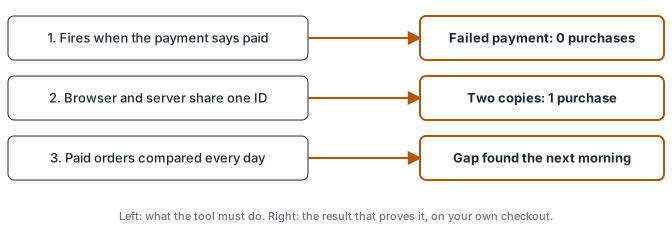
Pick the tool after you know what it has to prove. Almost every server-side tracking tool can send a purchase to Meta and GA4, so features rarely decide whether your numbers hold up. Three checks do: the purchase fires when the payment provider says paid, the browser and server copies carry the same event ID, and something compares paid orders with what each platform received, every day. A tool that passes all three is worth trusting. A tool that fails one gives you confident, wrong numbers.
This question comes up every week in the tracking groups I follow, usually as “Stape or a ready-made tracker?” or “is my own container worth it?”. I set these flows up for clients and I am not neutral about containers, so this page judges tools by checks you can run yourself instead of by my preference.
Check 1: the purchase fires when the payment says paid
A thank-you page loads when an order is placed. That is not the same as a sale. Card declines, pending bank slips and abandoned payment pages all reach some kind of confirmation screen, and a pixel there counts them as purchases.
The source of truth is the payment provider. Its webhook for the paid status (Stripe’s checkout.session.completed with a paid status, a gateway’s “approved” or “paid” event) is the moment a Purchase should go out. That means the tool must be able to receive server events from your backend or payment provider as well as what the browser sees. The Conversions API Gateway vs server-side GTM comparison shows the difference: the Gateway only forwards what the Pixel fired, while a server container can take the payment webhook directly.
To check it, place a test order that fails payment. If a Purchase reaches Meta’s Test Events or GA4 DebugView, the tool fires on the wrong moment.
Check 2: browser and server send the same event ID
Most setups send the purchase twice on purpose, once from the browser Pixel and once from the server, so a blocked browser doesn’t lose the sale. Meta then has to know the two copies are one sale. Its deduplication documentation pairs them when the event name and the event ID match under the same Pixel, and only if both arrive within 48 hours of the first one. For purchases, Meta suggests the order number as that ID.
This is where tools quietly differ. Some generate a random ID in the browser that the payment webhook never sees, so the server copy can’t match it. The order ID as event_id guide walks through the pairing with code and a negative control.
To check it, open one test purchase and look at both copies. Same event name, same event ID, and Meta shows them as deduplicated. Then confirm a second real order gets a different ID.
Check 3: something compares paid orders with events received, daily
The first two checks make the numbers right on the day you install. The third tells you when they stop being right, which a status page rarely does, because each system judges only itself.
On a client stack I monitor, a site change on 2026-09-09 started hashing the customer email in the data layer. The server used that email to find the visit for each payment webhook, so every lookup came back empty. GA4 purchases as a share of the bank’s paid deposits went from 97% to 67% that day, 26% the next and 18% on the third. Every pixel kept firing and the server’s outgoing requests kept returning 200. Only a comparison against the business count saw it. The full story and the monitor design are in catching silent tracking failures.
To check it, take yesterday’s paid orders from your payment provider and the purchases each destination received for the same day. Compare order IDs one by one, because missing, extra and repeated IDs each need a different fix.
We built this check into ATA Edge. Its health page tracks the share of paid sales it could match to a visit, for yesterday and for today, against the seven days before. When either moves more than 10 points, it sends a Telegram or WhatsApp alert. A drop like the one above trips it on the first day.
What to ask before you pick
Put these to any vendor, or to the developer who set up the one you have:
- Can it fire the purchase from my payment provider’s paid event?
- Does the browser and server copy of each purchase carry the same order-based event ID?
- How will I know, the next morning, if purchases stop arriving at one destination?
If the answer to the third is “check the dashboard”, you’ll learn about the next break from your ad results instead of from a check.
The short version
The tool sends the data. The three checks are what make the data worth spending money on. Run them on what you have before you switch, because a new tool with the same gaps gives you the same numbers.