
The business case for better tracking isn’t server-side tagging. It’s one number the client can’t see today: ad spend divided by qualified leads. Put the CRM count, the qualified count and the platform’s conversion count side by side for the same dates, price the qualified lead, and show that a campaign bidding on form fills can’t see the leads sales wanted. Then start with the free fix, a click ID in the CRM and an import of qualified leads into the goal the campaign bids on, and add a server when the numbers ask for one.
A question in r/PPC this week put it plainly: a B2B SaaS client spending about US$5,000 a month on Google Ads and LinkedIn, GA4 and the CRM disagreeing on leads, cost per lead drifting up, and a client worried about hosting fees and one more vendor. That last worry is fair. Leading with the infrastructure is what makes it expensive.
Reconcile before you pitch
Pull three counts for the same date range: leads in the CRM from paid search, leads the CRM marks as qualified, and conversions Google Ads reports for the lead action. Use the CRM’s created date and filter out test records, duplicates and existing customers first.
Don’t call the GA4 or Ads gap “data loss” yet. The two systems often count different things. GA4 usually only sees leads whose browser let the tag fire, and a CRM can also hold duplicates, spam and leads from other channels. A gap can be blocked tags, a form the tag doesn’t cover, or two definitions of “lead”. Finding which one is the audit, and the audit is cheap. If you want this check running every day instead of once, the monitoring guide shows how to compare business records with tracked events.
Price the qualified lead
Here is the math with example numbers. Replace them with the client’s.
| Count (same month, EXAMPLE) | Value |
|---|---|
| Google Ads spend | US$5,000 |
| Leads in the CRM | 50 |
| Conversions Google Ads reports | 40 |
| Leads sales marked qualified | 10 |
Google Ads reports a cost per lead of 5,000 / 40 = US$125. The CRM says 5,000 / 50 = US$100. Neither number is the one the client cares about. The cost per qualified lead is 5,000 / 10 = US$500.
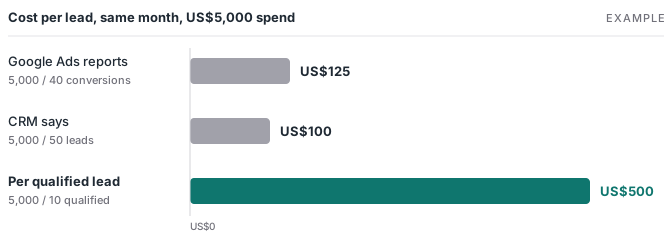
That last number is the pitch. Smart Bidding optimizes toward the conversions in the goal a campaign bids on. If that goal is a form fill, it gets better at finding people who fill forms, spam included, and the ten leads sales wanted are invisible to it. Better tracking here doesn’t mean “more accurate reports”. Once the qualified leads match and sit in that goal, the bidder can learn from the outcome the business is paying for.
Start with the free part
The first steps cost no hosting and add no vendor.
- Keep the click ID with the lead. Auto-tagging adds a
gclidto ad clicks, and some iOS traffic carriesgbraidorwbraidinstead. Save whichever arrives in hidden form fields and store it on the CRM record. - Send qualified leads back through Google Ads Data Manager. Google now labels its old file import page “legacy” and says enhanced conversions for leads “only supports Google Ads Data Manager files”, so start there. Create an import conversion action and send each lead that reaches the qualified stage.
- Put that action in the goal the campaign bids on. Google’s help says primary actions are used for bidding “as long as the standard goal they are part of is used for bidding”, while secondary actions are “for observation only”, unless they sit in a custom goal. If you want bidding on qualified leads, also take the raw form-fill action out of that goal, or the campaign keeps chasing form fills too.
- Capture the lead’s email at the form. Enhanced conversions for leads matches on a hashed email or phone, and it needs a Google tag or GTM user-provided data tag on the lead form, with the setting turned on, before the import can use it. Google says it uses that data “to supplement imported offline conversion data to improve accuracy and bidding performance.” That’s the platform’s stated purpose, and it’s worth quoting to the client.
The routes, required fields and a worked upload are in the Google Ads offline conversion guide. One change to plan around: since June 15, 2026, new integrations upload through Google’s Data Manager API rather than the Google Ads API.
Low volume changes which stage you pick, not whether you do it. Google notes that “some Smart Bidding strategies rely on a minimum volume of historical conversion data.” In long B2B sales cycles, closed-won deals tend to arrive slowly and late, so I usually start with the qualified stage sales actually uses as a gate and send closed-won as well. Test which one the account can bid on.
LinkedIn follows the same logic
LinkedIn’s help center says: “To use qualified leads as the optimization goal for your ad set, we recommend setting up Conversions API first.” It also accepts CSV uploads, which LinkedIn notes are manual and can leave data older. A monthly CSV of qualified leads is a fine pilot. If it moves the numbers, the API is the version that runs without someone remembering to upload.
On effort, LinkedIn’s own estimate for a direct integration is two to four weeks on average, while partner integrations are faster “but might have potential associated fees”. Put that in the plan so the client hears it from you first.
When the server earns its cost
A server container matters once you’re sending the same lead to more than one platform, or once the audit shows browser events going missing that you can measure. Stape’s Pro plan is US$20 a month, or US$17 billed annually, for up to 500K requests (checked 2026-11-12). On the example budget, that’s 0.4% of spend.
So the order for a cautious client is:
| Stage | Cost | What it fixes |
|---|---|---|
| Reconcile CRM and Ads | An afternoon | Shows the real gap and the cost per qualified lead |
| Click ID in the CRM, qualified-lead import in the bidding goal | No hosting | The bidder can learn from qualified leads that match |
| Enhanced conversions for leads (form tag on, hashed email or phone captured at submit) | No hosting | Can match leads that lost their click ID |
| Server container | From US$20 a month | One clean feed to Google, LinkedIn and others |
If you’re choosing a server tool, run these three checks first. If the client needs the basics explained, send them the server-side tracking primer.
When it isn’t worth it yet
If the CRM can’t mark which leads qualified, fix that first. No upload helps if sales never updates the stage, and an import of unreviewed leads teaches the bidder the same thing the form fill did.
Platform policy is the other limit. If the client sells in a sensitive category such as health, finance, housing or employment, Meta and Google limit what lead data they accept, and no tracking setup lifts that. Check the account before you promise a better signal.
Everything else is the conversation you want to have anyway: what a qualified lead is worth, and whether the platform is being told.