
Bot traffic in analytics is activity generated by software rather than a person browsing your site. It affects your funnel when automated visits enter the traffic denominator or automated actions become leads and purchases. This guide measures both sides of your funnel: automated visits in the denominator and invalid conversions in the numerator, including the events you let advertising platforms use for optimization.
Start with your own traffic logs and a repeatable classification rule. Then apply geography rules, an IP blocklist and known user-agent filters where the evidence supports them. These are the first controls for obvious automation. Measure what remains before adding more complex detection, and validate conversions against the system that records the business outcome.
What does bot traffic do to funnel metrics and ad optimization?
Automated visits can enlarge a funnel’s entry count without adding customers, lowering the apparent conversion rate. Automation can also trigger forms or purchase tags, inflating the conversion count instead. Advertising optimization is exposed when those invalid events qualify as the campaign’s bidding goal. A traffic spike alone does not establish that this happened.
Consider a calculation with invented inputs: a site records 1,000 visits and 20 paid orders. Its visit-to-order rate is 2%. If 200 of those visits are correctly identified as automated and none produced the orders, the rate among the remaining 800 visits is 2.5%. No additional sale occurred. Only the denominator changed. These figures illustrate arithmetic, not a campaign result or an estimate of typical bot share.
The reverse problem is more expensive to diagnose. A script can repeatedly submit a form or load a confirmation page. If that fires your conversion tag, the account may report more leads while the sales team sees no additional qualified prospects. Check which conversion action the campaign actually uses before attributing bidding changes to those events.
Google’s invalid traffic documentation, checked October 29, 2026, explains in its “Protect your account from invalid leads” section that ad filters operate after an ad serves and do not block traffic at your site. It also explains that Google cannot control visitor actions after the click. An invalid-click adjustment in an ad account and clean on-site conversion data are separate checks.
Does Google Analytics already remove bots?
GA4 excludes known bot and spider traffic automatically, but it does not show how much traffic that process removed. You cannot use the GA4 interface to recover that excluded total. To estimate remaining automation, investigate the visits and events you can observe rather than subtracting an assumed bot percentage from reported sessions.
That limitation comes directly from Google’s known bot-traffic exclusion documentation, checked October 29, 2026. A bot that never executes your analytics tag may appear in web logs and never create a GA4 session. Conversely, an automated browser can execute JavaScript and generate analytics events.
Keep the populations separate. All HTTP requests include assets, crawlers and retries. Page requests are a smaller population. Observed visits depend on your visit identifier. GA4 sessions depend on collection, consent and processing. Comparing their totals can reveal a question worth investigating; the difference is not a bot count.
For the event side of the audit, the GA4 conversion tracking guide explains what marking an event as important actually verifies.
How do you measure your own suspected bot share?
Calculate suspected automated visits divided by all observed visits, using the same time window, identifier and collection source. Classify each visit once and retain the reason. This produces a reproducible suspected share for that dataset. It does not reveal bots that escaped your rules or traffic missing from your logs.
Use this workflow before changing collection:
- Select a fixed date range and timezone, ideally covering a normal business cycle. Record whether your logs are complete or sampled.
- Export page or collection requests from the edge, origin or server endpoint that actually receives the traffic. Preserve timestamp, path, method, response status, user agent, trusted client country and a restricted client-IP field where lawful.
- Define the unit. Prefer an existing first-party opaque visit ID if your consent and logging design permits it. Without one, report a request share instead. An IP address is not a visitor ID: shared networks combine people, and rotating addresses split one actor.
- Document rules before counting. A known monitoring user agent can identify declared automation. A recurring IP plus repetitive requests may justify a suspected-abuse label. An unfamiliar country alone remains a market mismatch, not proof of automation.
- Count distinct visits matching any rule, rather than adding each rule’s total. A visit matching both an IP rule and a user-agent rule must count once.
- Keep a separate ambiguous category. Review examples from it and from the supposedly clean group to find missed automation and false positives.
Keep IP addresses and full user-agent strings in access-controlled operational logs with an appropriate retention policy. Do not send them to GA4 as custom dimensions for this exercise. Derive only the minimum classification needed for reporting.
A practical normalized table called traffic_visits can contain one row per observable visit, with visit_id, visit_started_at, known_automation and suspected_abuse. Build the two boolean fields from the rules you recorded; they are your classifications, not fields GA4 supplies. The following query uses PostgreSQL syntax:
SELECT
  COUNT(*) AS observed_visits,
  COUNT(*) FILTER (
    WHERE known_automation OR suspected_abuse
  ) AS flagged_visits,
  ROUND(
    100.0 * COUNT(*) FILTER (
      WHERE known_automation OR suspected_abuse
    ) / NULLIF(COUNT(*), 0),
    2
  ) AS flagged_visit_percent
FROM traffic_visits
WHERE visit_started_at >= TIMESTAMPTZ '2026-10-01 00:00:00+00'
  AND visit_started_at < TIMESTAMPTZ '2026-10-08 00:00:00+00';
Replace the example dates with your reporting window. Verify the one-row-per-visit condition first, for example by comparing COUNT(*) with COUNT(DISTINCT visit_id). Exclude missing identifiers consistently from numerator and denominator and disclose that coverage gap. If the query returns no visits, the percentage is unknown, not zero.
To connect the result to GA4, compare campaign, landing page, country and date in Explore with the same cuts in your logs. Repeated bursts with little engagement or a high bounce rate deserve inspection, but neither short engagement nor bounce rate by itself proves a bot. Consent choices, a broken tag and a quick legitimate answer can produce similar observations.
Which bot filters should you try first?
Start with geographic scope, confirmed abusive IPs and declared automation user agents. These controls address straightforward cases without requiring a behavior model. Their usefulness depends on your traffic: count matches in logging mode, inspect legitimate visits they would catch, and measure residual suspicious activity before deciding the simple rules cover enough of your problem.
| Control | Evidence to use | Limit to check |
|---|---|---|
| Geography | Countries you cannot serve, alongside suspicious request patterns | Travel, VPNs and international buyers can be legitimate |
| IP blocklist | Repeated abuse tied to specific addresses or justified ranges | Shared addresses and rotating proxies create mistakes |
| User-agent rule | A documented crawler or your own monitoring agent | Headers can be copied or changed |
Apply geography cautiously. ATA serves a global English-speaking audience, so an unfamiliar country is not a reason to discard a potential buyer. For a business that serves only one territory, a report comparison can clarify market fit before any collection rule changes.
For user agents, begin with a declared internal monitor rather than guessing from a browser name. If you control a monitor that sends ATA-UptimeCheck/1.0, an illustrative case-insensitive pattern is ^ATA-UptimeCheck/[0-9.]+$. It identifies that declared header. It is not a security credential, and a different monitor header needs a different rule.
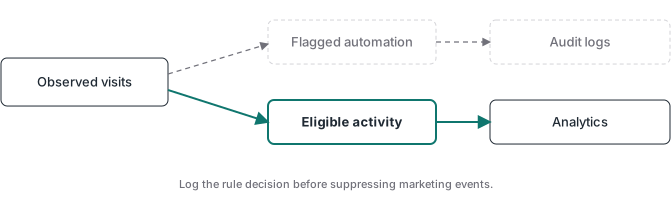
At the collection endpoint, evaluate the trusted client address against your maintained deny list, then the user-agent rule. Log matched_rule and the decision before suppressing analytics forwarding. Accept client-IP or country headers only from a trusted proxy that overwrites them; otherwise the caller can supply the classification inputs.
Google’s filter comparison documentation lists internal and developer traffic filters for GA4. Do not follow old instructions to create a Universal Analytics view or assume GA4 offers a general geography filter. Use a report comparison for analysis, or implement collection suppression at the edge or server endpoint you control.
For your own team or test automation, Google’s internal-traffic instructions provide a native route. Open the web data stream, then Configure tag settings and Define internal traffic. Add the IP rule and its traffic_type value. In Admin, open Data filters, create an Internal Traffic exclude filter for that value, and start in Testing. In Explore, add Test data filter name and Event count to inspect the matches before activation.
For debug-mode activity, create a Developer Traffic exclude filter in the same Data filters area, also in Testing first. Google’s developer-filter guide explains that it matches debug-mode events. These filters need property Editor access. Active exclusion permanently removes matching incoming data from processing, so verify the test labels first. Neither filter is a general detector for unknown external bots.
Blocking page access and suppressing measurement have different consequences. Keep legitimate search crawlers able to reach public pages. Google documents crawler verification using published IP ranges or reverse DNS followed by a matching forward lookup; trusting the user-agent name alone is insufficient.
How do you keep fake conversions out of ad optimization?
Generate purchase events from authenticated payment notifications, and send qualified-lead events from the system that records qualification. Filtering visits helps the traffic denominator, while outcome validation protects the conversion numerator. A server container only helps if its rules enforce that distinction; forwarding every browser event through it does not establish a real sale.
For a purchase, verify the provider’s webhook signature against the original request body, accept only the documented successful-payment state, and deduplicate using a stable transaction identifier. A syntactically valid webhook can still describe an unpaid or failed transaction. Preserve attribution and consent through a stable opaque reference, then send the verified result to the configured destinations.
For leads, backend acceptance proves that a submission reached your system. It does not prove a qualified prospect. Send the later CRM qualification outcome when that is what the campaign is meant to optimize. Retain browser diagnostics separately so you can investigate the journey without treating every form interaction as revenue.
ATA Edge connects checkout sales to Meta’s Conversions API from your own Cloudflare account. That makes the payment outcome relevant to the conversion signal. It does not replace a site security system or certify every visit as human. The Stripe purchase tracking walkthrough shows how the payment outcome becomes the source event.
If your server container runs on Stape, keep hosting and bot policy as separate implementation decisions. Verify which endpoint receives each browser request and which validation runs before forwarding. An event sent directly to another destination will not inherit a filter on your server route. The server-side GTM guide covers that collection boundary.
How do you know the filters helped?
Compare the same funnel definitions before and after the change, retaining raw classification counts alongside filtered reports. Check that valid purchases and qualified leads still reach their destinations. A higher conversion rate after removing visits can be a denominator correction; it is not evidence that advertising generated additional customers or that detection caught every bot.
Before enabling exclusion, test a normal browser visit, your declared monitor, an abusive-request fixture and a real payment in the provider’s supported test environment. Check each rule decision and destination receipt. Keep authenticated payment-webhook routes separate from browser geography rules so a provider’s infrastructure location cannot silently remove valid orders.
After activation, watch the excluded share, unexpected drops in valid business outcomes and traffic that still looks suspicious. Roll back the specific rule if it catches legitimate activity. Add rate limits, challenges or deeper behavioral checks only when the remaining pattern justifies them, and keep those challenges off machine-to-machine webhook routes.
The tracking monitoring checklist provides the next check: compare recorded outcomes with delivered conversion events. If you need paid-sale tracking for Meta, check whether ATA Edge fits your checkout and compare the recorded sales against the conversion events you send.