
The Kwai Events API sends website conversion events from your server to Kwai. Its request contract is easy to miscopy: checkout starts with EVENT_INITIATED_CHECKOUT, the pixel field is pixelId, and the click identifier arrives in the landing URL as click_id but goes back to Kwai as clickid. Those spellings are part of the interface.
Reference date: Payload fields follow the manual captured June 23, 2026, not a fresh live specification check. Before use, check pixelId, pixelSdkVersion and event_name against your current Event API manual.
A request can also look successful without proving attribution. This guide covers the documented payload, the identifier you must preserve, and the evidence to collect before calling a Kwai integration ready. It is for implementers building a direct backend connection or a Google Tag Manager server tag.
The field reference below follows Kwai’s official Event API Manual, captured in ATA’s documentation on June 23, 2026. The linked manual is a JavaScript application; its full contents may require opening it in a browser. This is the captured contract, not a claim of a fresh live specification check on November 12, 2026. Reconfirm the fixed values, supported currencies and event list in the current manual before deploying. The ATA observations below come from internal August 2026 tests whose raw receipts are not public; they are cautions to reproduce in your own account, not independent proof of current API behavior.
Which Kwai Events API fields must match exactly?
Use the captured manual’s field names and types without normalizing them. pixelId and pixelSdkVersion use mixed case; mmpcode is entirely lowercase. The event name uses uppercase letters with underscores. A wrapper’s friendly field labels are not necessarily the names that belong in the outgoing JSON request.
For POST requests, the manual specifies https://www.adsnebula.com/log/common/api with Content-Type: application/json.
| Field | Documented value or role | Mistake to avoid |
|---|---|---|
pixelId |
Event API pixel identifier, string | Replacing it with pixel_id or guessing it from another pixel |
access_token |
Token from the Event API settings | Exposing it in browser code |
clickid |
Original Kwai click value, string | Sending the landing parameter name click_id as the API key |
event_name |
Supported event name | Inventing or shortening a name |
mmpcode |
Fixed string PL |
Changing its spelling or case |
pixelSdkVersion |
Fixed string 9.9.9 in the manual |
Sending a shortened version |
is_attributed |
Integer 1 |
Treating this flag as proof that attribution happened |
testFlag |
Boolean false |
Turning it on to enter Test Events |
trackFlag |
Boolean true for testing, false for production |
Leaving the test route active after validation |
The manual calls is_attributed an attribution flag and specifies the fixed integer 1; it does not explain its processing semantics in the captured description. Send the required value without treating it as a measured attribution result.
The two flag rows follow the captured manual. ATA’s internal August 2026 validation also recorded Test Events reception with testFlag:false, trackFlag:true and the panel’s current click identifier. Those internal receipts are not published here, so confirm that combination in your own pixel’s panel before deployment.
Read the token and pixel identifier from the intended Event API pixel settings. Kwai’s security guidance requires them to belong to the same account. Keep the token in server configuration and redact it from request logs, screenshots and support messages.
Is the checkout name EVENT_INITIATED_CHECKOUT or EVENT_INITIATE_CHECKOUT?
The documented name is EVENT_INITIATED_CHECKOUT, including the final D in INITIATED. Use it when checkout begins. A completed payment belongs under EVENT_PURCHASE; placing an order and paying it are separate business actions. Copy the supported name into the event mapping and check the outgoing request itself.
For common website actions, the manual lists these mappings:
| Actual action | API event name |
|---|---|
| A page is viewed | EVENT_CONTENT_VIEW |
| Checkout starts | EVENT_INITIATED_CHECKOUT |
| A form is submitted | EVENT_FORM_SUBMIT |
| Registration completes | EVENT_COMPLETE_REGISTRATION |
| Payment completes | EVENT_PURCHASE |
The table above is the common website subset. For a full test sweep, the captured manual’s taxonomy contains these names, grouped here for readability rather than campaign eligibility:
- Web and commerce:
EVENT_ADD_PAYMENT_INFO,EVENT_ADD_TO_CART,EVENT_BUTTON_CLICK,EVENT_PURCHASE,EVENT_CONTENT_VIEW,EVENT_DOWNLOAD,EVENT_FORM_SUBMIT,EVENT_INITIATED_CHECKOUT,EVENT_CONTACT,EVENT_PLACE_ORDER,EVENT_SEARCH,EVENT_COMPLETE_REGISTRATION,EVENT_ADD_TO_WISHLIST,EVENT_SUBSCRIBE,EVENT_COMPLETE_TRANSACTION. - Finance:
EVENT_FIRST_DEPOSIT,EVENT_CREDIT_APPROVAL,EVENT_LOAN_APPLICATION,EVENT_LOAN_CREDIT,EVENT_LOAN_DISBURSAL,EVENT_CREDIT_CARD_APPLICATION,EVENT_VALUE_PRODUCE. - App and ad events:
EVENT_KEY_INAPP_EVENT,EVENT_KEY_INAPP_EVENT_1,EVENT_KEY_INAPP_EVENT_2,EVENT_KEY_INAPP_EVENT_3,EVENT_AD_VIEW,EVENT_AD_CLICK. - Purchase windows:
EVENT_PURCHASE_1_DAY,EVENT_PURCHASE_2_DAY,EVENT_PURCHASE_3_DAY,EVENT_PURCHASE_7_DAY.
This is the captured June 2026 list, not a guarantee that every name is appropriate for a website or available as a campaign goal. Compare it with the current manual before testing. An internal name such as begin_checkout can remain in your data layer if your server mapping converts it to the exact Kwai name. Inspect that conversion in Preview. A tag displaying a friendly label does not prove that the serialized request contains the right string.
Kwai’s official web-event GTM template is useful supporting material, but it describes a browser template. Do not assume every browser field, supported dropdown entry or matching rule transfers to the server API.
How do you preserve click_id and return it as clickid?
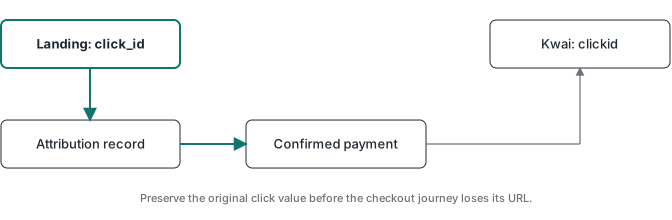
Capture the click_id query parameter on the first landing page and associate its value with the user’s later conversion. The API receives that value under clickid. A later page or payment webhook needs the stored association because the original query parameter may no longer be present in its URL.
The manual states that Kwai appends the identifier to the first ad landing page. If your server container receives that page’s full URL, it can extract the parameter for a landing-page event. That does not solve a purchase that happens after navigation or on another domain.
For example, read click_id from the landing URL into a server-side attribution record, pass that record’s opaque identifier into checkout metadata, then retrieve its click value when the payment webhook supplies the same record identifier. Store the click value in its own database column; keep the opaque record identifier unchanged across the join. Store the Kwai click value against that record, then retrieve it when the conversion occurs. Apply the user’s consent choices and your retention rules to this storage and transmission. The captured parameter description does not specify a storage retention period; do not infer one from the identifier’s presence. Do not substitute an email address or an unrelated analytics event ID when the Kwai click value is missing.
The hosted-checkout click ID guide explains this association across domains. If you already send other server events, the TikTok Events API guide provides a useful implementation companion. Keep each destination’s field contract separate.
A server GTM setup can host the Kwai tag alongside your other destinations. Check each tag’s outgoing body rather than applying one platform’s request format to all of them.
What does a minimal test payload look like?
A test request uses the intended pixel’s fresh Test Events identifier as clickid, keeps testFlag false, and sets trackFlag true. The example below illustrates the request body only. Its placeholders are deliberately unusable: replace them in protected server configuration, never in a public page or client-side tag.
{
  "access_token": "REPLACE_IN_SERVER_CONFIGURATION",
  "clickid": "CURRENT_TEST_EVENTS_IDENTIFIER",
  "event_name": "EVENT_INITIATED_CHECKOUT",
  "is_attributed": 1,
  "mmpcode": "PL",
  "pixelId": "INTENDED_EVENT_API_PIXEL_ID",
  "pixelSdkVersion": "9.9.9",
  "testFlag": false,
  "trackFlag": true
}
The names can look reversed, but the captured manual keeps testFlag:false in both modes. Only trackFlag changes. For a live, confirmed payment, the corresponding body is:
{
  "access_token": "REPLACE_IN_SERVER_CONFIGURATION",
  "clickid": "ORIGINAL_VALUE_FROM_REAL_KWAI_AD_CLICK",
  "event_name": "EVENT_PURCHASE",
  "is_attributed": 1,
  "mmpcode": "PL",
  "pixelId": "INTENDED_EVENT_API_PIXEL_ID",
  "pixelSdkVersion": "9.9.9",
  "testFlag": false,
  "trackFlag": false,
  "currency": "USD",
  "value": 10.28
}
In this example, value and currency are fields at the root of the request, separate from the optional properties string. The amount above is illustrative, not a value to send for every sale. For a payment event with value information, include both value and currency. The captured manual lists BRL, IDR and USD as supported currencies. Its parameter table describes value as numeric, while its example uses a quoted number. Start with the numeric type specified in the parameter table, as shown above. In Test Events, send a controlled request with that numeric value; inspect result and the panel. If it returns 10002, check the named field, then test the quoted-number representation from the official example while holding the other fields constant. Do not send both forms as production purchase requests.
The optional properties field has a separate serialization detail: the manual describes it as a JSON-encoded string, not a nested object in the outer request. Build the properties object and serialize it once into that string. event_timestamp belongs inside those properties and represents when the action occurred. Avoid adding fields borrowed from another advertising API without a Kwai source for them.
How do you test without mistaking acceptance for delivery?
Validate the API response, the intended pixel’s Test Events panel, and the campaign’s available goals separately. Use a fresh panel identifier for that exact pixel. Keep a redacted response beside the matching entry in the intended pixel’s panel.
ATA’s August 2026 controlled checks found that malformed pixel identifiers could still receive result:1. That observation is why checking the pixel settings and the logged-in destination matters. Do not use the API response to discover which of several supplied pixel IDs is correct.
For a new integration, use this acceptance procedure:
- Read the Event API pixel ID and token from the intended account. Open that pixel’s Test Events panel and obtain its current test identifier.
- Use the complete “Events Kwai Support” list in the official manual, rather than the website subset above. Send each currently documented event once in test mode, using negligible test values and no real customer data. Record each semantic response without credentials.
- With a valid test identifier held constant, run a corrupted-token control and an invented-event-name control. Require the documented credential and taxonomy errors.
- Confirm every accepted event in the exact pixel’s logged-in Test Events panel. Refresh and allow for propagation before resending an uncertain result.
- Read the campaign objective selector separately. Record which relevant goals are available for this account and campaign type.
- Remove the test identifier and set normal traffic to
trackFlag:false. Check that a genuine ad journey drives the published tag and returns the original click value.
Test traffic does not create legitimate production history. Check campaign eligibility in the account, including after genuine traffic has accumulated. Never manufacture production events to activate a greyed goal.
What do Kwai’s error codes actually tell you?
Read result and error_msg in the JSON response before changing the tag. The captured manual documents distinct errors for missing parameters, incorrect types, click identifiers, tokens and event names. Diagnose the reported validation stage first; a failed early check can prevent later fields from being checked at all.
result |
Manual meaning | First check |
|---|---|---|
1 |
Success | Confirm the event at the intended destination |
10001 |
Required parameter missing | Compare the serialized body with the required fields |
10002 |
Parameter type error | Check strings, integers and booleans |
10005 |
Click identifier verification failed | Use a current panel identifier or a genuine Kwai ad click |
10006 |
Token verification failed | Check the token and its account pairing |
10007 |
Event name verification failed | Compare the exact name with the manual |
ATA’s controlled checks found that a synthetic click identifier returned 10005 even when the token was also corrupted. That result provides no evidence that the credentials passed validation. Run credential controls with a valid test identifier, otherwise the test never reaches the question you meant to ask.
If normal production traffic is absent from Test Events, check the mode before debugging delivery. Production uses trackFlag:false and belongs in normal reporting. A direct visit without a Kwai ad click also cannot stand in for a genuine attributed journey.
What should trigger a Kwai Purchase event?
Send EVENT_PURCHASE with the stored clickid and the confirmed payment’s value and currency after verifying the payment webhook. Handle repeat webhook deliveries before sending so one payment does not generate repeated requests.
The Stripe conversion tracking guide covers the payment-confirmation side. Your implementation still owns the stored click value and payment checks; server hosting carries the outgoing connection.
The ATA Tracking Toolkit includes ATA Edge, its lessons and a server GTM container library. Its current product page lists what is included. For a Kwai release, retain the exact field mapping, redacted request and response, Test Events readback, objective readback, and the real tag’s delivery evidence. Leave any unproved step explicitly open.