
LinkedIn Conversions API sends conversion events from your server to LinkedIn. It can carry website actions, CRM updates and offline outcomes, so a qualified lead or confirmed payment can reach LinkedIn after the visitor has left your site. For direct setup, send a single-event JSON object to POST /rest/conversionEvents with authorization, Linkedin-Version and X-Restli-Protocol-Version headers. Configure the conversion rule and campaign association first.
For an implementer, the difficult part is keeping the meaning of the event intact. A form submission, a sales-qualified lead and a paid order belong to different stages. Choose the business action first, then map that action to the correct LinkedIn rule. A successful API request alone cannot tell you whether a campaign earned credit.
This guide covers a direct request, the shared event ID used with the Insight Tag, and a practical sequence for investigating missing conversions. The technical references were checked on November 21, 2026.
What does LinkedIn Conversions API do?
LinkedIn Conversions API connects your business systems to LinkedIn’s measurement system. A server can report an action when the underlying system records it, including an action that happens outside the website. For example, your CRM can report a qualified lead after a salesperson reviews it. That gives the implementation a source beyond a thank-you page load.
LinkedIn’s Conversions API overview describes online and offline measurement and supports using the API alongside the Insight Tag. That is a delivery choice, not a guarantee of better campaign results. Matching depends on the data available, and attribution depends on an eligible interaction and the account’s settings.
Before building, write a simple event contract: what happened, which system confirms it, and which record identifies that occurrence. For a lead, use the accepted form record. For a qualified lead, use a documented CRM status change. For a purchase, use a verified payment notification. The Stripe conversion tracking guide explains that last source in more detail.
What do you need before setting up LinkedIn Conversions API?
Start with access to the intended ad account, a server-side sender and a defined conversion action. The sender needs access to the action’s timestamp and permitted matching data. Keep the API token in server configuration; it must never appear in a web GTM variable, public JavaScript bundle or screenshot shared for support.
LinkedIn distinguishes direct advertiser access from partner access. Advertisers can generate a token through Campaign Manager without creating a developer application. If you are building an integration for other advertisers through the developer platform, follow that separate access process. Do not make every client apply as a software partner merely because your sender uses HTTP.
Agree on the business definition before creating rules. If sales calls something “qualified” only after reviewing budget and fit, a form-completion trigger cannot stand in for that review. Keep both milestones if the business needs both, each with its own mapping. Decide which action the campaign should optimize toward and verify that it is available for the intended objective in the account.
How do you set up a direct LinkedIn Conversions API request?
Create a conversion rule for API events, connect it to the relevant campaign, and send the confirmed action from your server. Use the rule identifier from the intended account. The website’s Insight Tag partner ID, campaign ID and conversion rule ID are different values. Recording them beside their labels before testing avoids sending to a plausible but unrelated destination.
Follow this order:
- In Campaign Manager, select the intended account and create a conversion using the Direct API connection. Choose the business action, attribution settings and campaign association.
- Generate the direct-access token and store it securely. If the account already has a managed sender, confirm who owns the credential before replacing anything.
- Open the API conversion rule for editing. The numeric value after
/conversions/in its URL is the conversion ID. Build theconversionvalue asurn:lla:llaPartnerConversion:ID. - Map the action’s timestamp, value and permitted identifiers. Add a stable event ID before enabling a second delivery path.
- Validate a controlled event in the intended account, including the conversion breakdown. Keep production sends disabled until the mapping has been checked.
The official request reference documents POST https://api.linkedin.com/rest/conversionEvents. Its “Adding Single Conversion Event” section shows one event object as the request body, without a batch wrapper. The Python example below follows that single-event contract and reads the JSON in the next section from event.json. It includes the required authorization, version and protocol headers; the token stays in an environment variable:
import json
import os
import urllib.request
from pathlib import Path

payload = json.loads(Path("event.json").read_text())
request = urllib.request.Request(
    "https://api.linkedin.com/rest/conversionEvents",
    data=json.dumps(payload).encode("utf-8"),
    headers={
        "Authorization": "Bearer " + os.environ["LINKEDIN_ACCESS_TOKEN"],
        "Content-Type": "application/json",
        "Linkedin-Version": "202611",
        "X-Restli-Protocol-Version": "2.0.0",
    },
    method="POST",
)
with urllib.request.urlopen(request, timeout=30) as response:
    print(response.status)
The versioning reference, checked November 21, 2026, lists November 2026 with header 202611 as its latest version. Use documentation matching that header; check the supported releases again when deploying later. This snippet only shows transport: it does not implement webhook authentication, consent filtering, durable retries or a delivery ledger. Do not run it against a production rule with the illustrative data below.
Which event fields should you send?
The LinkedIn event schema defines these fields. This purchase-shaped example uses a fictional rule, a sample timestamp and the SHA-256 hash of test@example.com. Replace them with a permitted controlled record and its actual occurrence time before testing. The API error reference requires the timestamp to be within the past 90 days. That ingestion limit is separate from the rule’s ad-attribution windows; an accepted event still needs an eligible ad interaction:
{
  "conversion": "urn:lla:llaPartnerConversion:123456",
  "conversionHappenedAt": 1795219200000,
  "eventId": "purchase:example-order-4821",
  "conversionValue": {
    "currencyCode": "USD",
    "amount": "49.00"
  },
  "user": {
    "userIds": [
      {
        "idType": "SHA256_EMAIL",
        "idValue": "973dfe463ec85785f5f95af5ba3906eedb2d931c24e69824a89ea65dba4e813b"
      }
    ]
  }
}| Field | Meaning | Check before sending |
|---|---|---|
conversion |
Target conversion rule URN | Intended rule and ad account |
conversionHappenedAt |
Actual occurrence time in milliseconds | JSON number, not seconds or a quoted placeholder |
eventId |
Identifier for this occurrence | Stable across copies of the same action |
conversionValue |
Optional currency and decimal-string amount | Confirmed value, not an abandoned checkout total |
user.userIds |
Matching identifiers | Correct identifier type and normalization |
For SHA256_EMAIL, LinkedIn specifies lowercasing the email and removing whitespace before SHA-256 hashing to a hexadecimal string. Hashing an unnormalized value produces a different identifier. Hashing also does not replace consent controls or permission to share the underlying data.
For an ad click identifier, the schema uses LINKEDIN_FIRST_PARTY_ADS_TRACKING_UUID. Its value can come from li_fat_id, which LinkedIn adds to click URLs when enhanced conversion tracking is enabled. Preserve the genuine value; do not create one when a visit has none. The hosted checkout identifier guide explains how to retain an association through a later payment.
How does deduplication work with the LinkedIn Insight Tag?
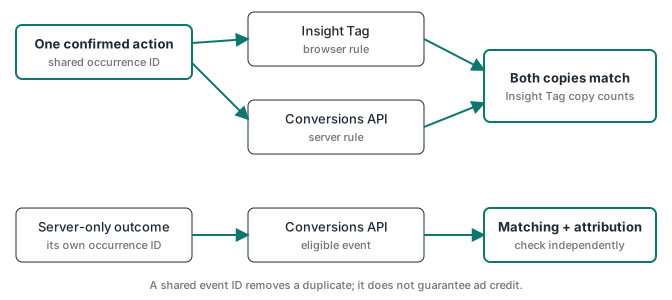
For redundant tracking, create a conversion rule for each data source and associate both with the campaign. Give the browser and server copies of the same action the same event ID. LinkedIn’s deduplication documentation says that, for the same account and event ID, “we discard the Conversions API event and count only the Insight Tag event in campaign reporting.”
That behavior matters when reading the conversion breakdown. A lower CAPI count can reflect deduplication rather than missing delivery. The practical reading of that documented result is that the redundant CAPI event does not replace its matching browser event in this reporting breakdown. The cited overview does not give a deduplication time-window parameter; do not invent a cutoff or assume cross-account deduplication. Use a distinct conversion for a separately confirmed business outcome, such as the later CRM qualification, rather than sending it as another copy of the original form submission.
For an event-specific browser conversion, the documented call uses event_id:
window.lintrk("track", {
  conversion_id: 12345,
  event_id: "purchase:example-order-4821"
});
Here 12345 is the browser conversion rule ID. The API request uses its own server rule URN, while eventId carries the identical occurrence string. Generate the ID once and pass it through your own flow. A form submission and a later qualification are separate occurrences and should have separate IDs.
For payment webhooks, also make the sender idempotent: repeated notification deliveries should resolve to one business occurrence. Store the send status under an opaque internal record ID. Customer email is matching data, not a reliable database key for joining a browser visit to an order.
Can you use server-side GTM for LinkedIn conversions?
Yes. A server GTM container can receive an event and send it through a LinkedIn CAPI tag. The mapping below describes the outgoing API fields, not guaranteed field labels in every tag template. Check whether your installed template expects a numeric conversion ID or the full URN before filling its conversion field.
| Sender input | Outgoing API field | Variable source |
|---|---|---|
| API conversion rule | conversion |
Fixed configuration for the intended account |
| Action occurrence time | conversionHappenedAt |
Original event timestamp converted to milliseconds |
| Shared occurrence ID | eventId |
Event data variable carried unchanged from the source |
| Normalized email digest | user.userIds with SHA256_EMAIL |
Server-side normalization and SHA-256, once |
Genuine li_fat_id, when available |
user.userIds with LINKEDIN_FIRST_PARTY_ADS_TRACKING_UUID |
Stored original click value associated with this action |
In server Preview, select the incoming event and verify that these variables resolve on that event. Open the fired tag and inspect its outgoing HTTP request. Compare the serialized JSON with the single-event example above, then read the response. If the click value is absent, trace the landing-page capture and stored association before changing the tag. Never substitute a fresh random value to make an empty variable look complete. Honor the recorded sharing permissions before the tag fires, and redact customer identifiers in retained debug captures.
Stape’s LinkedIn server GTM setup guide documents its tag route. A host supplies the runtime; your implementation still supplies the event definition and field mapping. If the only incoming event comes from browser JavaScript, moving the outgoing request to a server does not recover a browser event that never reached that server. A verified backend notification provides a different source.
For the wider implementation workflow, explore the lessons and container library listed in the ATA Tracking Toolkit; a ready-made LinkedIn container is not promised here. The server-side GTM guide covers the container architecture behind this route. Stape disclosure: ATA is a Stape Level 2 partner for professional implementations and uses a partner hosting link on this page.
Why are LinkedIn conversions missing after the API accepts an event?
Work backward from the missing result. First check whether the intended conversion rule shows activity. Then inspect matching and campaign association. Finally compare attribution settings and dates. An event from someone with no eligible LinkedIn ad interaction can be received without earning campaign credit, so use a controlled ad journey when testing attribution.
| Symptom | What to inspect first |
|---|---|
HTTP 401 with EMPTY_ACCESS_TOKEN |
Supply the server-side token; verify the Authorization header is populated |
HTTP 403 with USER_NOT_AUTHORIZED |
Check access to the intended ad account and required permissions |
HTTP 400 with INVALID_CONVERSION_TIME_FIELD_VALUE |
Use the actual occurrence time in milliseconds within the past 90 days |
| Wrong rule shows activity | Conversion ID copied from another rule or account |
| Weak identifier coverage | Email normalization, double hashing, missing original click value |
| CAPI count below browser count | Deduplication and the Insight Tag conversion breakdown |
| Activity exists but campaign credit is absent | Campaign association, eligible interaction, windows and reporting dates |
An expired OAuth token is another possibility for a developer integration. LinkedIn’s direct advertiser access documentation, checked November 21, 2026, states: “The generated access tokens don’t expire.” That statement applies to the Campaign Manager advertiser route; a token can still be revoked or wrong. Identify the token route before prescribing a refresh process.
Keep a redacted request, its response and the corresponding account-side activity together. Record the actual reporting delay you observe instead of repeatedly resending an uncertain event. Once the path works, monitor confirmed source actions against sends and destination activity. For discrepancies across channels, why ad platform numbers do not match explains why delivered events, attributed results and unique paid orders need separate totals.