
This multi-tenant sGTM design sends webhook-confirmed purchases to approved affiliate destinations using shared server-side Google Tag Manager logic. Its scope is paid conversion delivery; click-postback and lead-based affiliate programs need different event contracts. Instead of copying a tag for every partner, one dynamic tag reads a verified partner key through a lookup table. Missing or unauthorized keys produce no affiliate request.
A page view with an affiliate code in its URL is a browser observation. An authenticated payment webhook carrying a partner assignment from your backend can support a conversion route. Giving both events the same trigger turns uncertain attribution into data sent to someone else’s account.
This article covers the routing design, its failure cases and a migration test. The configuration example uses fictional partners and needs testing with your chosen template. For the underlying client and tag model, start with the server-side GTM guide.
Why replace per-partner tags with a lookup table?
A lookup table keeps partner differences in configuration while a reusable tag owns the shared delivery logic. That reduces duplicated settings and makes review easier. It works when the destination API and payload contract are compatible across partners. A lookup still needs maintenance, and its own size can become a problem.
The anonymized implementation report supplied for this article on November 8, 2026 described roughly 48 per-partner tags and containers showing 97% to 99% against a reported 200 KB ceiling. These are reported operating conditions, not an ATA benchmark or a universal server-container limit.
According to Google’s container size guidance, consulted November 8, 2026, a size indicator above 70% calls for optimization. Its recommendation is to “combine multiple similar tags” using variables, with a lookup table as its example. It also warns that long lookup tables can hurt performance. The page does not establish the reported 200 KB ceiling for every server container.
Measure the affected container before changing it. Save its current version, note the displayed size, and list the fields that actually vary between partner tags. If the differences are only destination ID, access token and enable state, copying the delivery logic adds little value.
| Design | What changes for a new partner | Main risk to inspect |
|---|---|---|
| Copied partner tags | Another tag and its trigger settings | Inherited destinations or inconsistent fixes |
| Shared tag with lookup | One approved mapping and its tests | Wrong key resolving to the wrong partner |
| Separate containers | A separate configuration and release | More maintenance, but a clearer access boundary |
Choose separate containers when independent owners need container editing access or the contracts require stronger separation. A lookup table is a routing mechanism, not an access-control boundary.
How does one dynamic sGTM tag select the right affiliate?
One tag selects a partner by resolving a trusted key against an exact-match allowlist. The resolved row supplies the approved destination settings. The trigger also requires a verified source, an eligible event and an enabled partner. A key that is absent, unknown or disabled must stop affiliate delivery before any outbound request.
Use an illustrative contract like this. These field names are examples, not fields that every checkout sends:
| Verified input | Meaning | Routing use |
|---|---|---|
tenant_id |
Business that owns the conversion | Scopes the partner namespace |
partner_id |
Partner assigned by the backend | Selects an approved mapping |
event_id |
Stable identifier for this business event | Survives retries and supports duplicate handling |
payment_status |
Verified state from the payment system | Determines whether a purchase is eligible |
Build a collision-safe composite key from tenant and partner. Do not concatenate ambiguous strings without an escaping rule. An explicit map might resolve tenant_demo:partner_demo to a fixed destination ID, access token, permitted event names and an enabled flag. Reject duplicate keys during configuration review.
In the server container, expose the normalized key through an Event Data variable. Use exact-match Lookup Table variables for the destination fields, all keyed on that same input. Leave the default unresolved and require successful resolution in the affiliate trigger. The chosen tag template must accept variables in those fields; verify that in Preview rather than assuming every template does.
Configure the variables with fictional partner rows
Assume your ingestion service has already authenticated the webhook, checked the paid state and normalized its fields. It emits affiliate_route_key: tenant_demo:partner_alpha, source_verified: true and a stable event_id. These are internal fields set by your service after validation. Reject or overwrite incoming copies so a public request cannot set them itself.
- In the server container’s Variables area, create an Event Data variable named
ED - Affiliate route key. Set its Key Path toaffiliate_route_key. - Create a Lookup Table variable named
LT - Affiliate destination. Use{{ED - Affiliate route key}}as its input and add the rows below. The destination IDs are fictional. - Create matching Lookup Table variables named
LT - Affiliate access tokenandLT - Affiliate enabled, using exactly the same route keys. The access-token output is the actual partner token, stored in the server container configuration. The enabled output is the boolean used by your trigger. Test its resolved type. - In your compatible destination tag, replace the fixed destination ID with
{{LT - Affiliate destination}}. Set its access-token field to{{LT - Affiliate access token}}. Field labels depend on the template; use the field that actually controls the outbound destination. - Set the trigger to require the verified source, paid event, enabled mapping and a resolved destination. The no-match output is undefined, never another partner’s ID.
- In Preview, send the synthetic alpha event and read Variables, fired tags and the outgoing request. Its destination must be
demo_alpha_001. Repeat for beta and the unknown key.
| Lookup input | Destination output | Expected affiliate action |
|---|---|---|
tenant_demo:partner_alpha |
demo_alpha_001 |
Send the eligible alpha event |
tenant_demo:partner_beta |
demo_beta_002 |
Send the eligible beta event |
| Any other value | Undefined, no default destination | Send nothing |
An alpha payment with event ID evt_demo_paid_001 resolves to alpha’s destination with that same event ID. Replaying it must not create a second business conversion. A beta key in alpha’s authenticated account is rejected during ingestion before any lookup can authorize it.
The token table is server-container configuration, not a native secret vault. Container editors and exports can expose its values, so restrict editing, Preview access and exported backups. Never copy these variables to a web container. If your security policy requires external secret storage, use an explicitly implemented secret-retrieval integration instead of pretending a lookup string resolves itself. Never accept an access token, pixel ID or destination URL from the incoming browser event as authority to send. Restrict outbound hosts through the template’s permissions and inspect the actual request. Google’s server template permissions reference documents that permission layer.
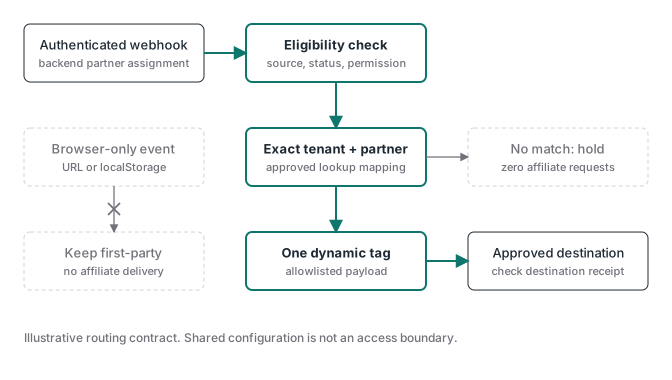
Keep the first-party destination in a separate, intentional path. A common copying mistake is to retain the owner’s global destination inside a partner tag. After consolidation, verify the complete outbound destination list for each event. A green tag execution does not tell you whose account received the payload.
The ATA Tracking Toolkit membership lists a server GTM container library as a bonus. Treat this affiliate router as a custom extension with its own acceptance tests.
Which purchase events should you refuse to send to affiliates?
For this purchase-conversion integration, I would refuse affiliate delivery when partner assignment depends only on a URL parameter, browser storage or an unverified client payload. This is a conservative sharing policy, not a claim that affiliate click tracking is inherently invalid. If the contract requires a click ID, capture the permitted ID on arrival and persist it against the validated transaction reference. Retrieve it for the purchase postback; use a separate authorized endpoint for any click postback. The click ID is attribution context, not permission to select a destination.
Here, affiliates receive only authorized server-origin business events with a trustworthy partner field. Browser observations remain first-party. Write the sharing rule before configuring the tag:
| Event and evidence | Affiliate route in this design | Reason |
|---|---|---|
| Page view with a partner URL parameter | Refuse | A supplied code does not authenticate entitlement |
| Click or checkout start tied only to localStorage | Refuse | Browser state is mutable and may be missing |
| Thank-you-page purchase without payment confirmation | Refuse | Page access does not establish a paid purchase |
| Authenticated paid webhook with a verified partner assignment | Eligible after permission checks | Source and routing ownership can be checked |
| Valid payment with a missing or disputed partner key | Hold affiliate delivery | Payment validity does not resolve partner ownership |
A browser-origin code can be an input to your application. It becomes usable for this route only after your backend validates the assignment and persists it under the business’s attribution rules. Merely copying the URL value into webhook metadata does not make it trustworthy.
Choose a solid webhook field: one whose semantics are documented, whose value your backend controls or verifies, and whose partner assignment survives payment retries and delayed notifications. Confirm whether it identifies a tenant, partner, campaign or customer. Similar-looking identifiers are not interchangeable. An order ID identifies the purchase; it is not automatically the partner lookup key.
Only send fields the partner needs and is authorized to receive. A conversion receipt does not justify sharing a full customer profile. Keep consent, contractual purpose and destination requirements in the eligibility check. An authenticated webhook establishes its source; it does not establish a legal basis for sharing everything inside it.
Why can’t the webhook recover missing browser attribution?
A webhook request does not run inside the visitor’s browser and cannot read that browser’s localStorage. It receives the fields sent by the source system. To recover permitted browser context later, your application must store it earlier and carry a stable reference into the transaction. Without that reference, the association remains unknown.
The MDN localStorage reference, consulted November 8, 2026, describes storage tied to the document’s origin. Your backend must capture permitted browser context earlier and persist it behind an opaque reference carried into the transaction. The hosted checkout attribution guide covers that handoff. If the reference is missing, keep attribution unknown and hold any partner route that depends on it.
How do you restrict the payload and prove tenant isolation?
Restrict affiliate tags to an explicit field allowlist, then test both accepted and rejected routes. An eligible event for one tenant must never resolve another tenant’s mapping. Unknown keys, disabled partners and browser-only events must produce zero affiliate calls. Destination-side evidence is required before claiming that a conversion was recorded.
Google’s transformations guide describes how to limit the event parameters exposed to selected tags. Apply the allowlist to the affiliate tag, preserving the fields its template needs. Inspect the transformed data and the final outbound body: a transformation setting alone is not proof that the payload is correct.
Before replacing the copied tags, run this sequence in a test environment:
- Save the current container version and the approved partner mapping. Keep a rollback path that restores one sending route.
- Test each enabled mapping with synthetic data. Confirm the expected destination and confirm that no extra destination receives it.
- Send an unknown key, an empty key, a disabled partner and a tenant paired with another tenant’s partner ID. Each must produce no affiliate request.
- Submit a browser event carrying a plausible partner code and a forged webhook request. Neither should pass the verified-source boundary. Authentication must be checked at ingestion, not represented by a browser-set boolean.
- Replay an accepted webhook with the same stable event ID. Verify your ingestion or delivery ledger suppresses repeats, and verify any destination deduplication contract separately.
- Inspect the destination’s test view or authoritative receipt. An HTTP success response proves only that the request received that response, not attribution or reporting credit.
- Disable the old sending tags before enabling the new route for live events. Compare the resulting container size and retain the old version for rollback.
For shadow testing, log the route the new tag would select without sending it. Running both old and new tags as live senders creates a duplicate-delivery risk. The sGTM debug ladder helps distinguish ingestion, client processing, tag execution and outbound delivery.
Monitor lookup misses, unauthorized-source rejections, outbound failures and verified-event-to-receipt coverage. Scope records by tenant, partner and event ID, with minimal retained data. A server event audit log can preserve those receipts, but it still needs destination reconciliation.
When is a shared affiliate container the wrong choice?
Use a shared container only when one trusted operator owns configuration, the partner contracts permit it and every route can be tested independently. Separate containers are easier to justify when partners require editing access, distinct governance or incompatible delivery rules. Consolidation should reduce duplicated work without weakening ownership or making failures harder to contain.
For managed sGTM hosting, Stape is an option. ATA is a Stape Level 2 partner for professional implementations, with an affiliate relationship.
Use the shared route when one operator controls edits and each partner’s accepted events and permitted fields fit the same tested contract. Choose separate containers when a partner needs independent editing access or a release must not change another partner’s configuration.