
Starting January 11, 2027, server-side Google Tag Manager stops applying one IP redaction setting to the whole container, and tags that send to Google Ads, Display & Video 360, Search Ads 360 and Campaign Manager 360 will accept the full IP, while Google Analytics tags keep redacting it. If you want your Google Ads tags to keep getting a partly hidden IP, you add a Transformation in your server container before that date.
Google announced it in a mandatory service email to advertisers on November 2, 2026, signed by the Google Tag Manager team. We received the Portuguese version in two of our inboxes. PPC Land quoted the English version the same day, and the quotes match ours in meaning. None of the coverage we read mentions payment webhooks. This guide adds the part that bites info-product sellers: a sale sent from a payment webhook can carry the address of Stripe, or of whatever relay or gateway forwarded the webhook, instead of your buyer’s, and the change makes it worth checking now.
A few terms first, because the rest depends on them. Server-side GTM (sGTM) is a Google Tag Manager container that runs on a server you control, often hosted by Stape or on Google Cloud. Your site sends events to it, and it forwards them to Google, Meta and the rest. Inside it, a client receives each incoming request and turns it into an event, and tags read that event and send it to one platform. IP redaction means hiding the last part of the address before it leaves your server, so the platform sees roughly where the visitor is but not the exact address.
What changes in server-side GTM on January 11, 2027?
From January 11, 2027, IP handling in a server container is decided tag by tag instead of once for the whole container. Google’s notice reads: “Server containers in Google Tag Manager will transition from container-wide IP address redaction to individual tag-level processing.” It then lists four rules:
- Tags that send data to Google Ads, Display & Video 360, Search Ads 360 and Campaign Manager 360 “will now accept the full IP address.”
- “Google Analytics tags will continue to apply IP redaction.”
- “Third-party tags will maintain independent control over the signals that they accept.”
- “Transformations can redact these signals before any tag accesses the data.”
Google gives the reason in the first paragraph. The change lets tags “process standard network signals like IP address to facilitate improvements to ads measurement and personalisation.” The IP is the only network signal the email names.
If you only run GA4 through your server container, nothing changes for that tag. If you run Google Ads conversion or remarketing tags through it, Google says those tags accept the full IP from that date unless you redact it. Check in Preview what your events actually carry, because a tag can only pass on the IP the event holds.
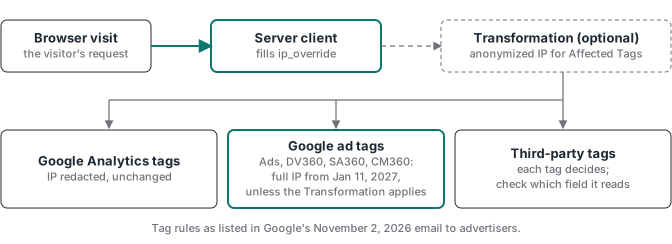
ip_override, but not one that reads the IP from its own field.Do I have to do anything before January 11?
You have to decide, tag by tag, whether each Google ad tag should be sent the full IP, and then make the container do that. Google’s email calls the way back an opt-out (“detailed opt-out instructions”), so plan as if the full IP flows to those tags unless you act. Work through this list for every server container you run:
- List your server containers. Include the ones a freelancer or agency set up for you, and note where each one is hosted.
- List the tags in each container that send to Google Ads, Display & Video 360, Search Ads 360 or Campaign Manager 360. These are the ones the change touches.
- Decide per tag: full IP or partly redacted. Read your privacy notice and consent banner first. Google’s email says the notices and consents have to cover this before collection starts (more on that below).
- For each tag that should stay redacted, add the Transformation from Google’s Help page (next section).
- Find every client that receives server-to-server requests, such as a Stripe or Hotmart webhook client, and check where
ip_override(the field that carries the visitor’s IP to your tags) comes from on those events. This is the trap covered further down. - Check your third-party tags. Find out which field each one reads the IP from. Some don’t use
ip_override. - Test in Preview, then in the destination’s own test view, and publish the server container.
- Re-read Google’s Help page close to January 11. As of November 10, 2026, it doesn’t mention the date or the change.
How do I stop Google Ads tags receiving the full IP?
You add a Transformation that replaces the IP with an anonymized one for the tags you choose. A Transformation is a rule in the server container that edits event data after the client reads it and before tags see it. Google’s Transformations guide says they “allow you to include, exclude or modify event parameters output from your client before they are exposed to tags”, and that you can apply one “to all of your tags, entire tag types or an individually selected set.”
The field to edit is ip_override. Google’s common event data reference defines it as “The IP address of the user in IPv4 or IPv6 format.” Google’s Help page redacts Google tags through this field, and says many major third-party tag templates read the IP from it too.
Google’s Tag Manager Help page, IP address redaction for server-side tagging, gives the steps. In short:
- Create the variable in two parts. First the template: in your server container, click Templates, then New under Variable Templates, which opens the Template Editor. Name it, click the Code tab, paste the code the Help page gives (below) and click Save. Then the variable itself: Google’s custom templates guide says that for a custom variable “you go to Variables > New”, where your template appears to pick.
const getAnonymizedIpAddress = require('getAnonymizedIpAddress'); return getAnonymizedIpAddress(); - Go to Transformations, click New and choose Augment event. Set it to override
ip_overridewith that variable. - Under Affected Tags, select the tags that should receive the partially redacted IP. The page gives “Google Ads, Floodlight, or other non-Google tags” as examples. If you also run webhook clients, add a Matching Condition that leaves their events out (see the warning below).
- Click Preview, trigger your tags and check that the IP is redacted before the data leaves the server.
- Save the transformation and publish the server container.
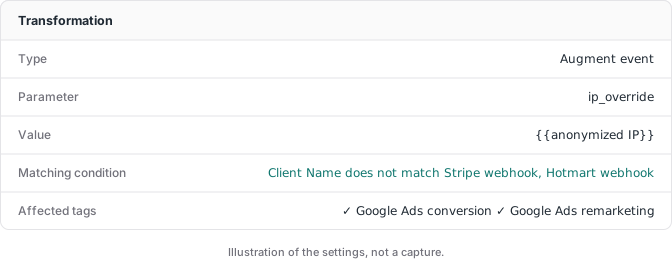
The two settings in step 3 answer different questions. The Transformations guide says Matching Conditions “lets you define rules for when to activate the transformation”, so it picks which events the rule runs on (for example, {{Event Name}} equals purchase in Google’s own example). Affected Tags picks which tags see the change, and “By default, the transformation applies to all tags.”
Warning for webhook sales. Google’s server-side API reference says getAnonymizedIpAddress “Returns an anonymized string representation of the IP address where the request originated”, with the last part of an IPv4 address set to 0. It takes no input, so you can’t hand it the IP your event already holds. On a browser event that’s the visitor. On a webhook event it’s Stripe’s server, or the relay that forwarded the webhook, so this rule would replace a buyer IP you joined from the visit with a redacted copy of the sender’s address. Leave webhook clients out of this rule with a Matching Condition on the client’s name, as in our fix further down. Google’s reference shows no way to redact the joined IP itself, so if you want webhook sales redacted too, no documented step does it cleanly. Check in Preview which IP each tag receives on a webhook event.
If you run more than one Transformation, order matters. The guide says Preview’s Tag Details “shows you which transformations ran for a tag and in what order”, the default order is Allow, then Augment, then Exclude, and “You can change the default order by assigning a priority value to a transformation.” Two Augment rules on ip_override (yours and the redaction rule) are worth checking there.
Two notes from the same page. “Google Analytics server tags already apply partial IP redaction by default,” so you don’t need this for GA4. And “Not all third-party vendors use the ip_override field.” If a vendor reads the IP from another field, you need a second Augment event rule that overrides that field, scoped to that vendor’s tags.
The email’s opt-out link resolves to this same Help page. On November 10, 2026, the page carried no date and said nothing about January 11, 2027. Treat it as the method, and check it again before the deadline in case Google adds a dedicated switch.
Does this affect purchases sent from a Stripe or Hotmart webhook?
Yes, and here the IP can be wrong rather than just redacted. A webhook is a message the payment platform’s server sends to your server when something happens, such as a payment being approved. When Stripe tells your server container about a sale, the request comes from Stripe’s machine, not from your buyer’s phone. Stripe’s IP address page lists 15 addresses that “webhook notifications might come from.”
So if your container has a rule that fills ip_override from the incoming request for every event, every webhook sale carries one of Stripe’s addresses (or the address of whatever relay or gateway forwarded the webhook) as if it were your buyer’s. Google Ads, Meta, TikTok and any other tag that falls back to that field then receive the payment platform’s server as the customer. From January 11, Google says its ad tags accept the full IP, so if that’s the address your event carries, that’s the address they’d accept, and it says nothing about who bought. Check in Preview what your webhook events actually carry.
We hit this in our own container. Our base container had a transformation that set ip_override from CF-Connecting-IP, the header in which Cloudflare passes the connecting client’s IP to the server, applied to all tags. That works for browser events. On September 25, 2026, TikTok’s Test Events panel showed us the address of the machine that sent our test webhook where a shopper’s should have been. We built the fix as one more matching condition on that transformation, excluding our Stripe and Hotmart webhook clients by client name. Both conditions have to be true for the rule to run, and Preview confirmed it. The webhook event lost the header IP while the GA4 page_view kept it.
The real fix is upstream of the transformation. Save the visitor’s IP, click IDs and browser details at visit time under an ID that travels to the checkout, then load them back when the paid webhook arrives. Our hosted checkout click ID guide shows how to build that join, and the Stripe conversion tracking guide covers the webhook side. With the join in place, the webhook sale carries the buyer’s IP from the visit, if the lookup finds the visit and no later rule overwrites it. A request-IP rule like ours, or the Help page’s redaction rule, can do exactly that, which is why both need the webhook clients left out. When the lookup misses, the client exclusion keeps that one rule from putting the sender’s address on the sale, but another rule, or a tag that falls back to the request’s IP on its own, still could. Either way, open the webhook event in Preview and read the IP each tag actually receives.
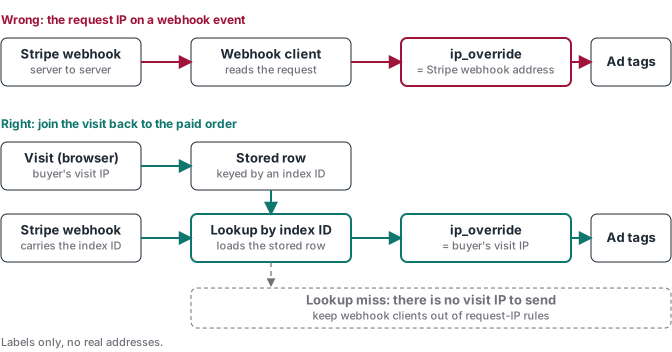
The money stake is plain. A webhook sale is often your only purchase event when the checkout is Hotmart, Kiwify or Stripe’s hosted page. If its IP points at a payment processor or a relay, you’re paying for server-side tracking and sending Google Ads a field that describes nobody.
Do I need consent or a notice for this?
Google says yes, and puts the duty on you. The email says that because the update involves processing network signals, “proper end-user notices and legally required consents” must be “in place before data collection begins.” For the EEA, advertisers “must strictly adhere” to Google’s EU user consent policy, and customers elsewhere “must ensure that their data collection practices comply with local privacy laws and platform terms.”
Google’s EU user consent policy covers end users “in the European Economic Area, the UK and Switzerland”, wider than the EEA the email mentions. The policy also says that if you fail to comply, Google “may limit or suspend your use of the Google product.” That’s the money risk on this side, an ads account you can’t use.
This is Google’s wording, not legal advice. If you sell into Europe, check your privacy notice and banner with whoever handles your compliance. The consent mode audit for EU sales shows how consent signals change what Google Ads reports.
Is Google’s Help page updated yet?
Not as of November 10, 2026. Google’s IP redaction Help page describes how to redact the IP with a Transformation, but it carries no date and no mention of January 11, 2027 or tag-level processing, and it doesn’t list the four ad products the email names. Of the Google pages we checked, none carries those details; the email is the only Google text that does. We’ll update this post when the Help page changes and again after January 11.
Where to go next
If your Google Ads server-side conversions are already missing, the three setup traps guide covers the action type, account access and test switches. For how ip_override maps into Meta’s client_ip_address, see the field table in Meta Conversions API with GTM. New to server containers? Start with what server-side GTM is and how it works.